

Headway Inc launches a new language for its apps in 4-5 days instead of about 10. The Globalization team got there by treating translation as the easy part: its Crowdin AI Pipeline has six steps, and only one of them translates. The other five tell the model what each string is or check what it produced.
Claudio López Stoeckl, Globalization Manager at Headway Inc, shared how the team built it – and what they would do differently.
| SUMMARY | |
|---|---|
| Products in Crowdin | Headway, Nibble, Skillsta |
| Languages | 10: Spanish, Brazilian Portuguese, Italian, German, French, Polish, Japanese, Czech, Romanian, Hungarian |
| Setup | A Crowdin account per product, a project per platform, synced with GitLab |
| AI Pipeline | 6 steps – 1 translates, 5 add context or check the output |
| Human review | Native-speaker linguists, with review depth matched to content risk |
| Result | A new locale (~21,000 words) ready in 4–5 days instead of ~10 – 50–60% less time |
One word, two meanings
“Continue” is one of the most common words in the Headway Inc apps, and it doesn’t always mean the same thing. In the Headway app’s Library, it’s the title of the section with the summaries you’ve already started. In onboarding, it’s the button that takes you to the next screen. Nothing in the English string tells the two apart, but other languages have to: in Spanish, the section becomes “Seguir leyendo” (“Keep reading”), and the button becomes “Continuar”.
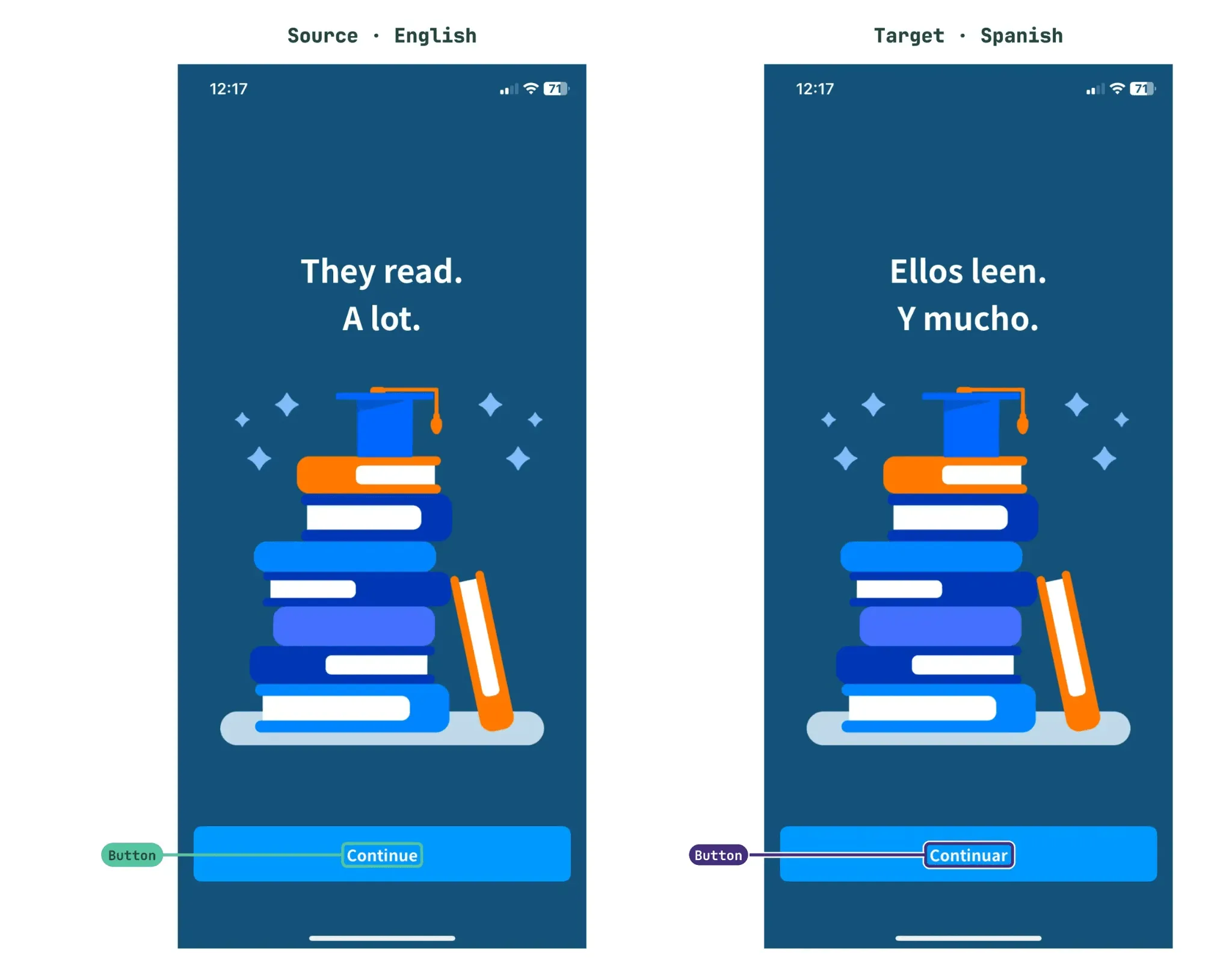
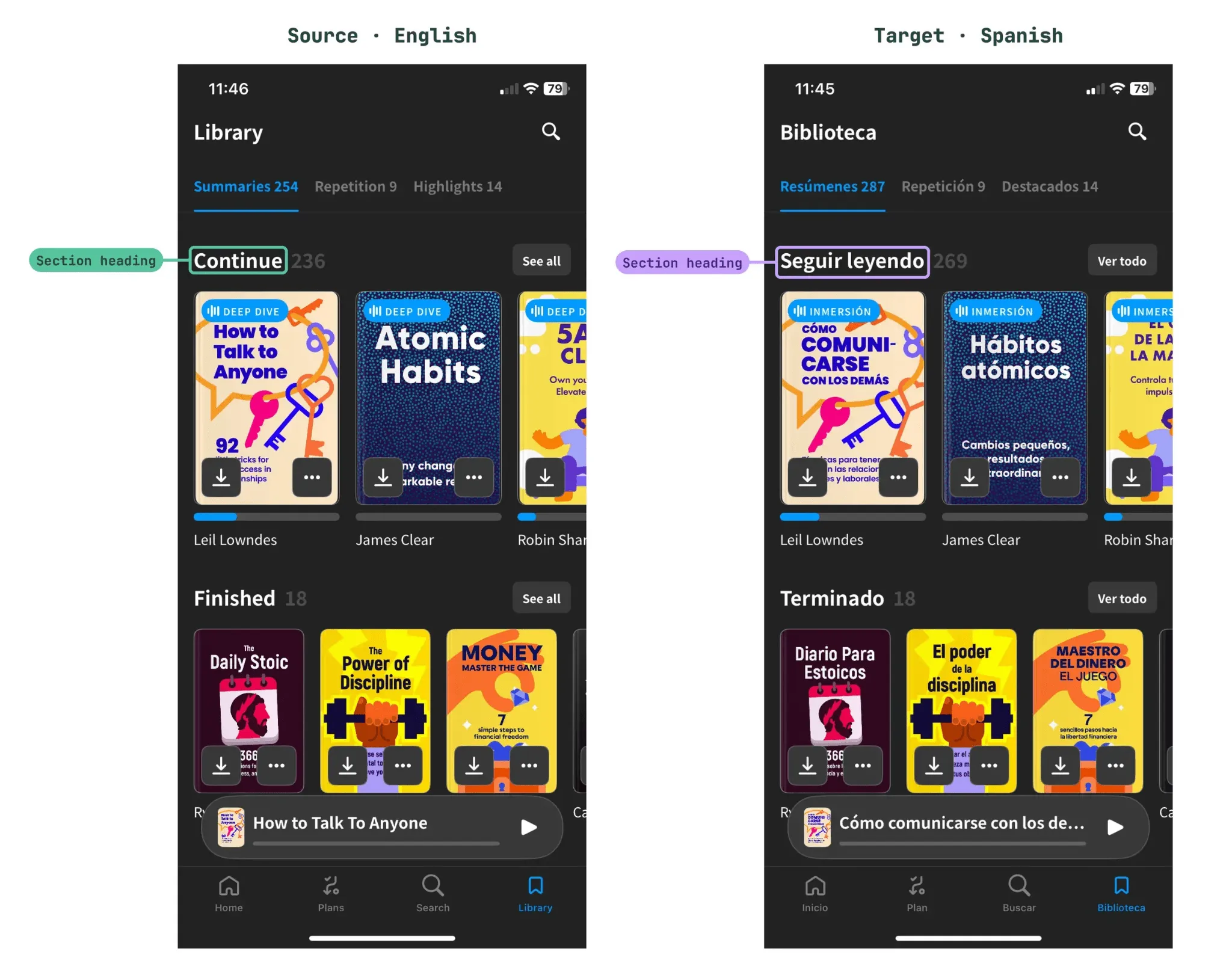
A translator who can’t see the screen has to guess. So does an AI model. That’s why Claudio frames the team’s localization work around one idea:
The hard part isn’t the translation, it’s the context. A good model with nothing to go on will still guess, so almost everything we’ve built is about telling it what each string actually is.
Today, Crowdin is the source of truth for UX/UI content at Headway Inc, across 10 languages and 3 products. Each product has its own tone and style guide, so a big part of the job is keeping them distinct. When a string like “Continue” has no screenshot to settle it, the pipeline flags it and a person decides instead of the model guessing.
Before: two people per string, and not enough context
Localization at Headway Inc sits within the Globalization team, which works across every product in the company’s ecosystem – from app interfaces to web and marketing materials. The team owns the localization infrastructure and writes the style guides and glossaries for each product and language. Freelance native-speaker experts for each locale take care of quality and cultural adaptation.
Before the current setup, everything was done by people:
- One linguist translated each string from scratch, and a second one reviewed it.
- Translation memory only helped with 100% matches. Anything else started from zero.
- Every string needed two people’s time in every language, so each new locale meant the same amount of work all over again.
The quality was good, but the process was slow and hard to scale. As Headway Inc wanted to launch in more markets, that became a real limit.
Their team also noticed something else. Translators struggled with the same thing AI struggles with now: knowing what a string actually is.
Without seeing the screen, even an experienced linguist has to guess. So when we moved to the AI Pipeline, the goal wasn’t only to translate faster. It was to give every string the context it needs, and to let our linguists focus on review and on the cases that really need a human.
How it works: six steps, only one of them translates
Headway Inc runs AI pre-translation through Crowdin’s AI Pipeline rather than a single set of instructions. Different glossaries, style guides and generated string context sit behind it, plus human review where it’s needed.
From GitLab to Crowdin and back
Each product has its own Crowdin account, with a separate project for each platform: iOS, Android, backend, web, and in-app and email messaging. The flow is the same everywhere:
- Developers add new source strings to the code in GitLab.
- The strings sync automatically to the matching Crowdin project.
- Once translations are approved, they sync back to the code and ship with the next release.
One small detail made a big difference: giving the model the file path of each string.
On iOS, a path like
Feature/Sources/Payment/PremiumSupport/already says which feature and screen a string belongs to, so the model starts with useful context before reading a single word.
Inside the pipeline
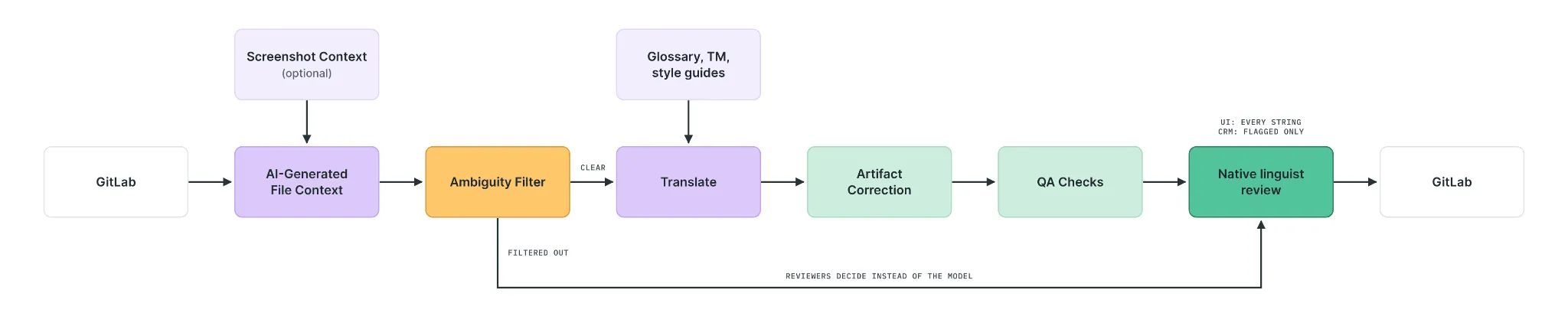
Ambiguity Filter catches strings, filters them out of AI translation, and sends them to native reviewers, who decide instead of the model guessing.
Two steps deserve a closer look.
Ambiguity Filter is the most sensitive step – and the one that taught the team the most.
It doesn’t always get it right, but overall, it helps us more than it gets in the way. It’s also the step that taught us the most, because what it flags shows us exactly where our context is missing.
At first, it flagged too much. It treated “Is the user male or female?” as a problem, even though the team’s style guides already solve that with gender-neutral wording. The team narrowed it down to the cases that matter:
- Words with more than one meaning
- Unclear references
- Unclear speaker
- Strings built from several pieces in the code
Here’s a real example. A recap card title, ”%@K people highlighted”, can be read two ways: people who highlighted something, or people who were highlighted. Instead of picking one, the filter kept the string out of AI translation and flagged it for a native reviewer – with a note explaining exactly what’s unclear:
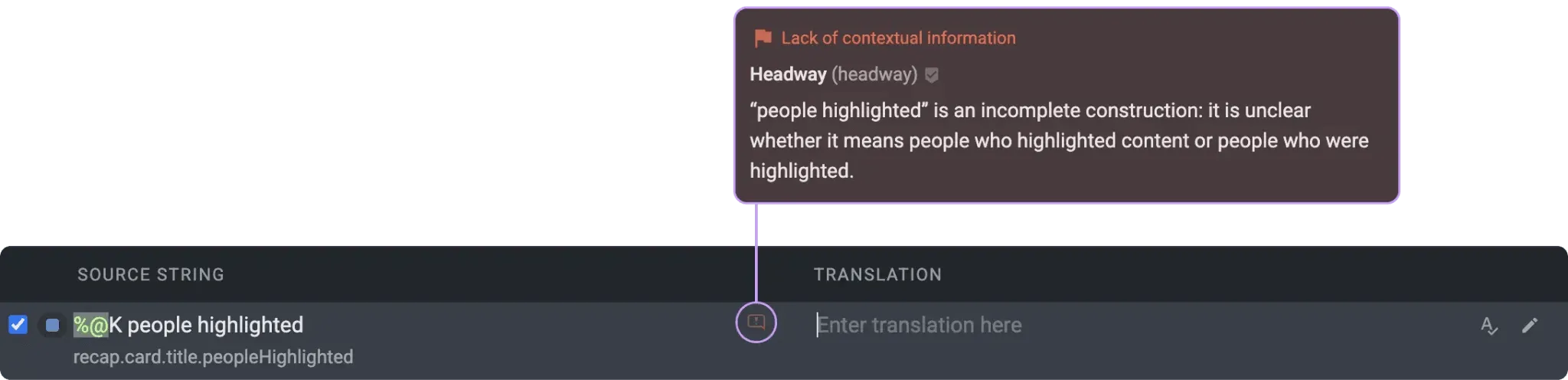
Screenshot Context is used sparingly. Screenshots are hard to add to every string, so the team turns them on only where they know a screenshot will make a difference. “Text context doesn’t replace screenshots, but for most of our strings it gives the model enough to work with,” says Claudio.
What goes into the context
From broad to specific, the Translate step works with:
- Project description: what the product is and who it’s for
- File path and file-level context
- AI-generated context for individual strings, which covers most of them
- Glossary, scoped per product
- Translation memory
- Global style guide for the product
- Style guide for the language
Built step by step, from real results
Headway Inc didn’t design the pipeline up front. Their team started with Crowdin’s default setup and changed it wherever real results fell short:
- Feedback from the Italian reviewer led to the first changes in the translation instructions, to make translations sound more natural.
- Ambiguity Filter flagged too many strings, so the team taught it to ignore cases the style guides already solve.
- One quality check was undoing good translations. It replaced wording that followed the style guides with older translations from memory, so the team adjusted it.
- Style guides were split into two levels: a general one for each product and a more specific one for each language within it.
- Also, style guides were too long for the pipeline, so each one was cut down to the essential rules plus a few examples.
One lesson was expensive. A setting caused AI quality checks to run automatically many more times than needed, which raised costs without adding any value. Once the team found it, fixing it took one click.
We keep adjusting the pipeline as we learn. If a step stops adding value, we remove it.
Three products, three voices
For Headway Inc, keeping one product consistent across 10 languages is the easier job. Keeping three products distinct from each other is harder.
Consistency within a product is something the tools help a lot with: translation memory, glossaries and QA checks all push toward using the same terms and style everywhere. Keeping products distinct takes much more deliberate effort.
Some of the products speak to users in a closer, friendlier way, while others are more neutral. At the same time, they share a lot: general language rules, some of the same reviewers and a similar pipeline setup. Without clear product-specific rules, everything slowly starts to sound the same. So whenever a product has its own tone or terminology, the team writes it down explicitly instead of assuming it will carry over.
Glossary handles terms
Glossary is the single source of truth for product terms. Because the same English term doesn’t always translate the same way across products, each entry records which product it belongs to. “Premium” and “Pro” are a good example: subscription names often stay in English in one product and get localized in another.
Style guides handle everything else
Style guides cover what a glossary can’t: tone, register, false friends, anglicisms and formatting. Some rules apply to all products, like each language’s register, gender-neutral constructions and placeholder handling. Others reflect one product’s voice.
The team keeps the glossary and style guides from repeating each other. Duplicated rules tend to drift apart, and then the model has to choose between them.
Register is decided per language and confirmed with native experts. In the Headway app, for example:
| Register | Languages |
|---|---|
| Informal “you” | German, Italian, Spanish |
| Formal “you” | French, Czech |
| Polite forms in body text, plain forms on buttons | Japanese |
Keeping humans in control where it matters
Native-speaker linguists weren’t replaced – their time was reallocated. Instead of translating every string from scratch, they review the pipeline’s output and pay special attention to the strings it flags as unclear. How much review a string gets depends on the type of content:
| Content | Human review | Why |
|---|---|---|
| App interface | Native linguists review every string before it ships | Strings are short, highly visible, and often depend on the screen around them |
| Onboarding | Always checked by a person | Too important to ship without a human check |
| Emails and CRM materials | Only the strings the Ambiguity Filter flags | Longer text gives the model more to work with, so the risk of a wrong guess is much lower |
Review also gets lighter over time. As translation memory grows for a language, more strings are covered by translations the team has already approved.
Results: a new language in 4–5 days instead of 10
Launching a new locale now takes 50–60% less time. For Headway Inc, that’s the moment volume matters most: when an app goes to a new market, the whole product has to be localized at once.
| Content per language | Words | Before | Now | Time saved |
|---|---|---|---|---|
| App interface (iOS ~8,500 + Android ~5,300) | ~14,000 | ~5 working days | 2–3 days | 40–60% |
| Backend, onboarding strings and CRM materials | ~7,000 | ~5 days | ~2 days | ~60% |
| Full new locale | ~21,000 | ~10 days | 4–5 days | 50–60% |
Most of the gain comes from how the work is split. Every string used to go through two people. Now the pipeline does the first translation, and linguists review it instead of starting from zero.
That only works because the first translation is good. When AI output is weak, reviewing and fixing it can take even longer than translating from scratch. Getting the first draft right is what makes the time savings real.
The change shows up in other places too:
- New markets are easier to test. Adding a language no longer has to be planned weeks in advance, so Headway Inc can scale and test new markets faster.
- Updates reach every language at once. After a launch, new strings for tests and features arrive in small batches, usually under 300–500 words each. They now reach all languages at around the same time as English.
- Terminology stays consistent. Different translators used to make different choices for the same term. Now the pipeline applies the glossary in every translation, and reviewers focus on tone and meaning instead of fixing terms.
- Each new locale costs less. Fewer linguist hours per language lower the cost of a launch – and make it easier to justify the next market.
Advice for teams building something similar
We asked Claudio what he would tell a team about to build its own AI localization pipeline.
Invest in these first
- Context. “In our experience, the model is often not the problem; what it knows about each string is.” That means clear file and key names, a glossary for each product and extra context for your shortest strings. Short strings are where AI makes the most mistakes, because they say very little on their own. Longer sentences usually explain themselves. And the effort pays off beyond the content you’re working on today – it gives you a base for any kind of content later.
- Reading the logs, not just the translations. Many of the team’s improvements came from seeing what each step actually received and what the model considered a problem. “The Ambiguity Filter doesn’t always work right, but in my opinion, it’s critical because it shows you how the pipeline is ‘thinking’ about your strings.”
- Measuring before you change anything. Write down how long localization takes and how much it costs before you start. “We didn’t do this well enough, and now it’s harder for us to show the full impact with numbers. Without that starting point, it’s difficult to prove later that the change worked.”
Skip these
- Style guides with every rule you can think of. The longer they get, the more likely the model is to skip something. Don’t explain basic grammar or spelling – the model already knows it. Use the space for what’s specific to your product.
- The same review for all content. “A paywall button and a CRM email don’t carry the same risk, so they shouldn’t get the same level of review.”
What’s next: a solid base for every new launch
For now, Headway Inc is refining what it has. The team wants to keep improving context, especially for short strings, and to review less where it makes sense. CRM content already works that way, and other lower-risk content may follow. The app interface still gets a full review, and onboarding will keep its human check.
We are growing fast, so more languages and products will come soon. That’s exactly why we want the base to be solid: every improvement we make now makes the next launch easier, even if it’s for a different product in the ecosystem.
The pipeline at Headway Inc shows where the real work in AI localization sits. The translation step is one box out of six. What makes it good happens in the other five – and in the people who decide what a string like “Continue” really means.
Want to build a pipeline like the one at Headway Inc? Read our guide to Crowdin AI Pipelines or explore the AI Pipeline app.
Localize your product with Crowdin

Yuliia Makarenko
Yuliia Makarenko is a marketing specialist with over a decade of experience, and she’s all about creating content that readers will love. She’s a pro at using her skills in SEO, research, and data analysis to write useful content. When she’s not diving into content creation, you can find her reading a good thriller, practicing some yoga, or simply enjoying playtime with her little one.