

By Willian Magalhães, Localization Specialist & Conversation Designer
Every Monday I had the same small problem. New content had landed over the weekend, and somebody had to turn it into tasks. Creating the tasks takes maybe five minutes. Figuring out who should get each one is what used to eat my morning.
In a TMS you sometimes run into fairly complex cases, and out of the box there is often no UI to handle them comfortably. This is one of them. “Which of my translators has room for this?” sounds like a simple question, but the answer is spread across every project you have. I have used a lot of TMSs and they all have good screens. None of them had a screen for how my team works, and honestly I don’t expect one to, because no product can ship a screen for every team out there.
So I did what most of us do. I exported a spreadsheet, or asked an engineer to write me something with the API, or I just opened project after project and kept the whole picture in my head.
I really believe your problem should be solved the way your team works, not the way your TMS happens to have UI for.
And this is where Crowdin is at its best for me. There’s the whole apps infrastructure to build on, plus Crowdin Copilot, which lets you run localization from a chat. And the chat builds a dynamic UI on the fly.
That last part I didn’t expect, so I recorded a video to test it on a setup that looks like a real company.
See the full walkthrough on video:
The setup
I built a fictional company called Kestrel. It has 40 projects split into five groups: Web, Mobile, Docs and Support, Comms and Internal. Each project is one surface of the product, so there’s the web app, the iOS and Android apps, the help center, the transactional emails and so on.
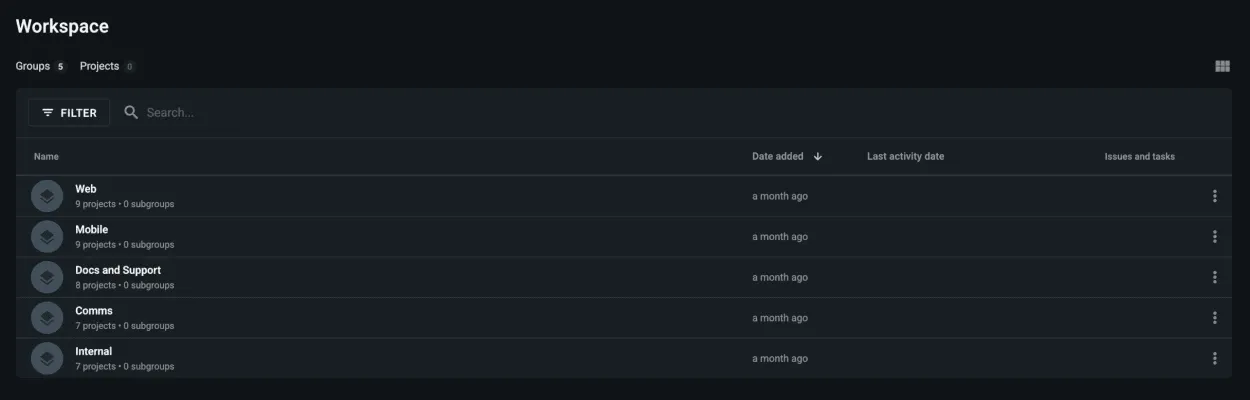
There are eight linguists, and they are not interchangeable. Each one covers a single language:
- Brazilian Portuguese: Bruno Tavares and Rafael Costa
- German: Jonas Weber and Lena Hoffmann
- Spanish: Elena Ruiz and Diego Marín
- French: Camille Laurent
- Japanese: Aiko Tanaka
Between them they already had 17 open tasks, spread unevenly on purpose. Then twelve projects got new content for the week, around a thousand words in total, and every one of those needed five languages.
I have to be honest about how I built this. The projects, the new content and the existing workload were all created by me with a script against the Crowdin API, and the linguists are demo accounts (that’s why you’ll see “pending” next to a name in one of the screenshots). I set it up this way so Copilot wasn’t preparing its own test.
Before assigning anything, I needed two facts for every piece of work. Who covers this language, and does that person have room right now? There was no screen in Crowdin that told me that.
Asking who has room
I opened Copilot, expanded it to full screen and kept it read-only for this first step. I only wanted to look. I didn’t want it touching my projects yet.
This is what I asked:
Before I assign anything, I need a picture of my localization team.
Start from the people who have translator access to my projects, all of them, including anyone who currently has zero open tasks. For each one show their language, how many open tasks they're carrying, and their nearest deadline.
Give it to me as a sortable table, busiest first, and tell me the total number of open tasks across the organization.
And this is what came back:
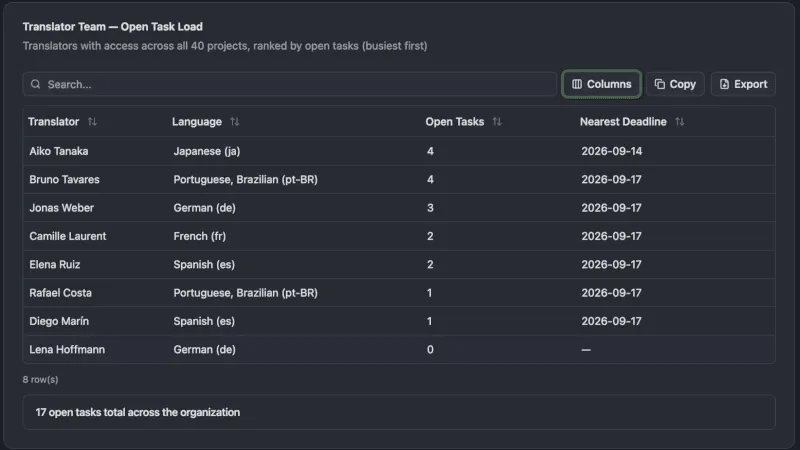
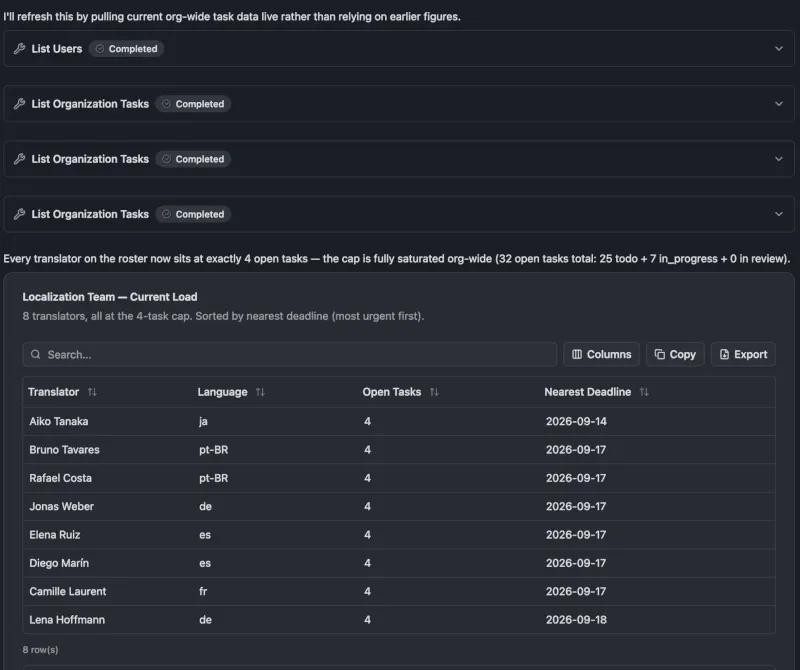
This table doesn’t exist anywhere in Crowdin. Nobody built a translator workload report for me. Copilot built it because my question needed one, and it’s a working component, so I could sort it, search it, pick which columns to show, copy it, or export it as CSV or Markdown.
The answer was useful, too. Lena had nothing at all. Bruno had four. And Aiko, the only person I have for Japanese, had four open tasks with the nearest one due the next day. Copilot also pointed out that Lena was the obvious pick for new German work before I said anything about it.
Making up a rule on the spot
Then I allowed Copilot to make changes and gave it a rule I had invented a few seconds earlier. It isn’t configured anywhere. There’s no setting in Crowdin where I typed the number four.
Twelve projects took new content this week. Create translation tasks for all of it, in all five languages.
Here's how I want it distributed. Nobody carries more than four open tasks. If someone's already at four, give the work to whoever else covers that language. Anything under a hundred words is due Friday the 18th; anything bigger gets until the 23rd.
I already knew this rule couldn’t be fully met. Japanese has one translator, she was already at four, and my rule says nobody goes past four. I hadn’t told Copilot what to do about that, and that was exactly what I wanted to see.
It stopped before creating anything
Copilot went through the twelve projects, counted the new words and sorted out the deadlines: nine projects under 100 words due Friday the 18th, and three bigger ones due the 23rd. Then it stopped.
I’ve identified the 12 projects and their new-content word counts, which sets deadlines cleanly. But before creating anything, I found a hard capacity conflict that needs your input.
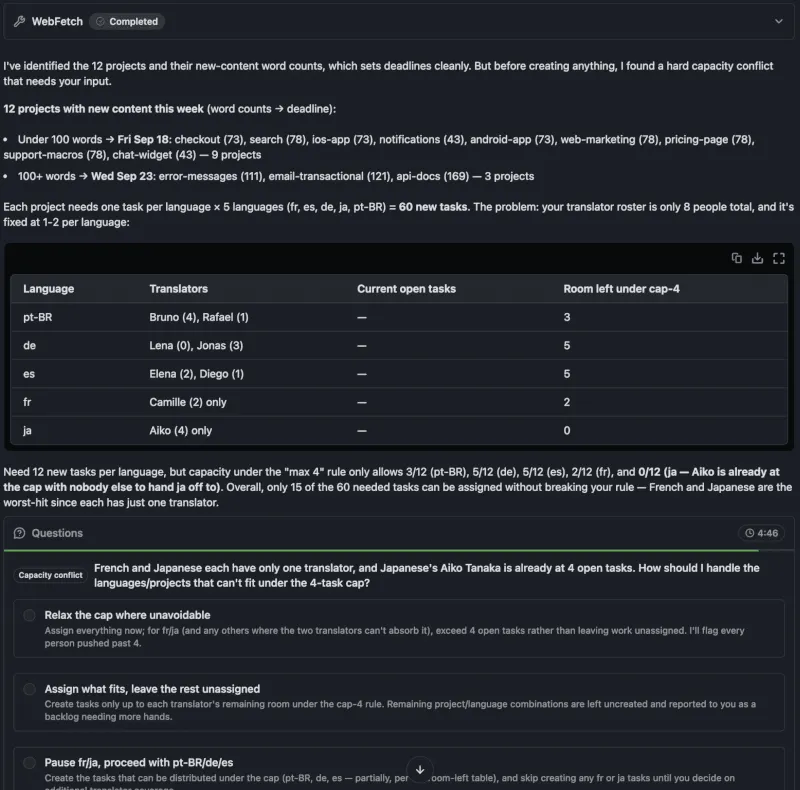
The math checked out. Twelve projects times five languages is 60 tasks, and under my cap there was room for 15 of them: 3 in Portuguese, 5 in German, 5 in Spanish, 2 in French and 0 in Japanese, since Aiko was already full and there was nobody else to hand Japanese to.
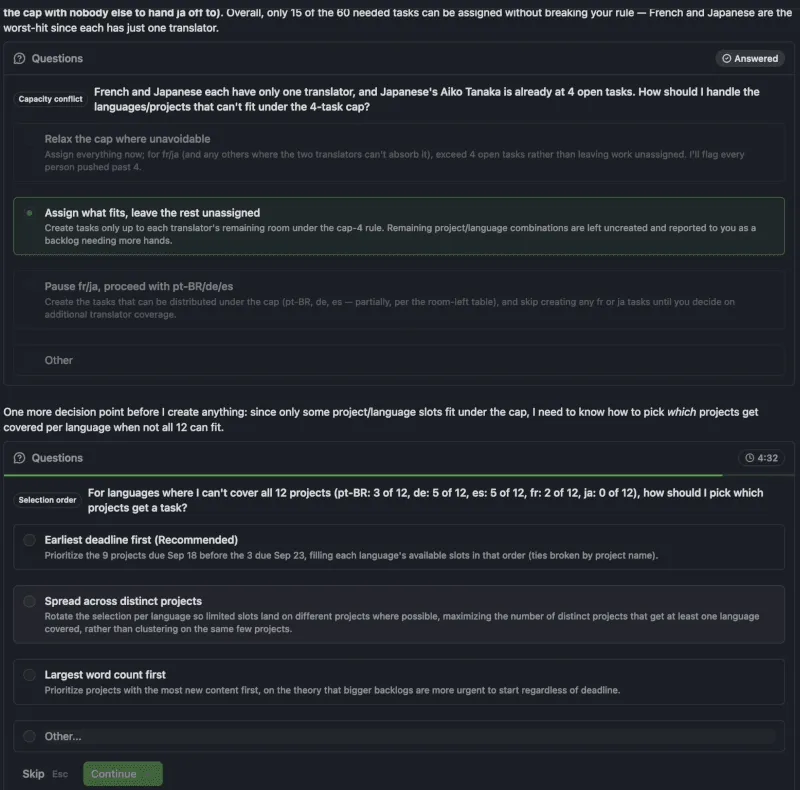
It gave me three options. Relax the cap where unavoidable, assign what fits and leave the rest unassigned, or pause French and Japanese and go ahead with the other three languages.
This was my favorite moment of the whole test. The easy thing for an agent to do here is break my rule without telling me, so the job looks finished. Copilot stopped and asked.
I picked “assign what fits, leave the rest unassigned”, because the cap was there for a reason. Then it came back with a question I hadn’t thought about at all: if not all twelve projects fit, which ones get covered first? It recommended earliest deadline first, so the nine projects due on the 18th get the free slots before the three due on the 23rd. I went with that.
What it created
Copilot created 15 tasks across six projects, every one of them inside the cap. On the way it found that the new content in the notifications project was made of hidden duplicate strings, so there was nothing to translate there, and it gave those two slots to other projects. The other 45 project and language combinations were left unassigned and reported back to me as a backlog that needs more people.
And once again I got a screen that nobody at Crowdin designed:
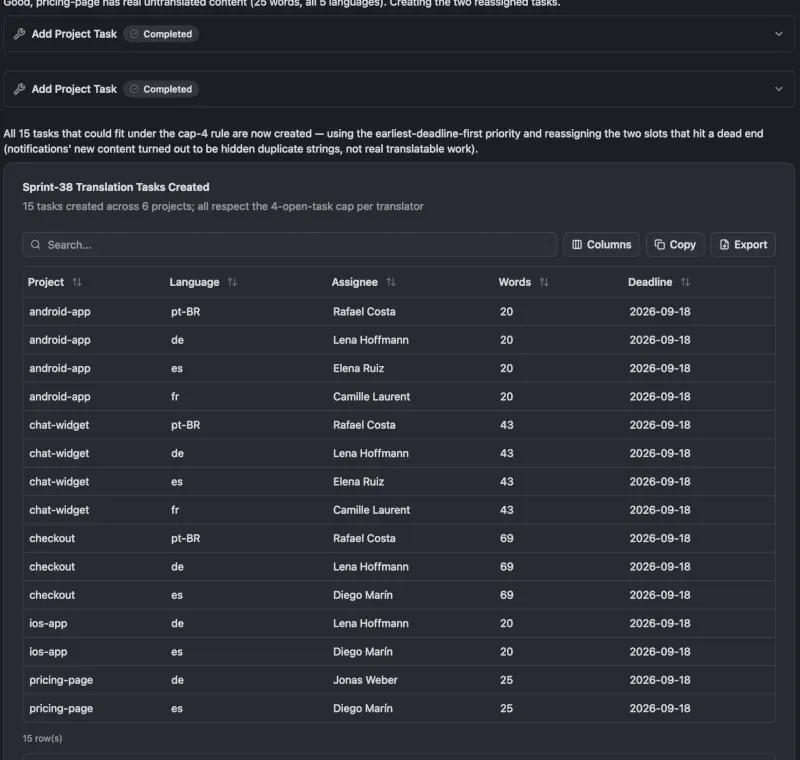
Then I asked for the same team table again so I could see what changed. Everyone was at exactly four. Lena went from zero to four, Rafael from one to four, and Bruno and Aiko got nothing new.
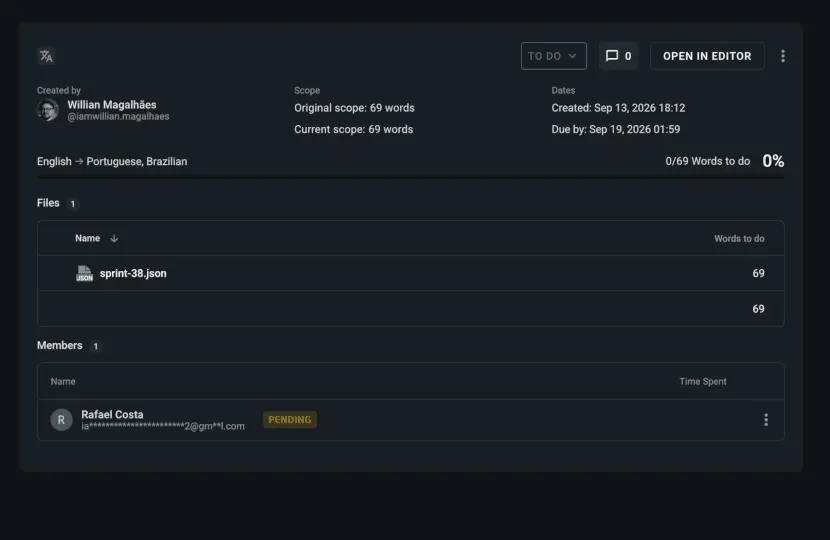
That was still Copilot telling me about its own work, though. So I left the chat and opened the projects. In checkout, task #132 was there: sprint-38.json, 69 words, English to Brazilian Portuguese, assigned to Rafael Costa, with the due date set. The same was true for the other tasks I opened.
Listen to our podcast with Willian on UX writing and localization
What it replaced for me
It replaced my Monday morning. I didn’t open a single project to check who was busy, and I didn’t build a spreadsheet. I described my problem, the screen came to me, and a rule I invented on the spot landed on every project that needed it.
The decision itself is still mine. Four was my number. Copilot applied it carefully, and when the rule couldn’t hold, it came back to me instead of guessing. Whether four is the right cap for a team is something I still have to decide, and I’m fine with that.
If you want to try this on your own projects, my advice is to write the rule the way you’d explain it to a colleague, and to think for a second about what should happen when it can’t be met. Copilot will probably ask you anyway, but it’s a better conversation when you already have an answer.
Honestly, I think this is where our tools are going. We’ll describe the problem in our own words and the tool will put the screen together for us. Crowdin is already doing that.
Localize your product with Crowdin

Willian Magalhães
Willian Magalhães is a Localization Specialist, Conversation Designer & a Crowdin Expert since 2022. He works on localization and AI tooling and won a Localization Hackathon using Crowdin & Slack to improve the whole localization pipeline. Willian believes AI improves processes and translation quality thanks to Evals & Guardrails Agents.