

New blog posts on your website, a rewritten help center article, next week’s email campaign – content that needs translating keeps arriving from different platforms. Until now, each of them meant opening its integration app in Crowdin, selecting the right items, starting the sync, checking progress, and then syncing the translations back. Automating it meant asking a developer for a script and waiting for it to reach a sprint.
Now you can ask an AI agent instead. Describe the outcome in plain words, and the agent reads the content through your integration app, imports it into Crowdin, follows the translation, and pushes the result back to the platform. It works in Crowdin Assistant (formerly Copilot), in Claude, ChatGPT and other AI assistants connected to Crowdin, and in a terminal through Crowdin CLI. integration-sync skill teaches the agent the whole loop.
It reflects a wider shift in localization toward agentic workflows: you describe what you need in a chat window, and an agent does the work across your localization platform and the tools your content lives in.
Why has integration content been so hard to automate?
Files and strings have long been easy to automate. A developer adds Crowdin CLI or the API to the build, and source files flow in and translations flow out on every release.
Content from websites, help centers, CMSs and email platforms took a different path. It reaches Crowdin through integration apps, and each app had its own interface. Someone had to open it, pick the right pages or entries, start the sync, and come back later to push translations.
Automating that work meant a developer had to learn each platform’s API, write a script, and keep it running as the platform changed. For a localization manager, the choice was simple and frustrating: do the clicks yourself or wait in someone else’s backlog.
What changed?
AI agents can now run your installed integration apps. The agent reads what the platform holds, imports the items you name into Crowdin, follows the sync job until it finishes, and pushes the translations back once they are ready. It can also read or change the app’s auto-sync schedule, so the loop keeps running after the first request.
“Translate the 3 latest blog posts on our Webflow site into all our languages and publish them.”
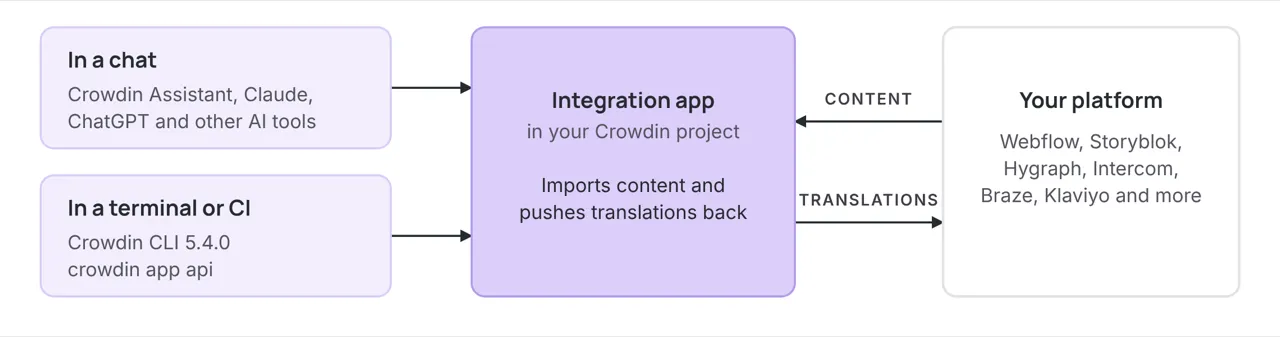
There are two ways in, and both follow the same loop:
- In a chat. Ask Crowdin Assistant right in Crowdin, or use Claude, ChatGPT or another AI assistant connected to Crowdin.
- In a terminal or CI job. Crowdin CLI 5.4.0 adds commands that call an installed app directly, so a developer or a coding agent can script the same steps.
It works with a growing number of Crowdin integration apps, including Webflow, Storyblok, Hygraph, Intercom, Braze and Klaviyo.
Two ways in, one loop through your integration app
What can you ask the agent to do?
You describe the outcome in your own words. The agent works out which app calls to make, runs them, and reports back.
| Content | You ask | You get |
|---|---|---|
| Website (Webflow) | “Translate the 3 latest blog posts into all our languages and publish them.” | The posts imported, translated, and live in every target language, without opening either app. |
| Headless CMS (Storyblok) | “We just rewrote the pricing page. Re-import it so translators see the new text.” | The new source text in Crowdin. Existing translations stay, and only the changed strings need work. |
| Help center (Intercom) | “Import every article in ‘Getting started’ before the Japanese launch.” | A whole section imported in one job, instead of selecting articles one by one. |
| Email campaigns (Braze) | “Which campaign emails aren’t translated into German yet?” | A list of emails with their German progress, including ones that were never imported. |
| Headless CMS (Hygraph) | “Publish every language that’s fully translated. Leave the rest.” | Only finished languages pushed to the platform. The others wait until they’re ready. |
| Sync status (Klaviyo) | “Did last night’s sync finish? Show me anything that failed.” | Recent sync jobs with their status and the app’s own error message for any failure. |
| Ongoing sync (Webflow) | “From now on, send every new blog post to Crowdin automatically.” | New posts flow into Crowdin on the app’s schedule, with no further requests. |
What does it look like in practice?
Here is one real conversation: three pages of a Webflow site, from the first message to a published translated version.
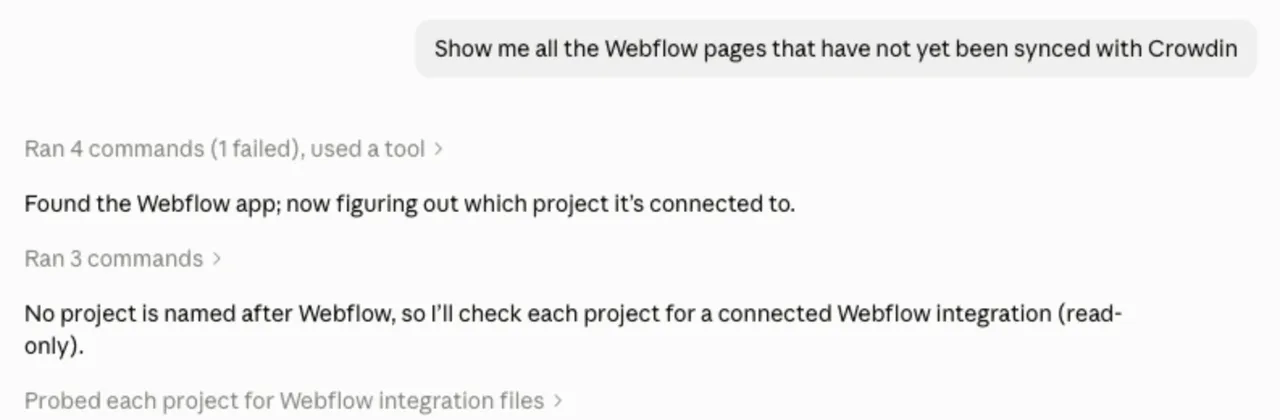
- Ask. User asks which Webflow pages aren’t in Crowdin yet. The agent finds the Webflow app on its own and works out which project it’s connected to.
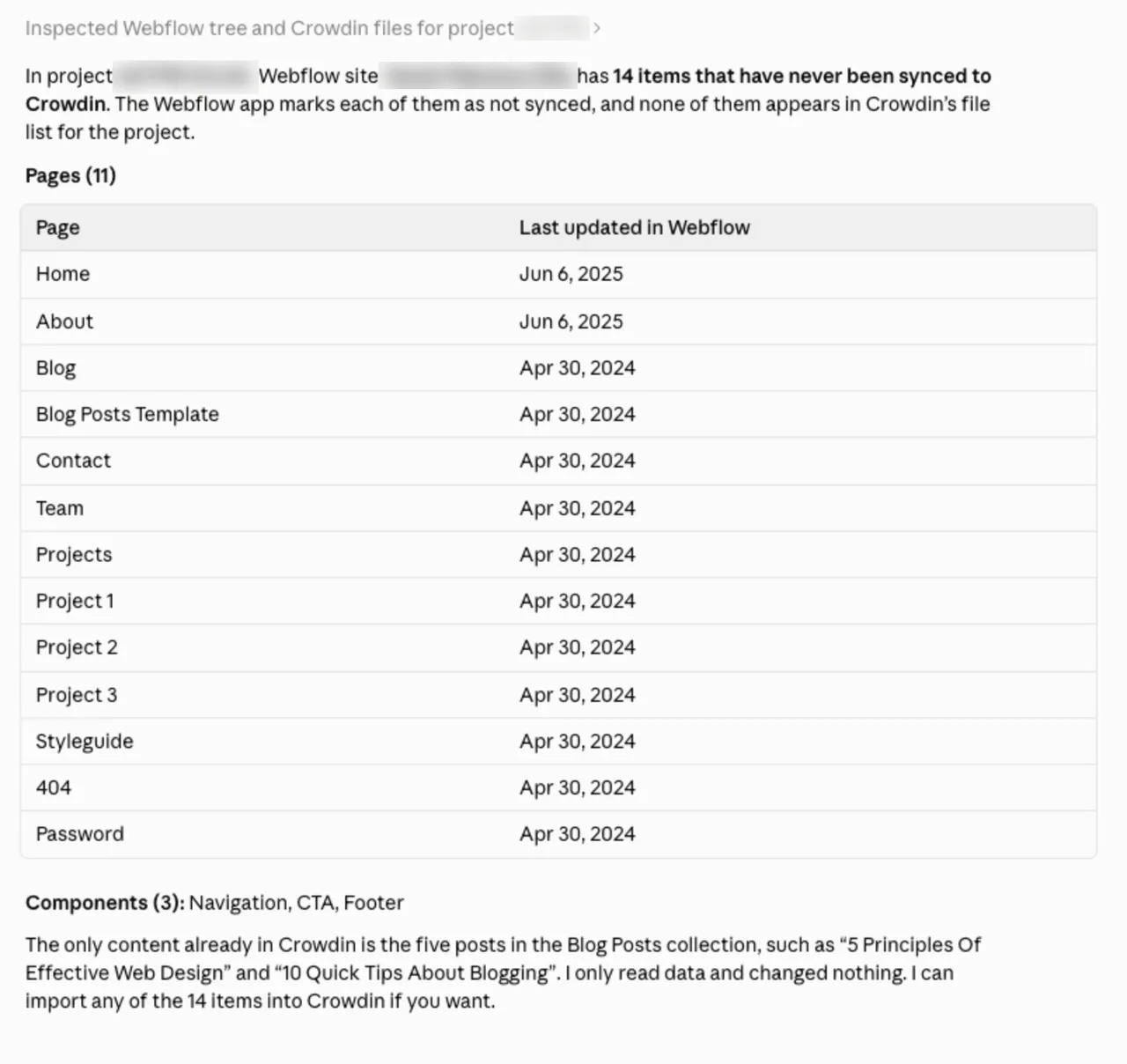
- See what’s missing. Agent lists every page and component that has never been synced, and changes nothing while it looks.
- Import and translate. User picks Home, About and Blog and asks to translate them with AI. Agent imports the pages, translates them into all project languages, and asks before sending anything back to Webflow.
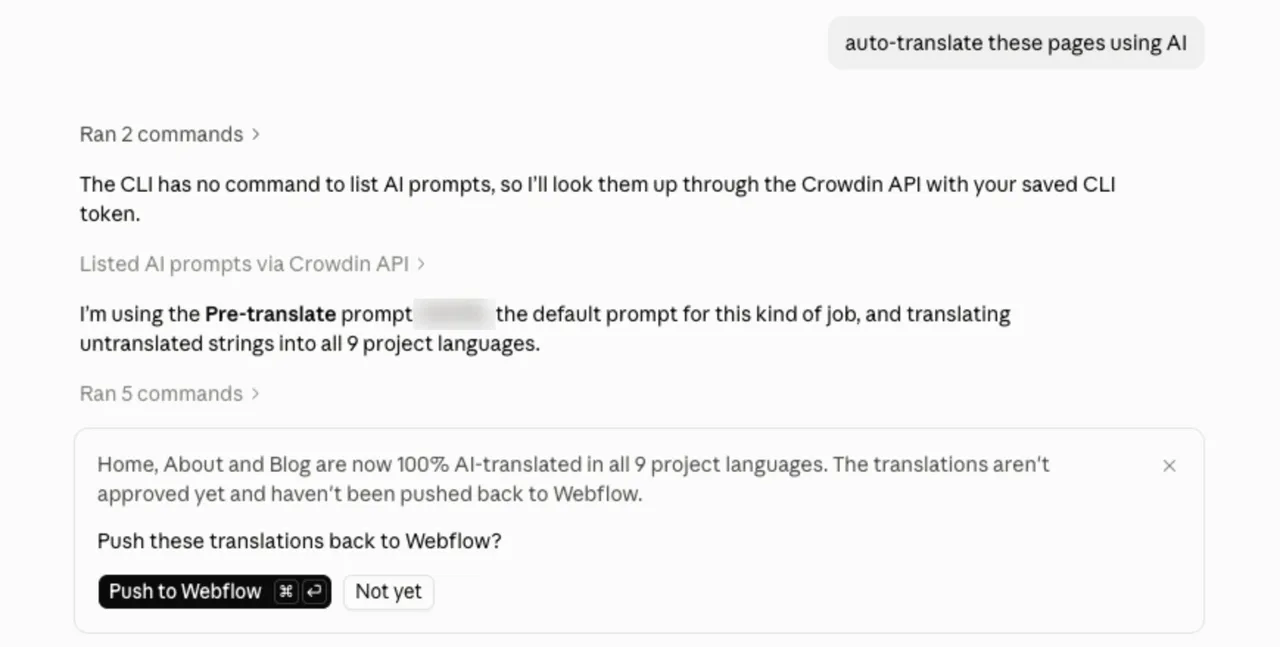
- Live. After the user’s yes, the translations go to Webflow, ready to publish.
The user typed a handful of short messages. The agent made every call to Webflow and Crowdin in between.
Who stays in control?
You do. Handing a routine to an agent works only when you can see and stop what it does, so the loop is built around that.
- Changes are shown first. Every call that changes something in Crowdin or on the platform is shown to you before it is sent. A change to the app’s settings, such as the auto-sync schedule, waits for your confirmation because it affects everyone in the project.
- Your permissions, nothing more. Agent acts with your own Crowdin access. It can’t do anything you couldn’t do yourself.
- Status you can trust. Agent reports a job as finished only after it has seen that status, and it passes on the app’s own error message when something fails.
- Translation stays in Crowdin. Agent moves content in and out. Translating it is still up to your setup: AI Pipeline with your style guide, glossary and translation memory, your machine translation engines, or your translators.
Where can you use it, and what do you need?
Pick the place you already work in. The integration app has to be installed in your Crowdin project.
| Where | What you need |
|---|---|
| Crowdin Assistant | Already built into Crowdin. Add the Integration sync skill from Crowdin Store. Runs on AI credits. |
| Claude, Cowork and other AI assistants | Connect the Crowdin MCP server and add the integration-sync skill. |
| ChatGPT and Codex | Install the Crowdin plugin from the ChatGPT plugin directory. |
| Terminal or CI | Crowdin CLI 5.4.0 or later and a token with the application.proxy scope. |
The list of supported apps keeps growing. The easiest way to check yours is to ask the agent: “Which of my installed apps can you sync?” It checks your project and answers for the apps you actually have.
For developers: two new CLI commands
Crowdin CLI 5.4.0 adds two commands for working with installed apps:
crowdin app methods <app>lists what an installed app can do, with the verb and fields for each call.crowdin app api <app> <path>calls one of those methods and prints the app’s response. When a call fails, you see the app’s own error message.
For example, this imports content from Webflow into Crowdin, with a dry run first:
crowdin app api webflow crowdin-update --input body.json --dryrun # shows the request, sends nothingcrowdin app api webflow crowdin-update --input body.jsonIf your coding agent also syncs files from your repository or sets up CI, add the Crowdin CLI skill as well. It handles crowdin.yml and file sync, and hands requests about integration apps to Integration sync.
Your content, on your terms
Content that matters most to your markets rarely sits in a repository. It lives on your website, in your help center, and in the emails your marketing team sends every week. Now the person who owns localization can move that content through Crowdin with a few sentences, at the moment it’s needed, without a ticket for the dev team.
That’s the idea behind Crowdin: a localization system built around the tools and processes your company already has. Add the integration-sync skill, ask your agent for the next batch of pages, and see where it takes your team.
Localize your product with Crowdin

Crowdin Team