

OpenAI hype has made many teams believe that a simple API call to GPT-4o is all they need to translate their product. This might work for a simple one-pager or situations where you don’t necessarily need the translation to feel native to your audience. However, there is a big difference between translating a sentence in a chat box and localizing a product at scale.
OpenAI is a powerful engine, but it is not a localization platform. It lacks the infrastructure to manage a product. To truly understand why, we need to look at the gap between a raw AI model and a professional localization ecosystem.
Besides the comparison, we want to show you how to get the maximum of both worlds: OpenAI and Crowdin.
How ChatGPT Works?
ChatGPT doesn’t read words the way humans do. It breaks text down into smaller chunks called tokens. A token can be a single character, a syllable, or a whole word. For common English text, 1,000 tokens is roughly 750 words.
What happens when you send a request to OpenAI:
- Tokenization: Your input text is sliced into tokens.
- Context Processing: The model analyzes these tokens against its training data and any context you provide (e.g., previous chat history).
- Prediction: AI predicts the next most likely token, one by one, until the translation is complete.
- Billing: You are charged for both the Input Tokens (your prompt and source text) and the Output Tokens (the generated translation).
When is ChatGPT Enough for Translation?
Before we talk about enterprise-grade localization, let’s be fair: ChatGPT is an incredible tool. You can use it if:
- You need to translate a single email, a generic blog post, or a social media caption.
- You are translating internal notes where a good enough quality is fine.
- You need a creative brainstorming and want to see how a slogan might sound in different languages.
- You do not have a product UI, strings, or a continuous development cycle to worry about.
If you are translating documents, use ChatGPT. If you are localizing a product, you need an ecosystem.
Core Difference: Tool vs. Ecosystem
ChatGPT is a standalone tool. You bring it a task, it gives you a result, and the relationship ends there. You have to manually export strings from your code, paste them into a chat, and paste them back into your files, or spend your devs’ time creating an API integration.
Every time you start a new chat, the AI forgets your product. You have to re-explain your brand voice, re-upload your glossary, and re-attach your screenshots.
Crowdin, as a localization platform, provides the infrastructure where your multilingual product actually lives. Instead of a blank prompt, the AI works within a project-aware environment that automatically feeds it your specific glossary, translation memory, and UI constraints for every string.
Comparison: ChatGPT vs. Crowdin
| Feature | ChatGPT (OpenAI) | Crowdin |
|---|---|---|
| Primary Role | General-purpose AI engine | End-to-end Localization Management (TMS) |
| Contextual Awareness | Limited to current prompt or manual attachments | Multi-layered: Screenshots (mapped to strings keys), Glossary, and Code Metadata |
| Semantic Knowledge | General training data | Vector Cloud: Brand-specific semantic search via RAG (Style guides, old docs) |
| Hallucination Prevention | Low (overloaded prompts lead to errors) | AI Pipeline |
| QA Checks | Manual review only | Automated (Length, tags, placeholders) |
| Workflows | Single-shot (Input - Output) | Multi-step (AI + Human + Review) |
| Code Protection | High risk of breaking tags/placeholders | Native Shielding: Variables like {user} are protected from translation |
| Design Stage | None | Translate and preview in mockups before coding |
| Integrations | Manual or custom-built middleware | 700+ apps: GitHub, GitLab, HubSpot, Zendesk, Shopify |
| Version Control | None (chat history only) | Track all translation history |
| Collaboration | Isolated individual chats | Tag team members, raise issues, and share feedback |
| Security | Data may train public models (on free tiers) | ISO 27001, GDPR, and Bring Your Own Key privacy |
| Translation cost / 1000 words | GPT-5.2 ~$0.021 | The same, ~$0.021 |
Approach to Context: ChatGPT vs. Crowdin
Context is a King. Without it, AI is just guessing.
The strongest argument for using OpenAI directly is that you can attach a screenshot or document to ChatGPT, and it understands what you need. This is useful for a single task, however, it fails in a professional production cycle. Crowdin works better than a single ChatGPT for AI localization because it treats context as data, not just an attachment.
1. Crowdin’s Context Enrichment with AI Agents
OpenAI requires you to manually explain the context for every new chat. In contrast, Crowdin’s Context Enrichment with AI Agents lets your AI coding agent (Cursor, Claude Code, Copilot) automatically scan your codebase, identify how a string is used in the code, and push that metadata directly to Crowdin.
- OpenAI: You tell it: this is a button.
- Crowdin: AI knows it is a button, knows which file it is in, and knows the technical constraints of that specific UI element.
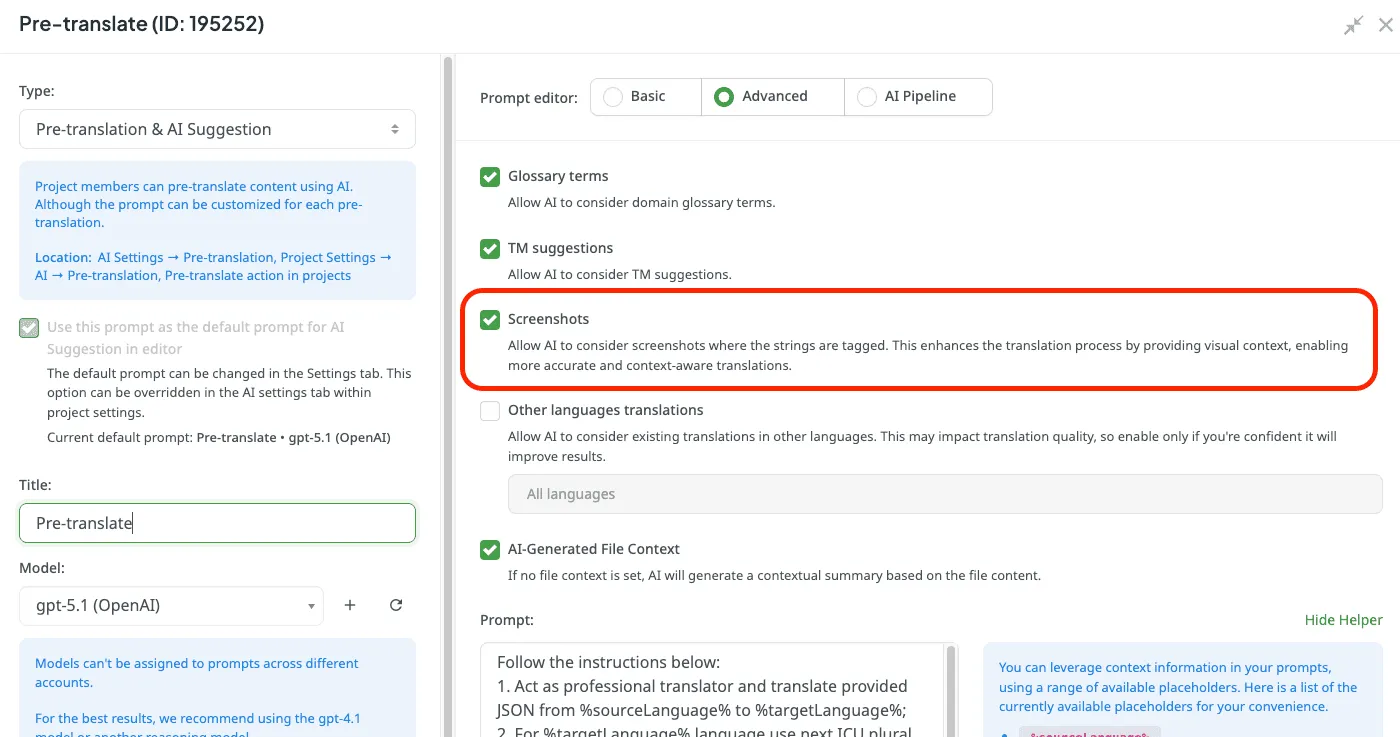
2. Visual Context (Screenshots)
When you upload a screenshot to ChatGPT, the context dies when the chat ends. In Crowdin, screenshots are mapped to strings.
- If you change the source text 6 months from now, Crowdin’s AI still has that screenshot linked to the key.
- In ChatGPT, you need to find that old screenshot and reupload it.
3. Crowdin Vector Cloud
Vector Cloud is a tool that uses a vector database to provide semantic input to your AI translation models.
- OpenAI: Uses a general knowledge base. If you ask it to translate a technical term, it guesses based on the internet.
- Crowdin Vector Cloud: You can upload style guides, product specs, or even monolingual reference files (like a blog post written in French). When the AI translates, it first looks through your vector database for the most relevant brand-specific context. It understands the style of your brand, even if there isn’t an exact match in your translation memory.

4. AI Pipeline
In Crowdin, you can provide multi-layered context (glossary, translation memory, style guide, screenshots, text). Raw OpenAI often hallucinates when overloaded with too many instructions.
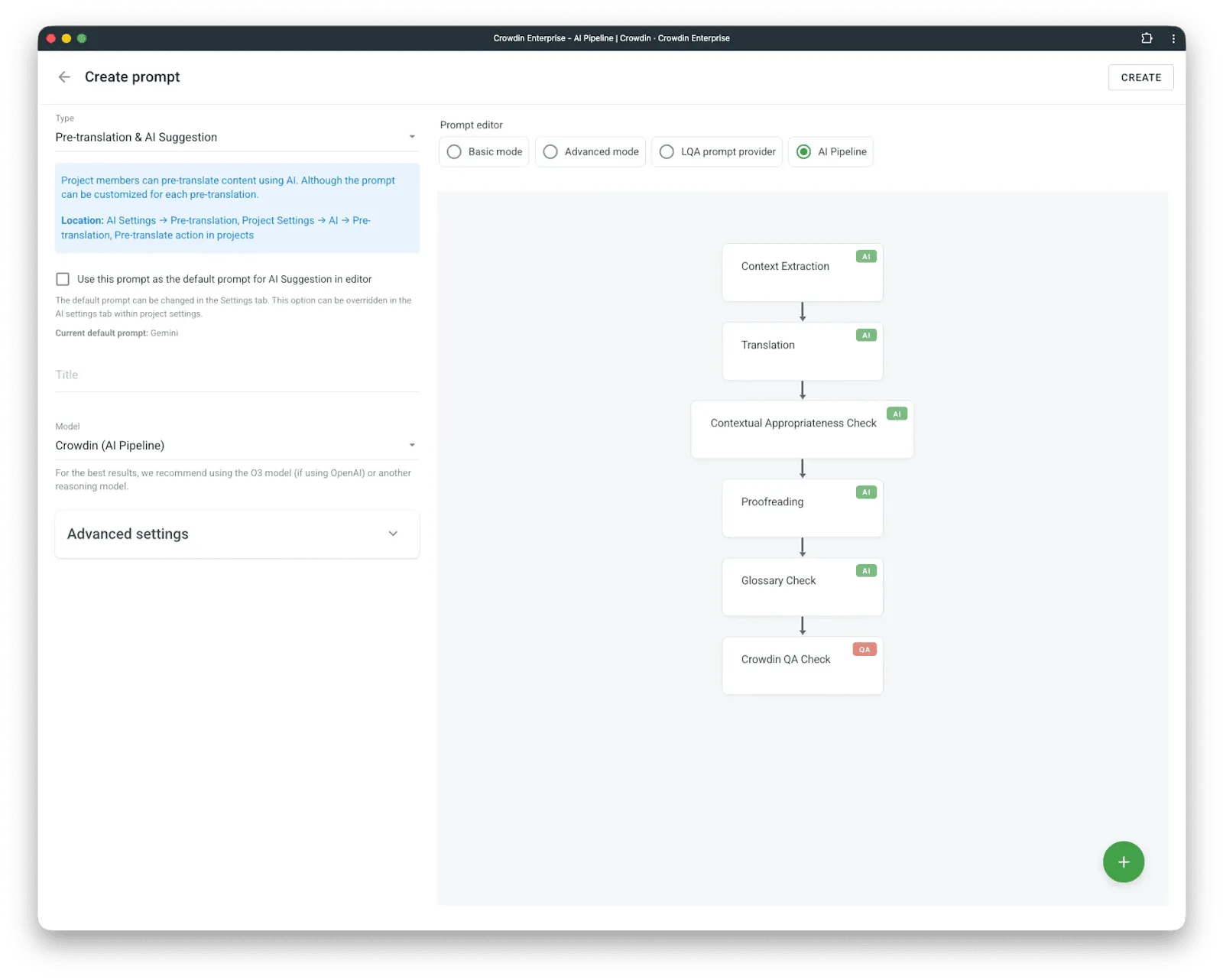
To prevent AI hallucinations, we recommend using the AI Pipeline app. Crowdin’s AI Pipeline prevents this by breaking the process into specialized steps. Instead of one giant request, it breaks the process into steps: extracting context, translating, verifying against the glossary, performing QA checks. All these steps can be customized – you can add some or delete the unnecessary.
We’ve added a new logic block called Skip Ambiguous Texts, because prevention is better than correction. Instead of the AI “flipping a coin” on a word with multiple meanings, the system analyzes the text first. If the source text is too vague or relies on missing information like gender or plurality, the AI simply skips it.
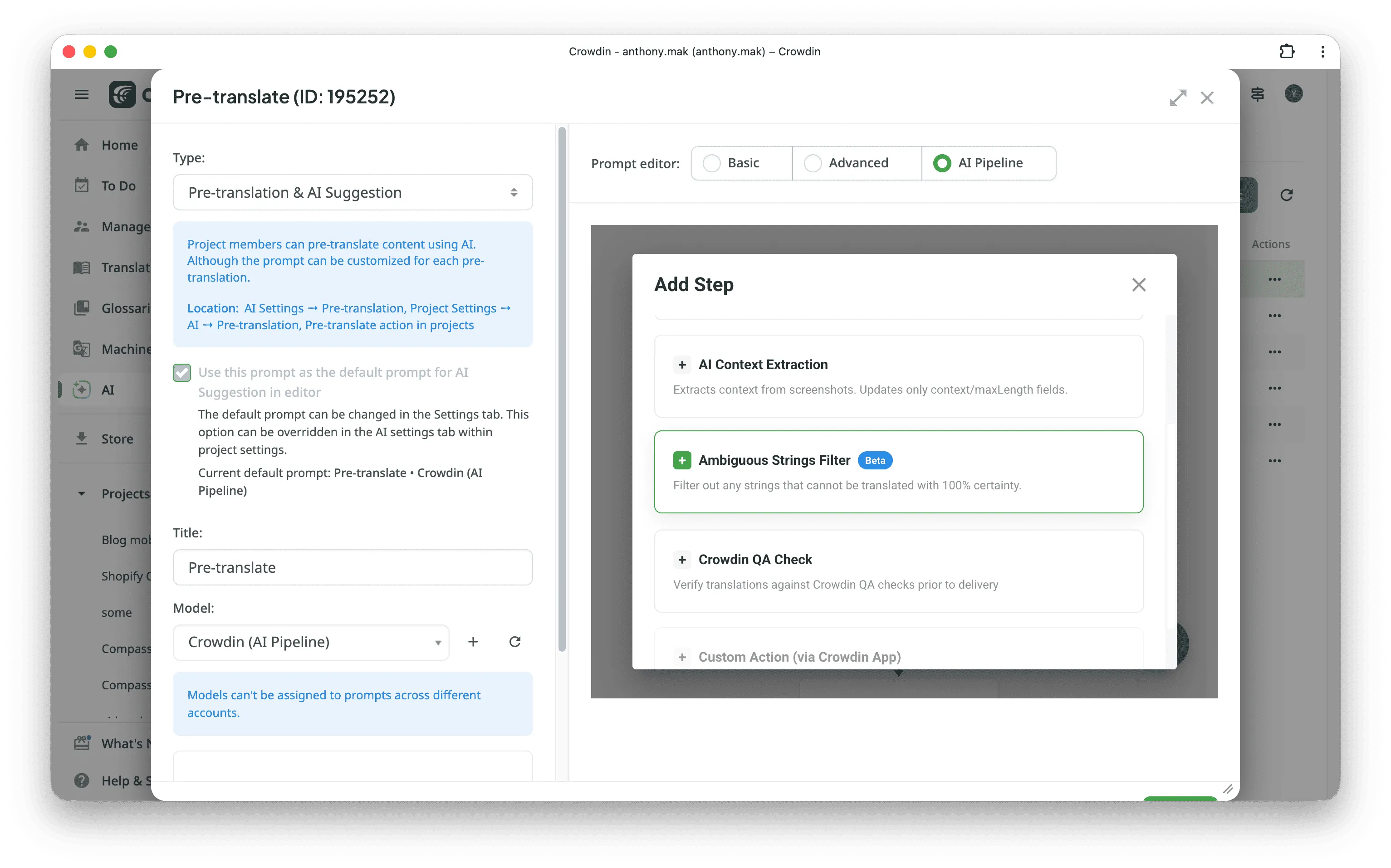
This flags the risky strings for you to review. By only translating the clear 80% and letting a human (or a manager with more context) handle the rest, you avoid the bad translations that usually break products.
Try AI Pipeline in Crowdin.
Why Crowdin Wins: Features ChatGPT Doesn’t Have
1. Integrations & Automation
OpenAI requires manual copy-pasting or custom-built middleware. Crowdin offers 700+ integrations with tools like GitHub, GitLab, Shopify, and Zendesk. It detects new strings automatically as developers push code and returns translated content.

2. Transparent Pricing
AI translations in Crowdin cost the exact same as they do in OpenAI directly. Crowdin doesn’t charge extra for AI features. In the long run, this ecosystem actually saves you money (up to 90%) by reusing old translations through Translation Memory instead of paying to translate the same sentence twice.
3. Version Control
With Crowdin, you can track the history of every change made by the AI or a human. All your content becomes consistent and published simultaneously across all languages. If something has changed in English, the platform will indicate which fields need translation and notify translators.
4. Design-Stage Localization
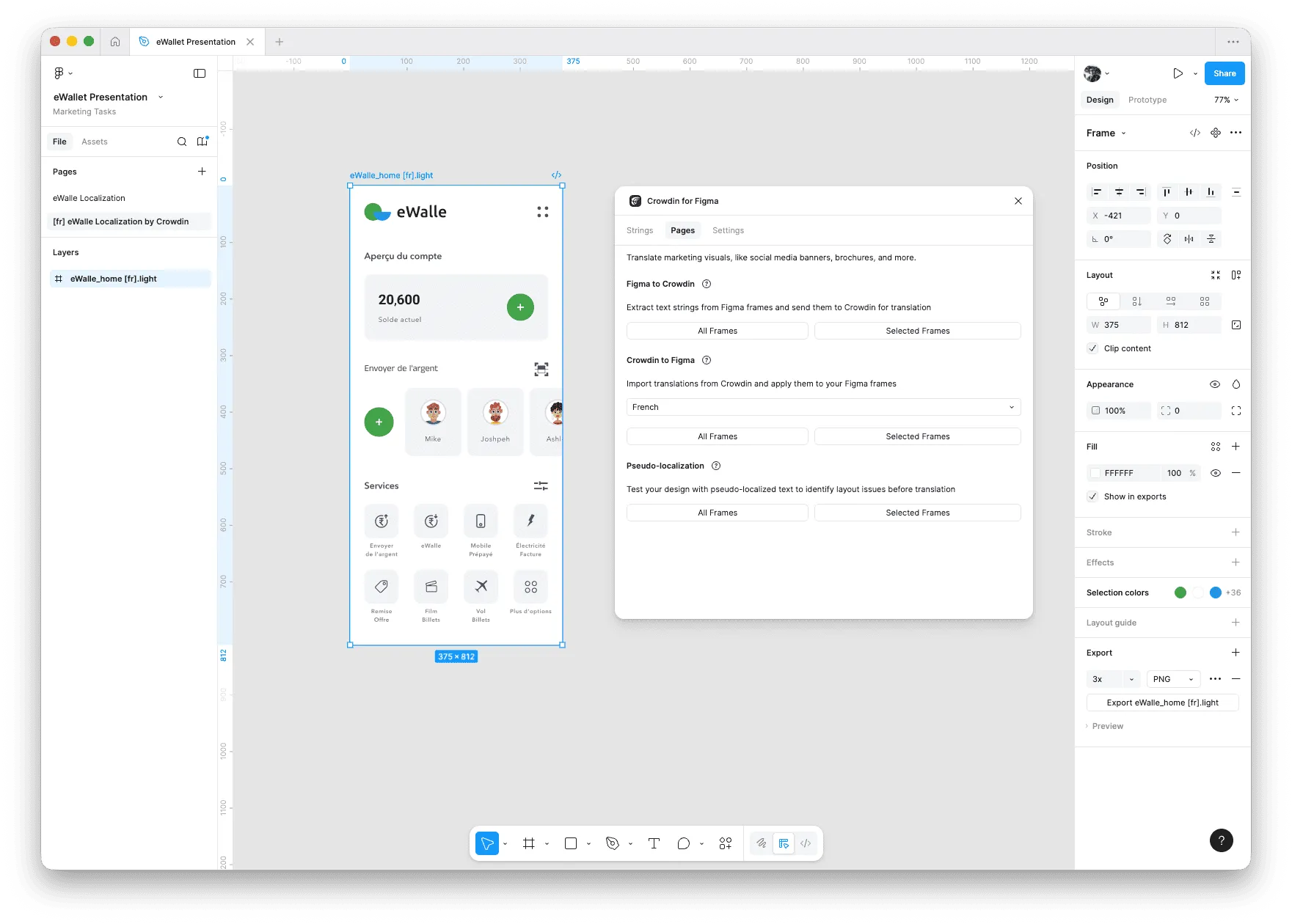
In a perfect scenario, localization should start before development. It can start at the same time as the design stage. With Crowdin’s design plugins, you can send text from Figma for AI translation and preview the results directly in your mockups. This helps you catch layout issues before the design reaches developers. Learn more about design-stage localization.
5. Centralized Communication
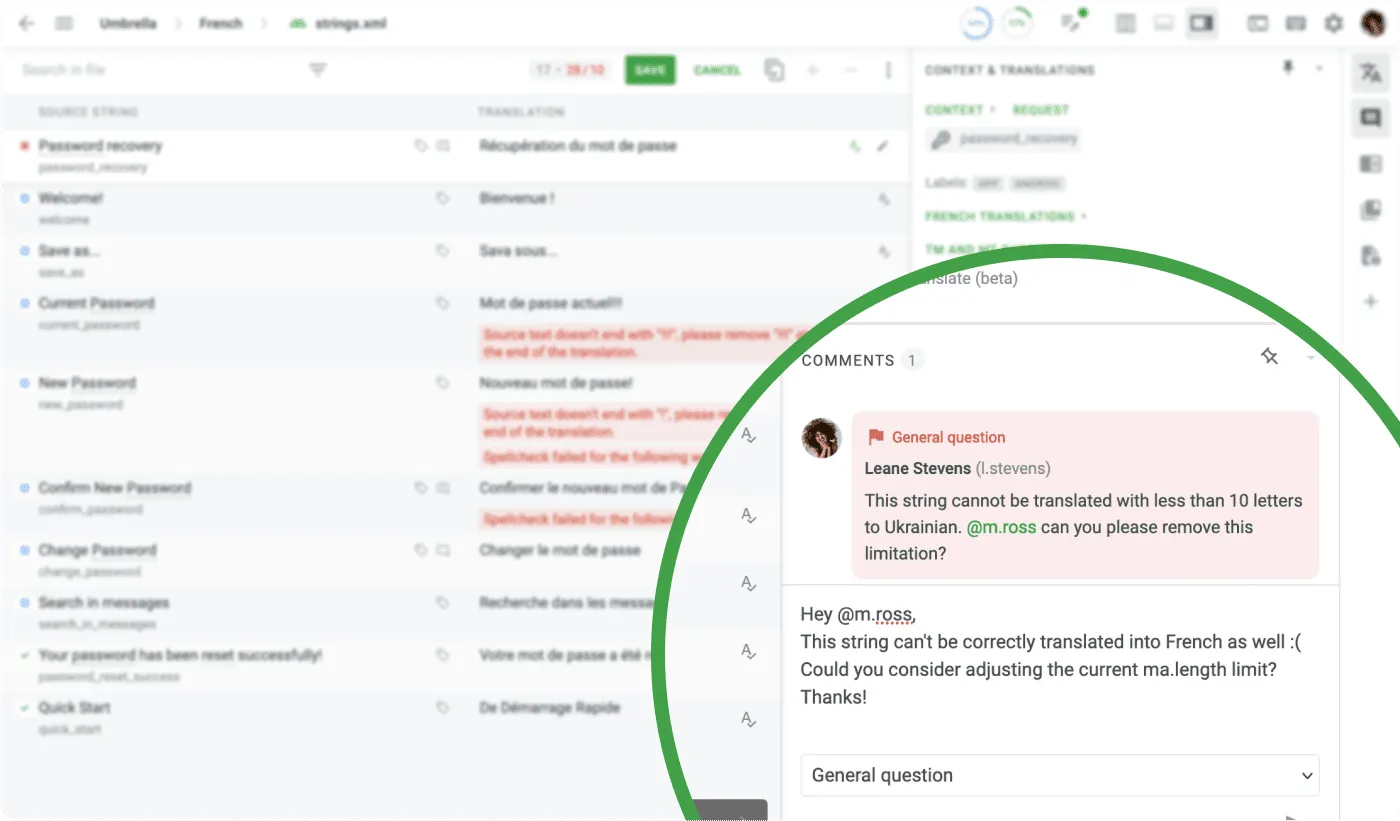
Localization needs collaboration. Crowdin provides a central hub where managers, translators, and developers can comment on specific strings. You can tag teammates, raise issues, and provide real-time feedback. This is impossible to manage in OpenAI chat history.
6. Native Placeholder & Tag Protection
OpenAI frequently translates {userName}, for example, to {nombreDeUsuario}, which crashes apps. Crowdin masks these tags, ensuring the AI does not translate or change them.
7. QA Checks
Besides the placeholders, Crowdin can automatically catch simple errors in translated text (missed commas, extra spaces, or typos) or more advanced errors (missing terminology, inconsistent translations, missing tags). Crowdin also has a Linguistic Quality Assurance (LQA) app to improve translation quality.
Read more about QA checks in our post Translation Quality Assurance.
8. Data Ownership & Security (BYOK)
You do not have to choose between Crowdin and OpenAI. Crowdin allows you to Bring Your Own Key (BYOK). You get the raw cost and power of OpenAI’s latest models while using Crowdin’s professional environment to manage translations.
Crowdin Ecosystem for AI Localization
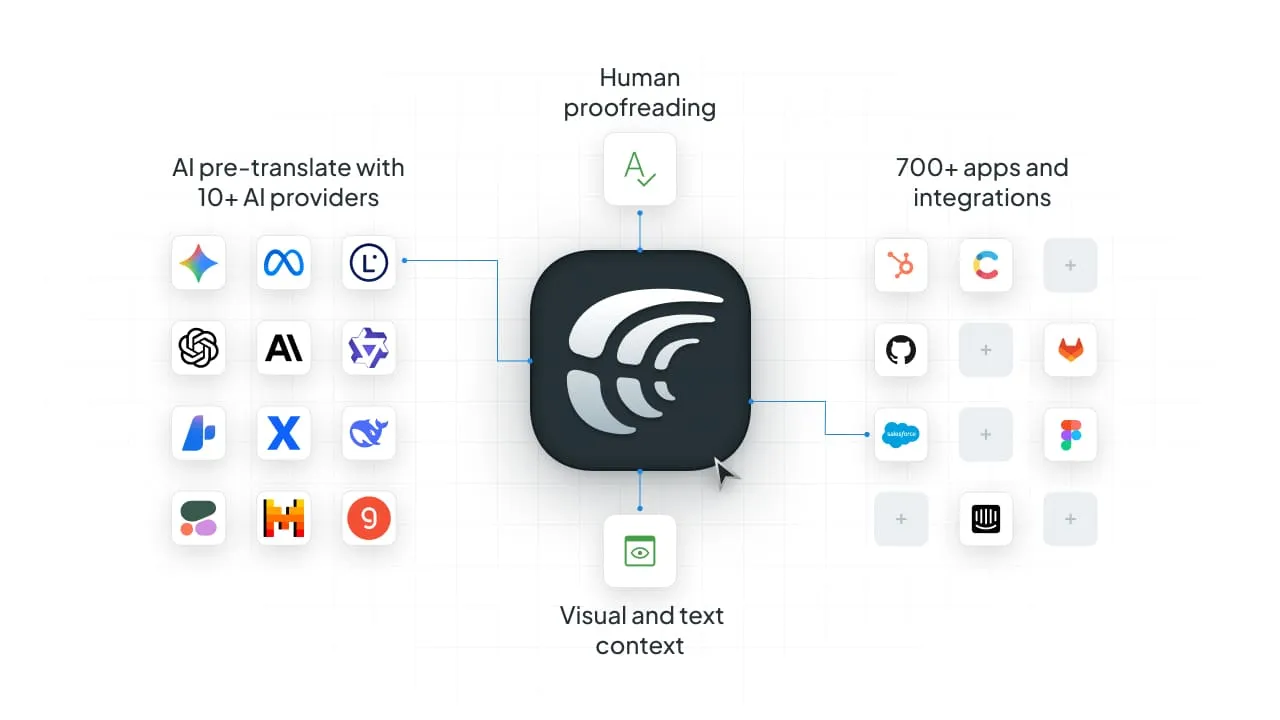
ChatGPT is just a tool. Crowdin is a whole ecosystem. If you are serious about global growth, you need more than a chat interface. You need a continuous localization pipeline that ensures consistency, provides automation, saves money, and scales with you.
By using ChatGPT within Crowdin, you get the speed of the latest AI models and all the features of a professional localization platform.
Localize your product with Crowdin
FAQ
Is it safe to send my product data to OpenAI?
Confidential data should never be sent to the public version of ChatGPT. However, Crowdin allows you to Bring Your Own Key (BYOK), giving you greater control over privacy and ensuring your data is handled according to your own private contracts with AI providers.
Can ChatGPT replace a professional Translation Management System (TMS)?
No. ChatGPT is excellent for short-form creative content or one-off drafts, but it lacks the infrastructure for large-scale product localization. It does not natively respect segmentation, glossaries, or translation memory, which often leads to inconsistent translations as you scale.
How does Crowdin improve the quality of AI translations?
Crowdin puts AI on “rails” by providing multi-layered context that raw AI lacks. This includes:
- Glossaries & TMs: Ensuring the AI uses your specific brand terminology every time.
- Visual Context: Linking screenshots to strings so the AI “sees” where the text lives.
- QA Checks: Automatically catching missing tags or placeholders that would otherwise break your app.
What is the cost difference between using ChatGPT directly vs. Crowdin?
Crowdin does not charge extra for its AI features; you only pay the direct cost of the tokens used by your selected AI provider. In the long run, using a TMS can reduce overall localization costs by up to 90% by reusing previously translated content and reducing the need for manual fixes.
Does AI localization mean I no longer need human translators?
AI is a tool, not a replacement. In the Crowdin workflow, AI handles the pre-translation, while human experts focus on high-value review, cultural nuances, and verifying high-stakes content.

Yuliia Makarenko
Yuliia Makarenko is a marketing specialist with over a decade of experience, and she’s all about creating content that readers will love. She’s a pro at using her skills in SEO, research, and data analysis to write useful content. When she’s not diving into content creation, you can find her reading a good thriller, practicing some yoga, or simply enjoying playtime with her little one.