

We’re a week late with this update due to the holiday season, but we’re finally here and excited to share all the great things we’ve been working on. On-Demand AI translation via API for translating dynamic content, security apps for controlled user access, and AI Lip Sync to level up your video dubbing. We’ve also added the new Google Translation LLM integration and various features to improve task management, hopefully saving you some of the manual work.
On-Demand AI Translation via API
The headliner of our release notes isn’t a new feature or an integration – it’s an API method: POST /ai/translate.
We are incredibly optimistic about the potential of this new endpoint because it solves the final piece of the localization puzzle: dynamic content.
Crowdin has been good at making our clients’ businesses multilingual – handling the translation of software UI, websites, and marketing campaigns. But clients often faced one gap: all kinds of Dynamic Content.
Dynamic content could be anything: product reviews (which vary by language in already multilingual products), aggregated listings (like restaurant menus or real estate), street names, or even user names in multi-user systems. All of these were logistically impossible to handle with traditional human-centric workflows.
The POST /ai/translate method changes this. It allows you to consume your configured Crowdin AI engine to get immediate, context-aware translations. Unlike a generic translation API, this leverages your specific Corporate AI pipeline – meaning the AI knows your terminology, respects your style guides, and adheres to your quality standards.
Sample request:
curl -X POST https://api.crowdin.com/api/v2/ai/translate \ -H "Authorization: Bearer {access_token}" \ -H "Content-Type: application/json" \ -d '{ "strings": [ "Chef's Special: Spicy Tuna Roll" ], "targetLanguageId": "de", "sourceLanguageId": "en", "aiPromptId": 82, "tmIds": [102, 305], "glossaryIds": [12], "instructions": [ "Keep dish names appetizing", "Do not translate brand names" ]}'Response:
{ "data": { "sourceLanguageId": "en", "targetLanguageId": "de", "translations": ["Chef's Special: Würzige Thunfischrolle"] }}Simply put, when you request translations, you can specify which translation memories the AI should use, which glossaries to respect, and even provide specific instructions to guide the AI’s output.
You also have full control over how the AI generates these translations. You can configure an AI Pipeline with multiple verification steps, or use Agentic AI to let the LLM determine the best approach based on the complexity of the request.
Alternatively, you can opt for a simple one-shot request when speed is the priority, while still leveraging all your existing localization assets.
We’ve got another companion API method to translate entire files. It works exactly the same way: send any Crowdin-supported file via API and get a translated version back instantly.
We can’t resist teasing two major updates just around the corner. It’s very unfortunate that we can’t just share about Style Guides arriving as a new, native localization asset, and a dedicated Translation Portal that will allow your team to get instant translations securely within your corporate environment.
We’ll save the full reveal for next month’s release notes!
Dubbing Studio App Upgrade
We’ve upgraded the Dubbing Studio app and happy to introduce 2 new features: AI Lip Sync and background audio preservation.
AI Lip Sync
Historically, lip-sync involved finding text that matched the mouth movements, which was a complicated and time-consuming process. Now it can be done by AI.
We added Hollywood-grade AI Lip Sync, powered by lipdub.ai. Using advanced generative AI, the Dubbing Studio app by Crowdin now automatically re-animates the lower half of the speaker’s face to perfectly synchronize with the translated audio.
Whether you are translating into Spanish, Japanese, or German, the visual output now matches the phonemes of the target language, making the content feel natively produced in each target language rather than dubbed.
Background Audio Preservation
Traditionally, dubbing often required a “clean” vocal track (M&E tracks) to avoid losing background music. Our new feature uses AI to isolate original vocals from the background environment. The system replaces only the speech and then intelligently remixes the new voiceover back with the original soundtrack and ambient noise.
This means you can now produce studio-quality, lip-synced, dubbed videos directly in Crowdin, without the need for expensive post-production for every language.
Try out new features in the Crowdin Dubbing Studio app.
Google Translate LLM
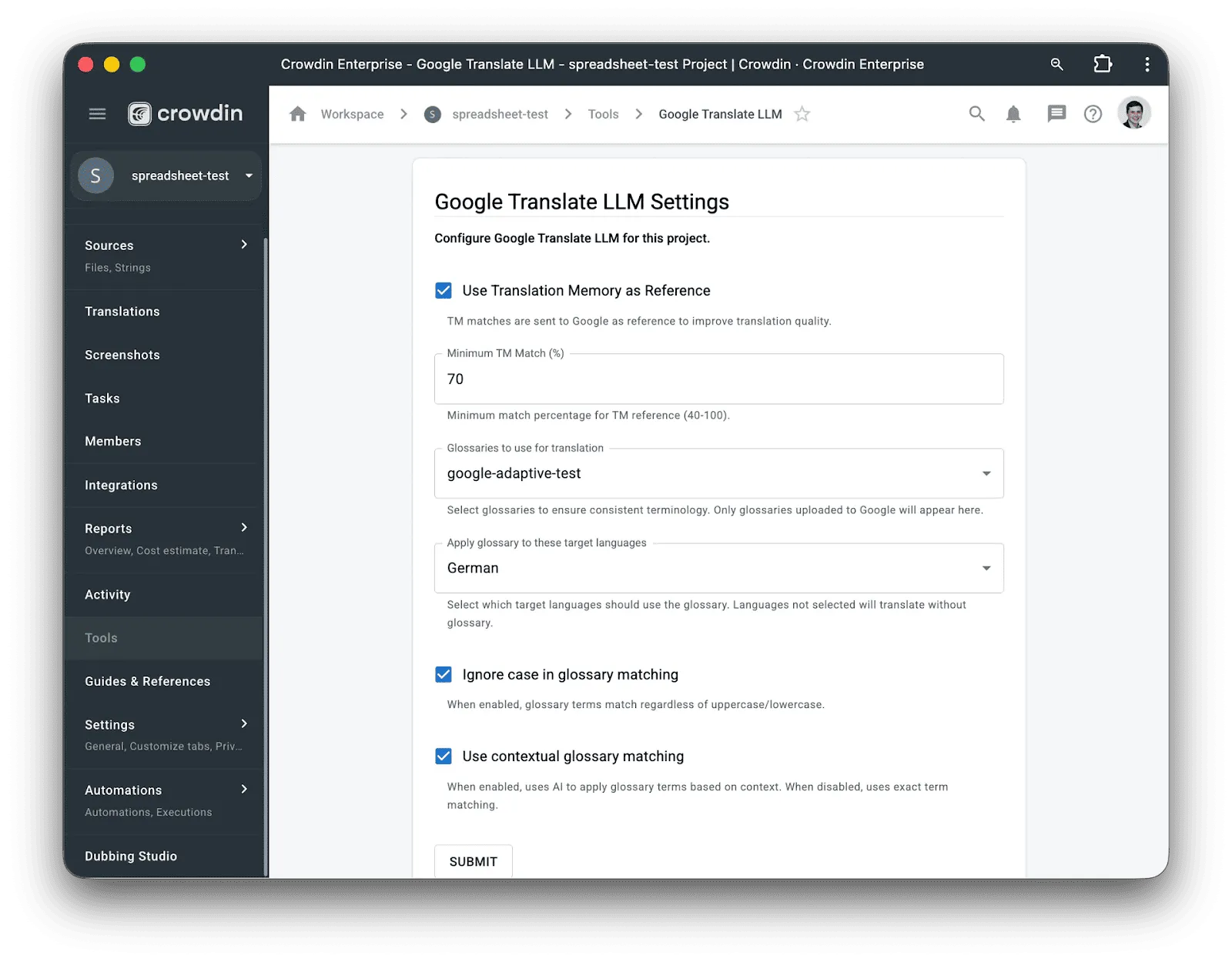
Crowdin now integrates with Google Cloud’s new “Translation LLM”, an engine that combines the fluency of generative AI (Gemini) with the strict control of enterprise machine translation. Unlike standard MT engines, this engine supports Adaptive Translation, which ingests your Crowdin Glossaries and Translation Memory to fine-tune output in real-time. This allows you to generate natural, context-aware translations that strictly adhere to your approved terminology.
Security Apps and Improvements
We’re happy to share about the new app API module: Auth Guard. The new module allows Crowdin apps to add extra checks during the user login flow. Whenever anyone logs in, the app can perform checks relevant to your organization’s security policies.
While managers’ roles in Crowdin can typically use SAML to access Crowdin Enterprise, third-party language providers and freelancers usually do not have this option. Leaving Crowdin with no other option than to start implementing controls that IdP providers usually do.
Today, we’re happy to share three new apps that can significantly improve login security for users who can’t use a secure, enterprise-grade IdP.
Device Approvals
We know of enterprise clients that send corporate-owned laptops with pre-configured security policies to freelance translators. While smaller companies can’t afford this luxury, modern cloud solutions now allow you to achieve a similar security level without purchasing physical hardware. Companies can adopt cloud desktops or virtual browsers from providers like Amazon WorkSpaces, Cloudflare Browser Isolation, or our favorite, Kasm.
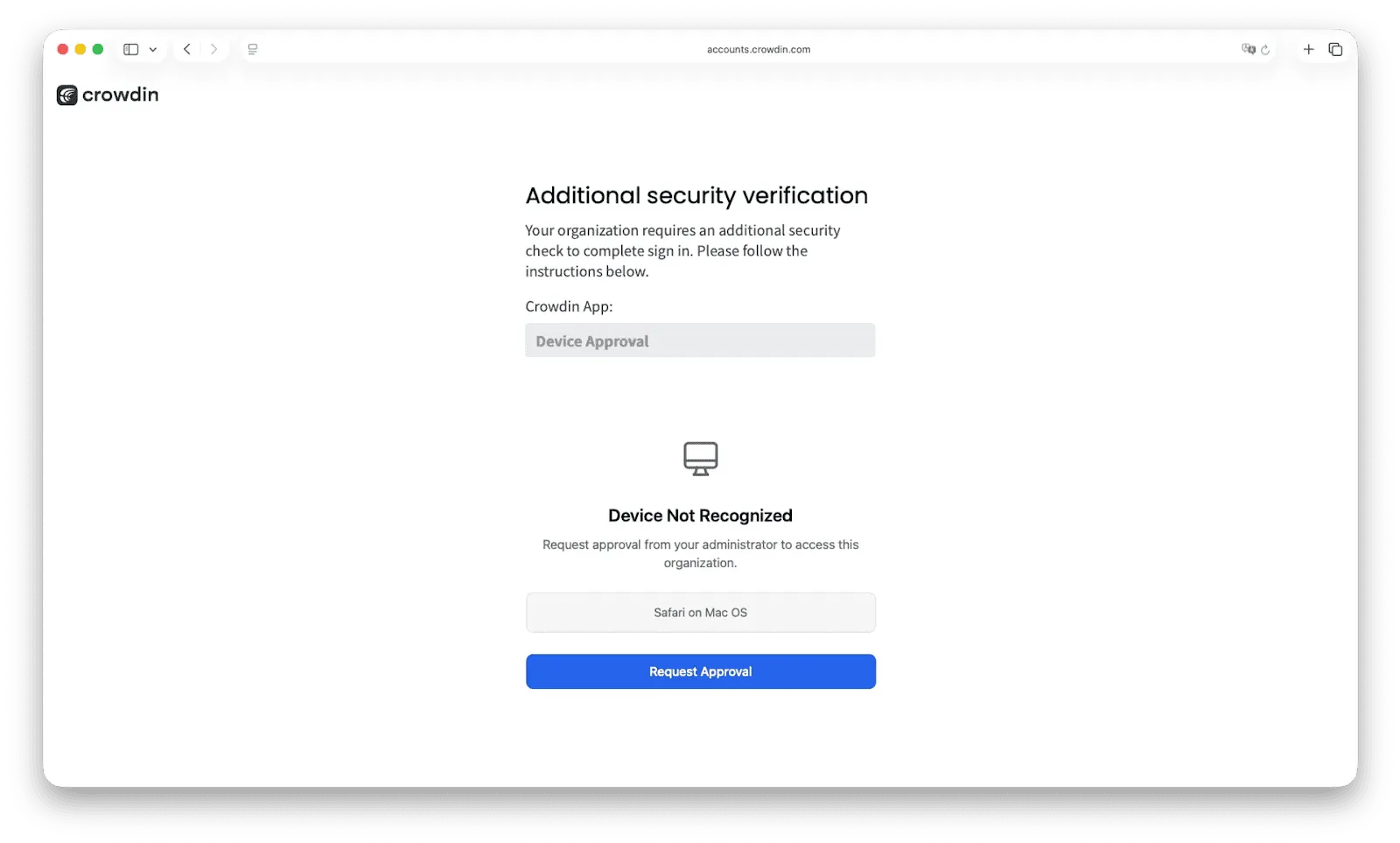
However, even with secure endpoints provided, how do you ensure linguists don’t access Crowdin Enterprise using credentials on their personal devices? This is exactly what the Device Approvals app enforces. Whenever a user attempts to log in from a new endpoint, access is paused, and a request is sent to the Crowdin Enterprise admin. Once an admin approves the device, the user can log in as usual. This ensures that only approved, secure devices can access your projects.
JIT Access
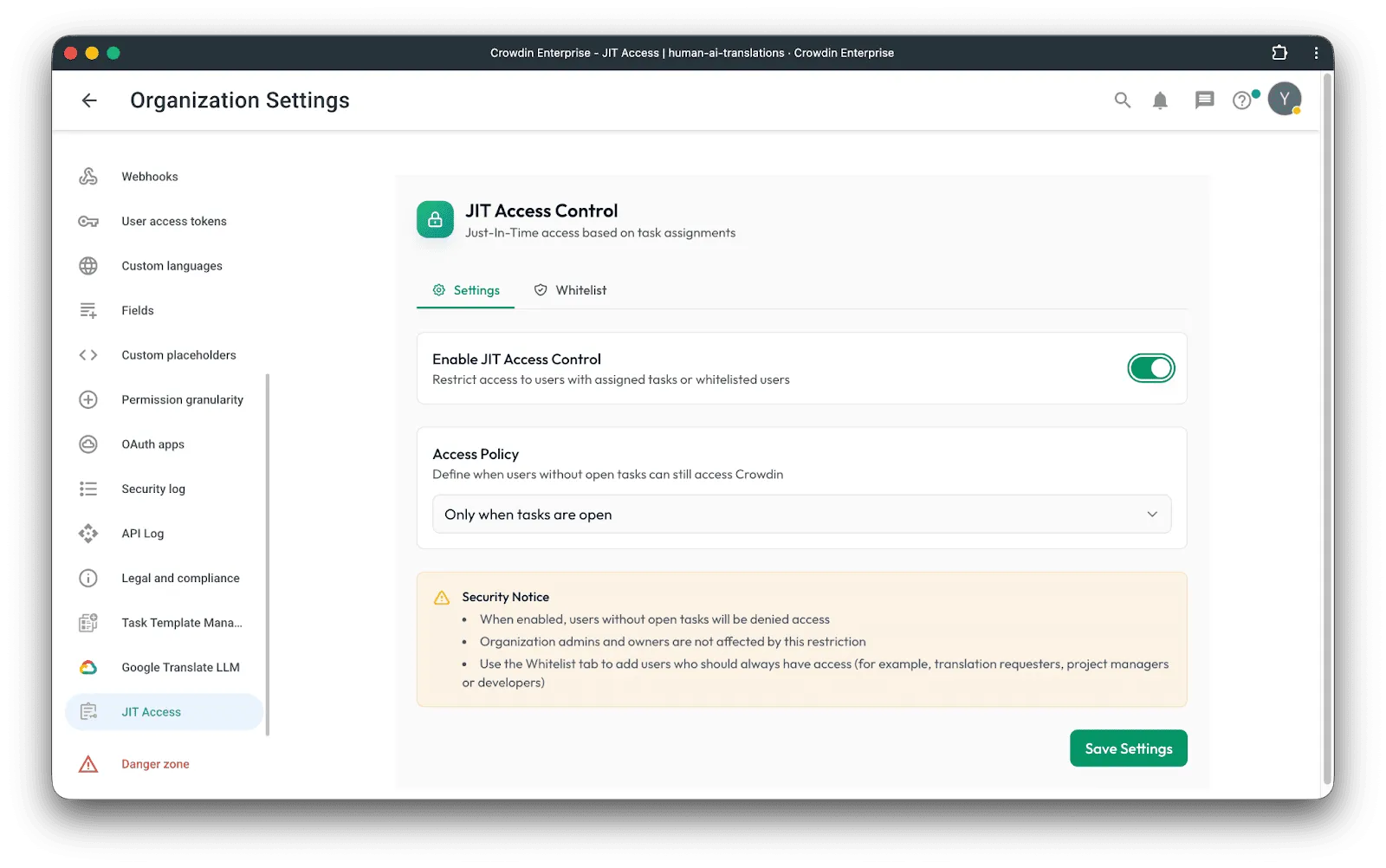
The more people who have access to your Crowdin organization, the larger your attack surface becomes – especially when freelancers retain access long after their work is finished. JIT (Just-In-Time) Access solves this by implementing the principle of least privilege: users can only log in to your organization when they have active tasks assigned to them. When a task is assigned, the user can log in immediately; once the work is done, access is automatically revoked based on your configured grace periods. This ensures that if a freelancer’s device is compromised while they aren’t actively working on your project, your data remains secure.
Terms Compliance
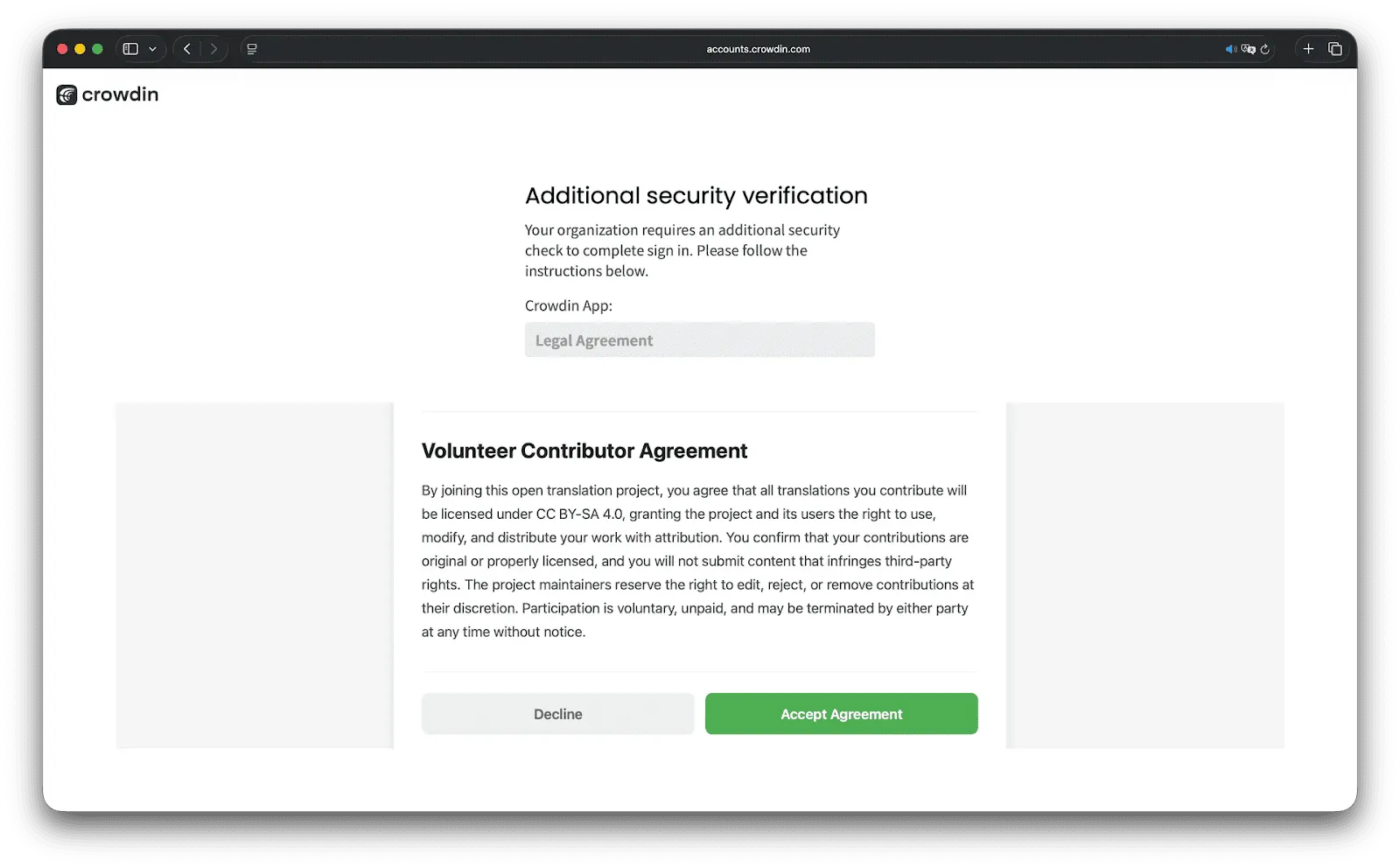
Make compliance part of your login. Security isn’t only about the technical side; legal gaps are also a major security risk. The Terms Compliance app adds a simple, mandatory step to your login flow. Before entering your organization, users must review and accept your specific agreements – whether it’s an NDA, a data policy, or volunteer terms. If they don’t agree, they don’t get in. It’s perfect for managing both crowdsourcing communities and professional vendors, giving you a clear audit trail with easy PDF/CSV exports and secure document hashing to prove exactly who signed what.
More Tools to Secure User Accounts
Skip 2FA for SSO Users (Crowdin Enterprise)
If your team logs in using SAML SSO, you can now skip the extra 2FA step. We’ve added an option for admins to disable Crowdin’s mandatory 2FA specifically for users authenticated via SAML. Since your IdP should already ensure a secure login, this new setting allows you to remove the unnecessary double-check and makes accessing your projects faster and more secure.
Expanded Security Logs: Track User Access and Deletions
We’ve enhanced the Security Logs in Crowdin Enterprise to give you more visibility over critical security events. Now, more user management actions (including inviting, deactivating, or deleting a user account) are recorded.
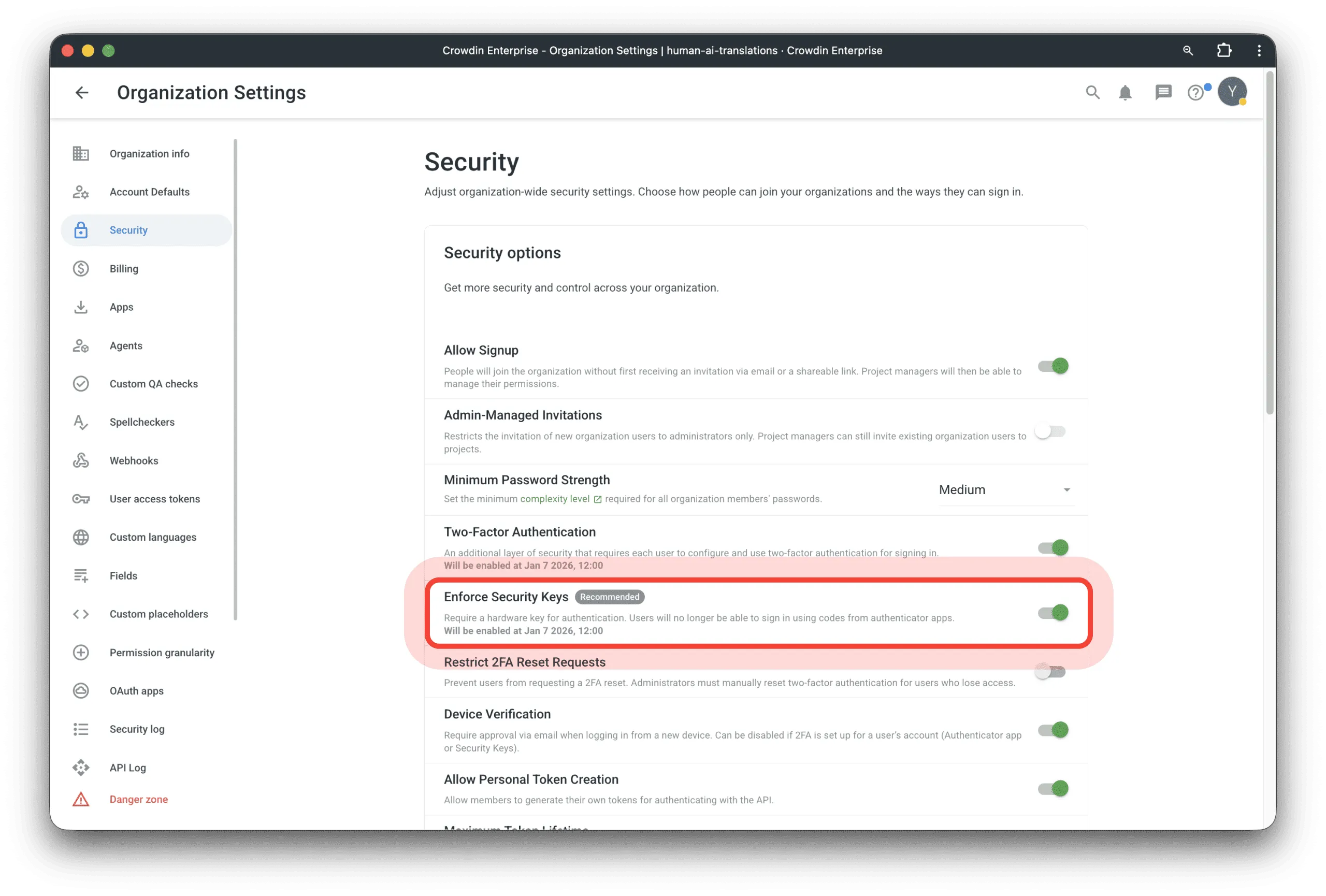
Enforce Security Keys
We are introducing a new feature for Crowdin Enterprise: Enforce Security Keys. This update makes user accounts, especially those that do not use SAML, more secure by letting users log in with FaceID, TouchID, or a physical security key.
While authenticator apps are great and accessible, they have a known vulnerability: phishing. It’s relatively easy to trick someone with a fake login page where they might accidentally give their 2FA code to an attacker. Biometric 2FA, on the other hand, is probably impossible to falsify or bypass this way.
As an admin, you can now require all users to set up biometric 2FA. Modern browsers allow users to use their phone’s biometric scanner to log in from a computer. Since almost everyone has a smartphone with biometrics, this ensures the highest level of protection without blocking anyone’s access.
Better Steam Localization Workflow
We’re excited to improve the localization workflow for companies publishing their games on Steam. While Steamworks doesn’t provide an API for automatic integration with Crowdin, it does offer export/import functionality that accepts multilingual content. You can translate your game listing into 10 languages and upload just one bundle file.
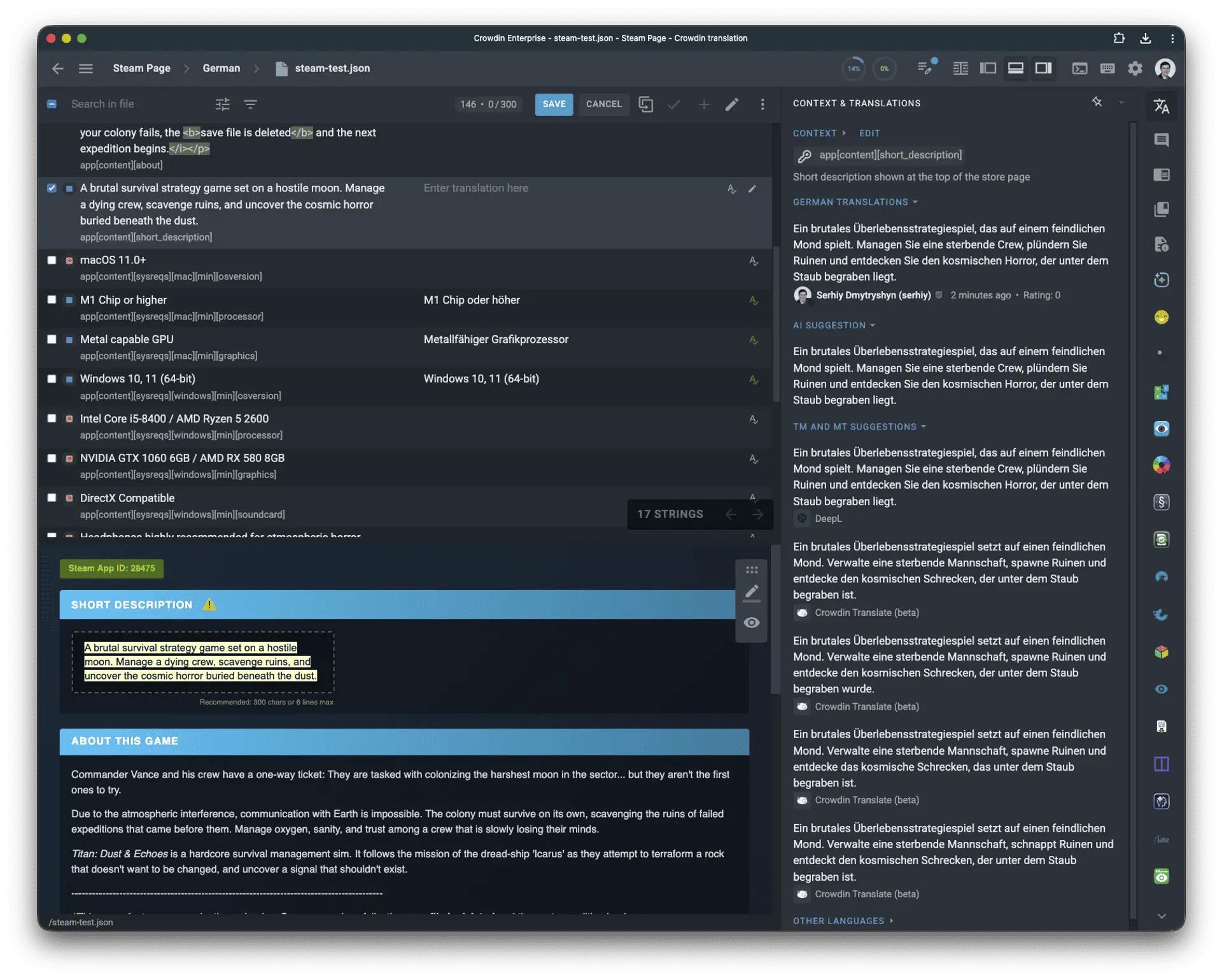
Our new Steam Store Page Localization app allows the following workflow: it processes your exported Steam JSON, extracts all translatable strings, converts Steam’s BB codes to HTML for a better editing experience, and provides linguists with a WYSIWYG preview that mimics how content will actually appear on the Steam store page.
This is especially valuable for short descriptions, where Steam enforces not just a 300-character limit but also a 6-line visual constraint. The preview in Crowdin tries to render the exact same block size so linguists can see if their translation will fit in production.
If you’re managing 10 games in 15 languages, localizing achievements used to be a lot of work. Even though Crowdin supports VDF files, you would still have to upload translations 150 separate times to Steamworks.
Our new Steam Multilingual VDF bundle generator fixes this. It creates files that contain multiple languages at once. So, if you have 10 games, you only need to perform 10 uploads instead of 150. It’s the same result with much less clicking.
Advanced Task Management
Task Template Manager
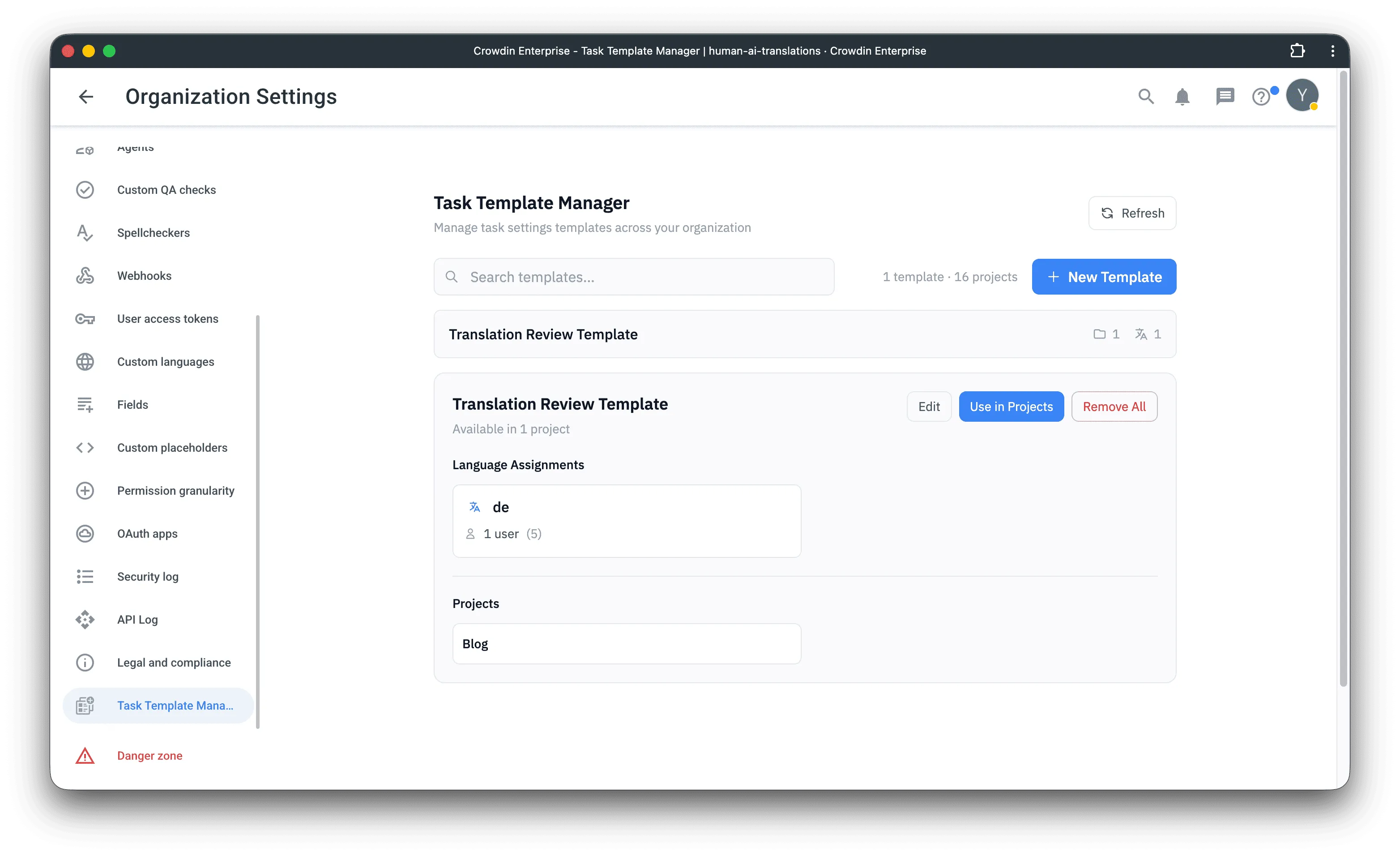
Task templates in Crowdin are great helpers, but they are restricted to individual projects, requiring you to manually recreate the same template for every new project. The Task Template Manager app solves this by enabling organization-level template management. You can create a template once, distribute it to multiple projects, and bulk-sync updates to assignees or languages across all of them. If you have many Crowdin projects with the same set of target languages and with the same team, this app would be a great helper.
Strings to Task
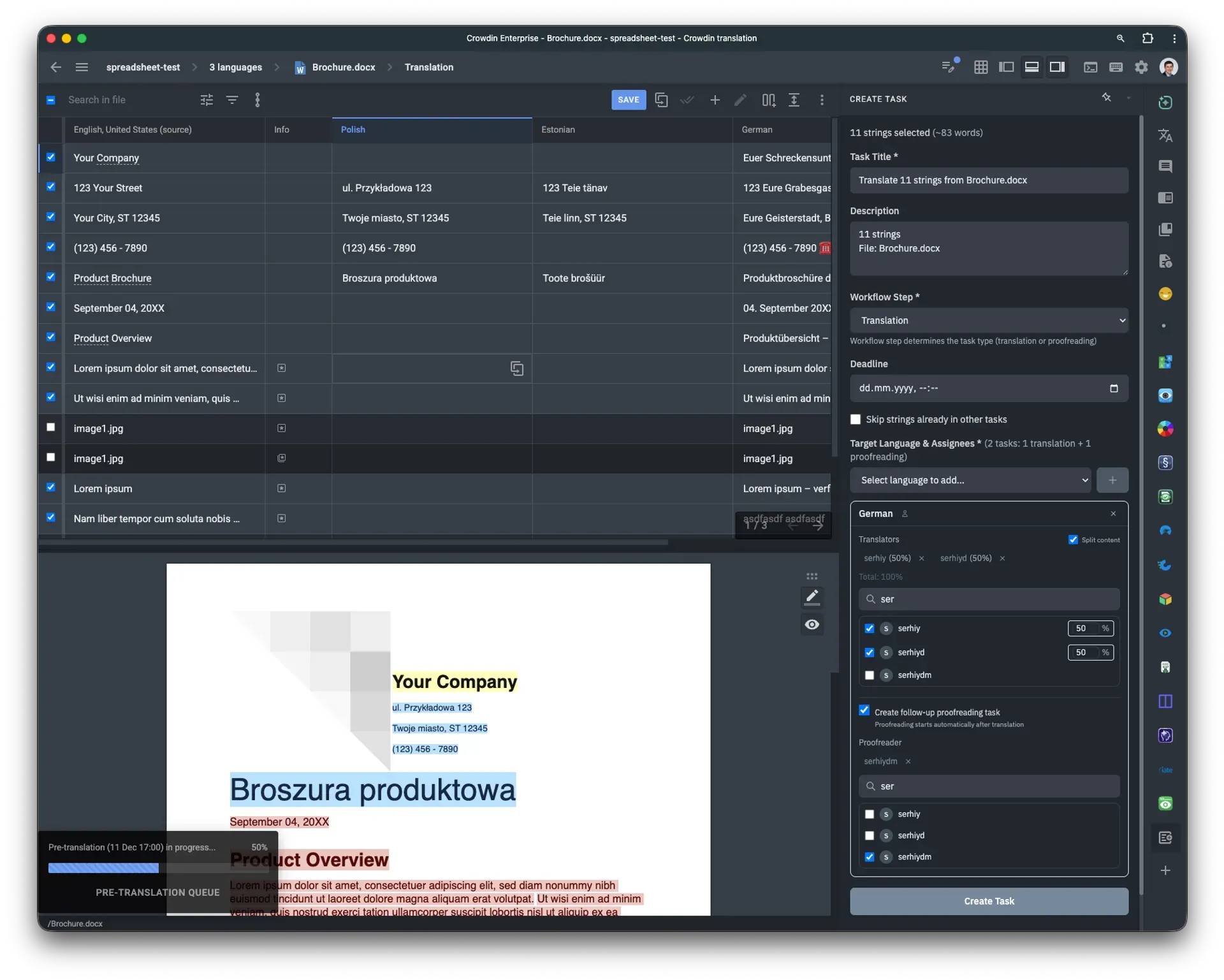
Create translation and proofreading tasks directly in the Crowdin Editor. The String to Task app lets you select specific strings or use Editor filters to define the task’s scope. Previously, you had to tag the strings you wanted to include in a task; now, it’s much easier, with no context switching.
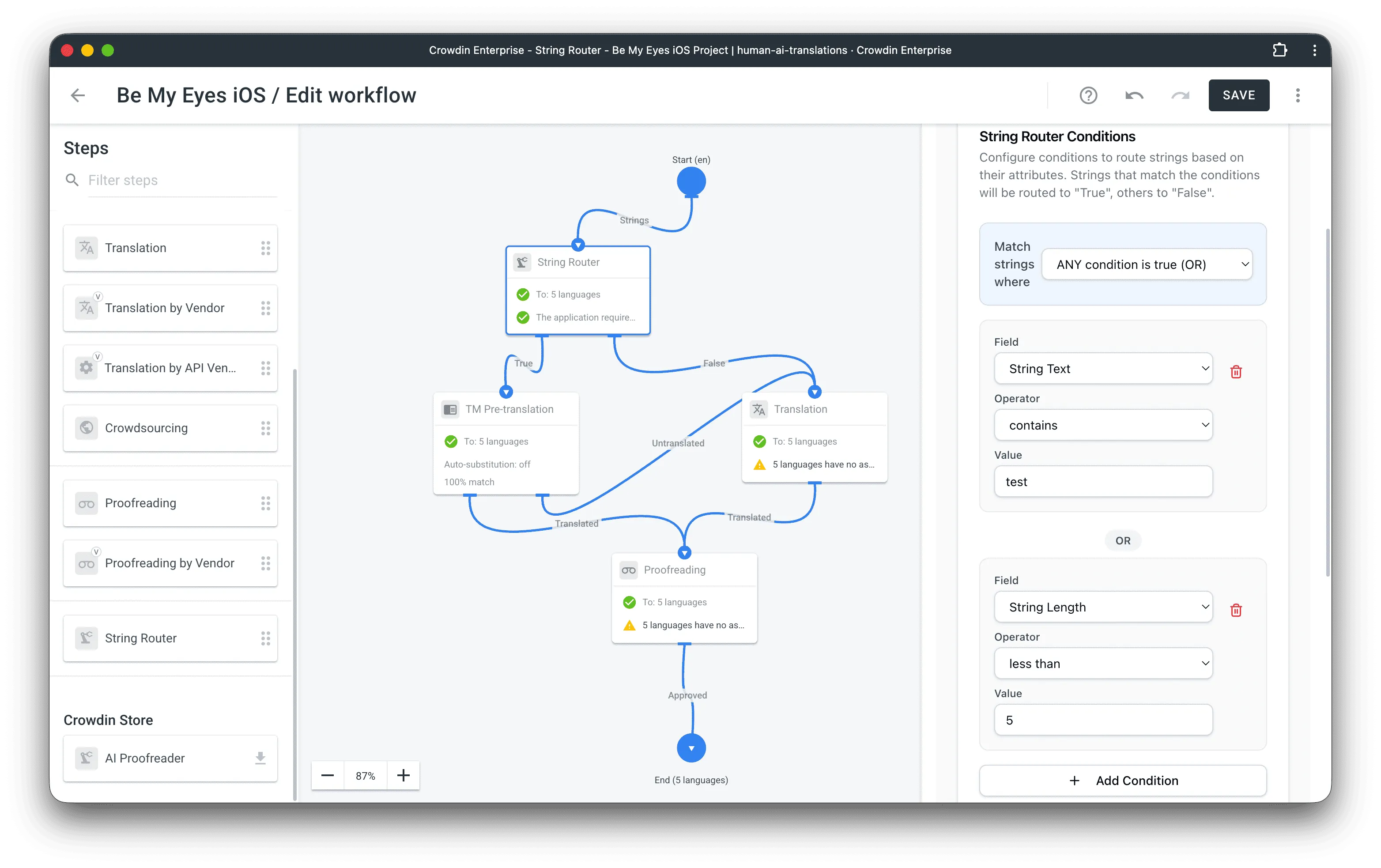
String Router Workflow Step
Crowdin Enterprise workflows apply the same process to every string, regardless of its content. The String Router app introduces conditional logic, allowing you to branch workflows based on string length, text, or context. A common use case is preventing Machine Translation errors on short UI labels by routing strings under a certain length directly to human translators, while sending longer content to MT. The app splits the workflow into “True” and “False” paths based on the rules you define.
Translate Insider Email Template
The new Insider integration enables synchronization (manual and automated) of content between Insider and Crowdin, allowing fast, easy localization of email templates. You can translate emails using MT/AI of your choice, and invite vendors to proofread texts if needed.
Go and translate your Insider emails with Crowdin to take one step further in making your marketing campaigns multilingual.
Document360 Integration Update: Import Translations
The updated Document360 integration by Crowdin now supports importing translations into Crowdin. This function allows you to synchronize existing localized articles and documentation from your Document360 repository back into your Crowdin project.
This helps you easily import previously translated content, improving your Translation Memory (TM) for better consistency.
Alchemer Surveys and Forms Localization
This new integration connects your Alchemer surveys and forms directly to Crowdin. You can send survey text to Crowdin for translation and pull the finished versions back into Alchemer automatically. It’s a huge time-saver for anyone running international feedback campaigns.
Translate your Alchemer surveys and forms in Crowdin.
Bulk Assign Translators and Proofreaders Across Projects
Managing large teams across hundreds of projects is now much faster. Previously, you could only bulk-assign Managers or Developers, leaving you to manually add Translators and Proofreaders project by project.
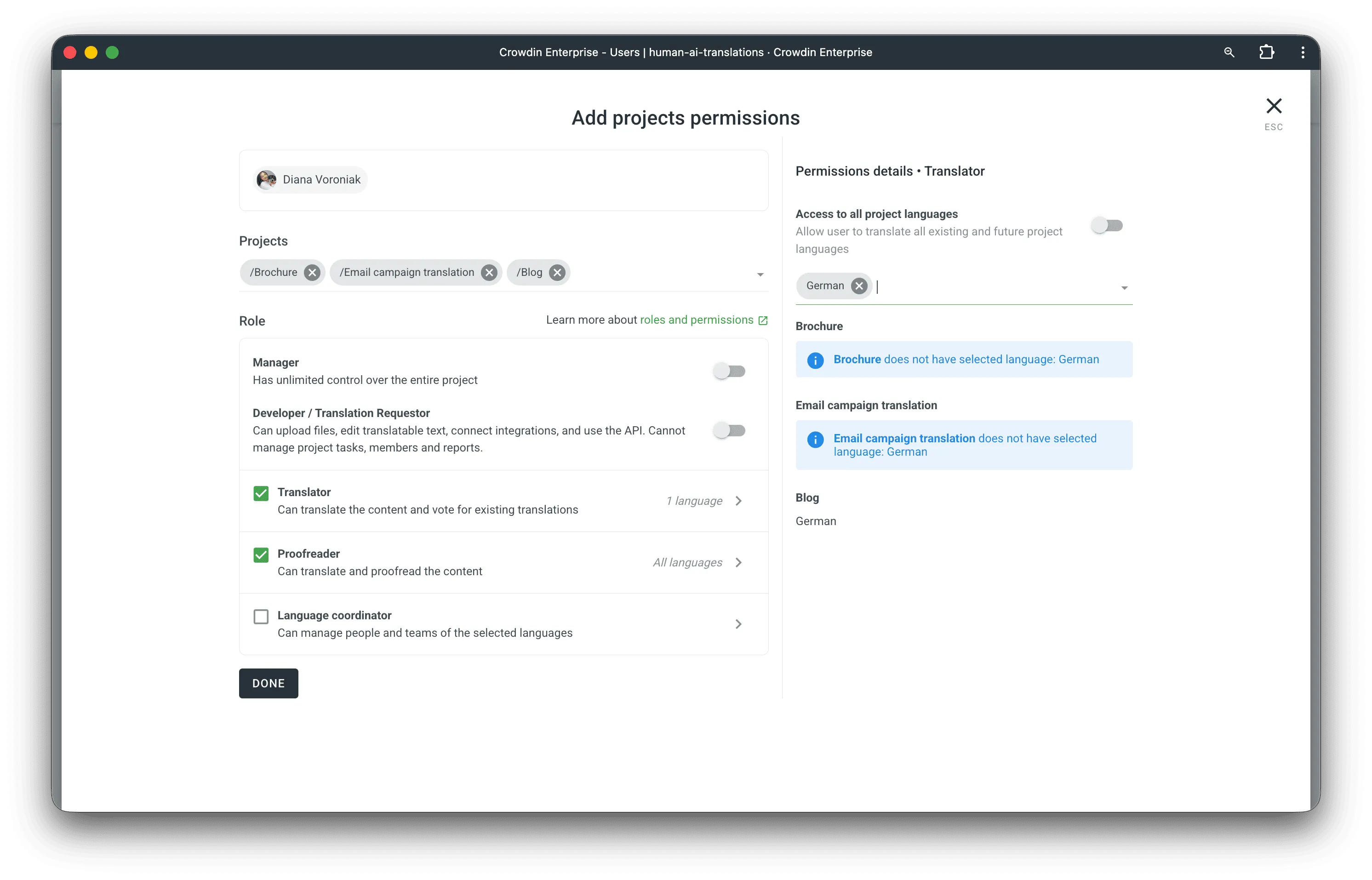
If you’re handling dozens of projects, the “click and repeat” era is over. You can now select multiple projects and assign linguists or proofreaders in a single action. It’s a massive time-saver for onboarding new vendors or internal teams across your entire Crowdin Enterprise organization.
View Prompt Status while Selecting
We’ve improved the experience of working with AI prompts by adding instant status feedback. Now, when you’re setting up a Pre-translate or using a prompt elsewhere, you’ll see its status immediately.
New status labels now appear below the prompt dropdown menus, helping you immediately identify configuration issues.
For example, labels show issues such as ‘Provider not found’, ‘Model not found’, ‘Please provide API credentials’, or ‘No model selected’.
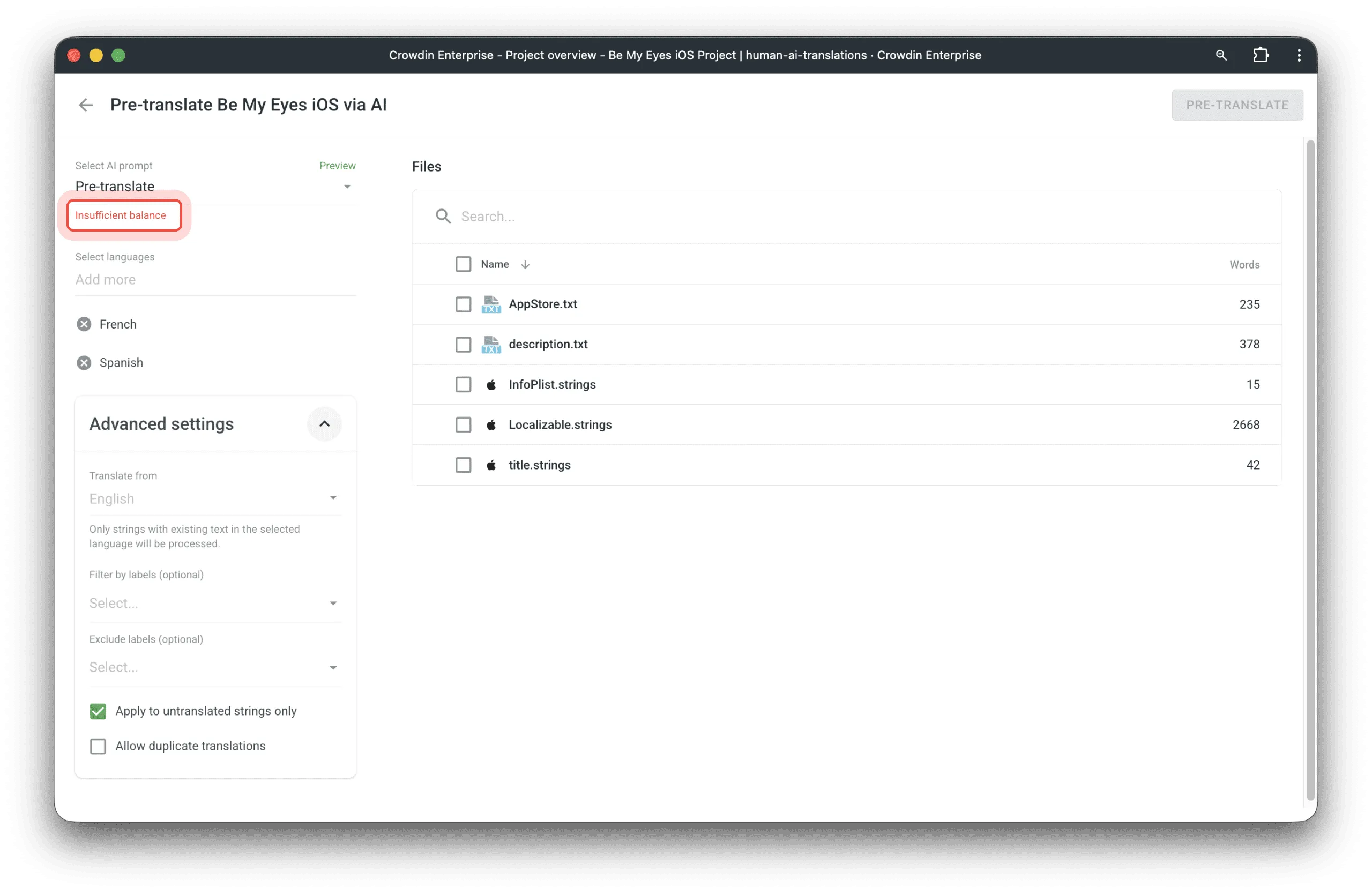
Targeted Visibility: Warnings like Insufficient balance are visible only to Owners/Admins. Provider configuration issues are only shown to users with access to manage those providers.
Latest added models: GPT 5.2, Mistral Large 3.
Other Platform Updates
- Global Accuracy Reporting: The Pre-translation and Translator Accuracy reports are now available at the organization level, allowing you to evaluate prompt quality globally with new filters for projects, source languages, files, and labels. We’ve also unified the report layouts across products.
- String-based Project Support for Apps: Several popular “Tool” apps have been updated to support string-based projects. This includes communication and integration tools like Discord, Slack, Microsoft Teams, Google Chat, and Opsgenie, as well as specialized apps like Salesforce Localization Format, XCStrings, Custom Bundle Generator, Lingui String Exporter, and more.
- XLIFF Updates: Added support for XLIFF 2.1 and XLIFF 2.2 formats. These versions are better at handling metadata and technical context (like ITS categories).
- Unify Placeholders now supports
.xcstrings. This is key for cross-platform apps localization because it automatically matches Apple’s specific variables with those from Android or Web. It prevents duplicate strings, keeps your TM clean, and saves you from paying for the same translation twice. - We’ve improved the Glossary search. You can now search by definitions and subjects within concepts, making it much easier to find the right entry even if you don’t remember the exact term.
Power Up: AI Pipeline
In our latest Crowdin Power Up episode, Dorota Pawlak and Stefan Huyghe looked at why AI translation often fails and how a new Crowdin app called AI Pipeline solves it. Instead of overloading AI with one giant prompt, this app breaks the process into small, specialized steps like context analysis and glossary checks to eliminate hallucinations and ensure high-quality results. Crowdin recommends using the AI Pipeline unless we find an even better way.
External Tools
This month, we released new versions of:
- JS API Client 1.50.0, 1.51.0, 1.51.1
- Figma plugin: version 93, version 94, version 95. Key improvements include better text detection for nested frames, faster “Pages mode” performance, and UX enhancements for Figma Dev Mode and searchable labels.
- Java API Client 1.31.0
- Python API Client 1.25.0
- .NET API Client 2.42.0
Bonus: Focus & Translate Playlist
We know many of you like to have something playing in the background while you work. Crowdin teamed up with Estonian composer and producer Sander Mölder to curate an exclusive playlist: Focus & Translate.
It’s a simple collection of chill, lyric-free beats from producers all over the world. We hope it helps you stay in the zone and makes your daily localization tasks a bit more cozy.
Sander Mölder is an Estonian composer, producer, and DJ. With a background that spans from classical cello to the Red Bull Music Academy, Sander has become one of the household names in the Baltic electronic music scene.

Sending you great vibes for 2026 from the Crowdin Team!

Diana Voroniak
Diana Voroniak is a localization marketing professional with a background as a translator. She led the marketing team at Crowdin, driving growth through content, SEO, partnerships, and international events. She celebrates milestones, redesigns platforms, and spoils her dog and cat.