

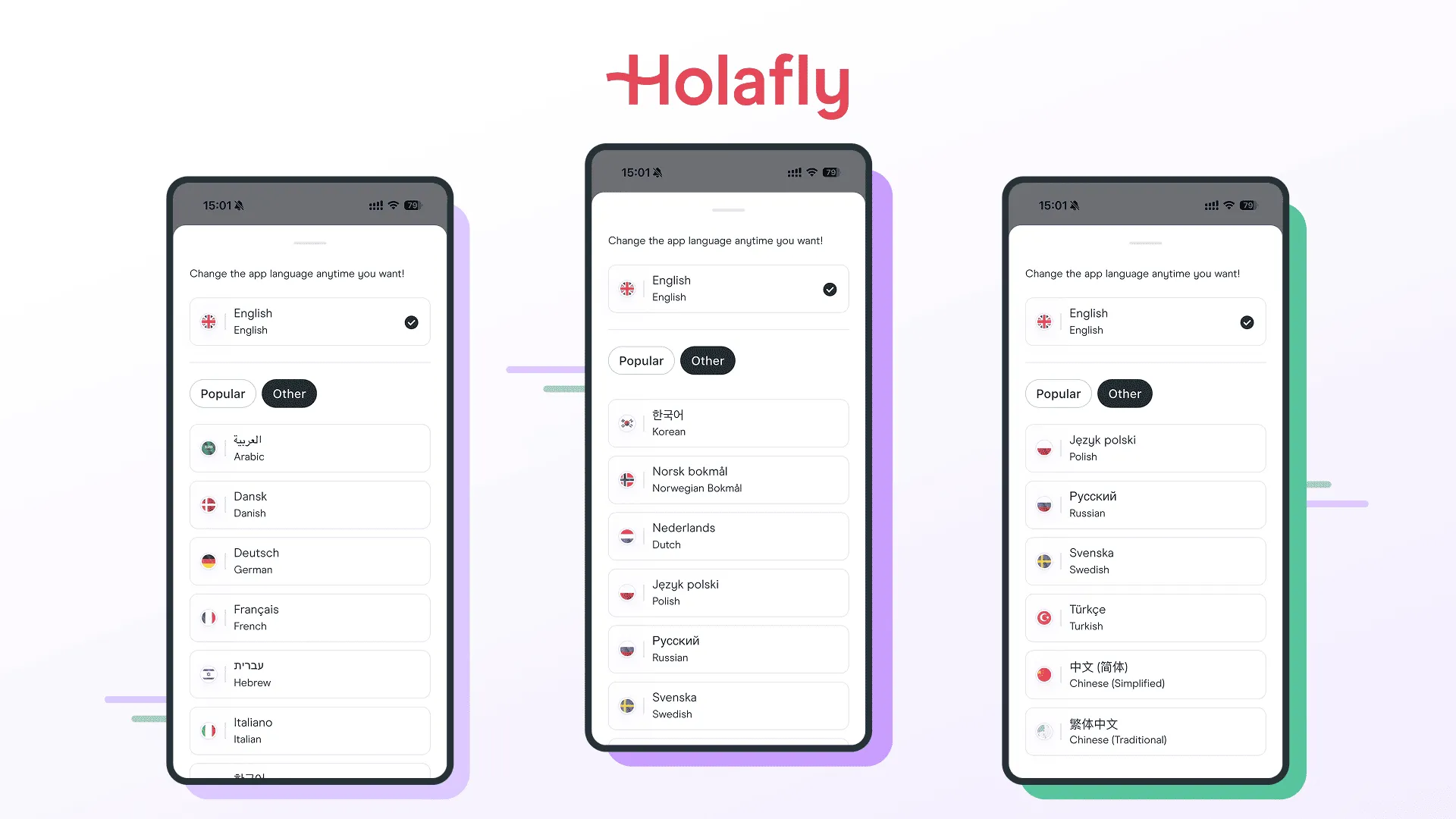
Every two weeks, Holafly sends a new version of its mobile app out to users worldwide. The app helps travelers track data usage, manage roaming, and earn rewards like “HolaCoins” across 16 languages. Behind this global operation is Marcel Pintó Biescas, Head of Mobile at Holafly. We came across his post on LinkedIn, where he shared Holafly’s new localization workflow, and decided to ask more deeply about their approach.
Marcel’s team ran into a classic problem: their localization process was slowing them down. This is the technical story of how they fixed it by building a custom AI development skill and connecting it to Crowdin.
| SUMMARY | ||
|---|---|---|
| Focus area | Key metric and tech element | Impact on workflow |
Custom | 4x to 5x faster engineering cycle | A custom developer command ( |
| Full-screen context | Multi-layered context mapping | The skill automatically reads the file and widget structure to understand screen layouts. Developers can also feed the AI screenshots or Figma links via MCP to prevent layout breaking. |
| Translation approach | AI translation + human proofreading | Translation Memory (TM) + AI workflow translates new strings to keep nightly builds moving, while professional human linguists proofread the copy to ensure a perfect brand tone. |
| AI model | Claude 4.6 Sonnet | The content team uses an AI model with a custom prompt, a glossary, and a style guide inside Crowdin to keep translations more accurate and consistent. |
| Scalability and speed | Last 4 new languages added with 0 development work | Introducing a new language is now completely straightforward. Holafly launched 4 new European languages smoothly without requiring any extra engineering or development work. |
How it was before Crowdin
Before their current automation, a single new app feature had to go through a slow pipeline.
First, the content team defined translation keys and added them to Figma designs alongside the English source text. Next, they manually entered and translated everything inside the previous localization platform. Only after all the languages were completely ready could the engineering team finally tackle the task.
This setup created constant friction. If a developer realized a key was wrong, or if a text string needed to be broken into smaller chunks to fit the mobile layout, the work bounced right back to the content team. This back-and-forth loop made the process take 4 to 5 times longer than it does today. Marcel knew they needed to remove these manual steps.
Developing a custom /localize skill
Marcel’s breakthrough idea was to flip the workflow upside down: let developers write code first, and use a custom skill to fully automate the localization handoff.
Today, a Holafly developer writes layout code and hardcodes plain English text directly into a Flutter widget – for example, typing Text("Login");. Instead of manually copying that text into an external spreadsheet or file, the developer stays right inside their code editor. They open Cursor, Claude Code, or a similar agent and run a command:
/localize-text in @path_to_file_or_linesThis command triggers the custom skill to kick off the automation. Under the hood, the skill reads the file, looks at the surrounding widgets, and understands the exact context of the screen. If a layout is tricky, the developer can pass extra hints, screenshots, or Figma links using a Model Context Protocol (MCP). Team even has a skill to use Dart MCP or Maestro MCP to let the AI pull screens directly from a running device, though the file context alone is usually enough.
// The skill reads the hardcoded view and outputs a type-safe ARB block:{ "account_text_holacoinsCreditAfterDataUse": "We'll add {holacoinsCount} HolaCoins to your account...", "@account_text_holacoinsCreditAfterDataUse": { "description": "Caption on the account screen...", "placeholders": { "holacoinsCount": { "type": "int", "format": "compact", "example": "100" } } }}Teaching AI Holafly’s naming rules
To prevent the AI from generating messy assets, Marcel loaded the skill with Holafly’s strict design rules, examples, and an internal checklist.
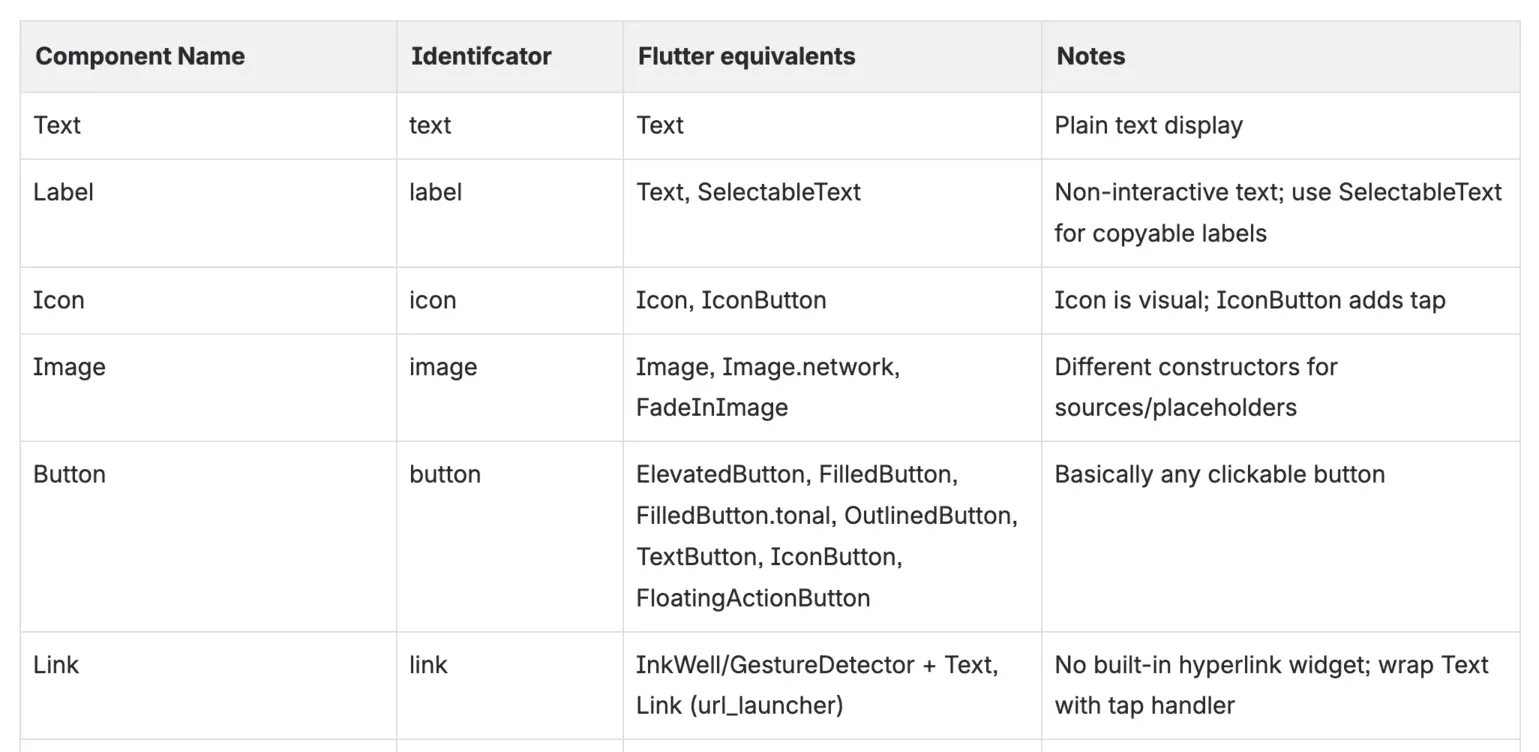
AI is trained to format keys strictly using camelCase segments separated by underscores like screen_componentIdentifier_contextState
A core requirement of this automation is forcing the AI to choose descriptive names over generic ones:
- ❌
error1_title - ✅
checkout_text_paymentFailedErrorTitle
Anyone looking at the codebase instantly knows exactly where the text lives (checkout), what kind of UI element it is (text), and the exact state or context it represents (paymentFailedErrorTitle). Marcel provided us with the example of their naming table:
Managing layout risks and text expansion
A major challenge in mobile app localization is text expansion – German phrases, for instance, often run much longer than English ones. To address this, the /localize skill analyzes the UI context to see if a text string is being placed inside a tight or rigid component that cannot stretch. It then passes these layout boundaries directly into the translation notes and the ARB metadata.
Because AI isn’t 100% reliable at predicting visual layout breaks on its own, Holafly has two more checks:
- Proofreading phase: Human translators use the metadata and context clues to adjust phrasing if a translation looks too long.
- QA regression tests: Holafly’s QA team runs rapid multi-language regression tests across the app. They do not validate the actual translations, but they check every language specifically to catch and fix broken layouts before release.
Once the skill finishes generating the formatted .arb file, the developer simply reviews the AI’s work and opens a Pull Request. Check our Flutter localization guide.
Crowdin + the /localize skill workflow
Once a Pull Request is approved and merged, AI’s job in the local codebase is done, and the automation shifts over to Crowdin.
Holafly wrote custom scripts around the Crowdin CLI. A GitHub Action pushes the newly generated keys directly to Crowdin, where the platform triggers an automated workflow that combines translation memory and AI.
To ensure these automated translations actually sound like Holafly, the content team didn’t rely solely on default settings. They built a foundation for AI and created a glossary and a detailed style guide directly in Crowdin. The content team then wrote a small custom prompt to guide the AI translation engine.
Balancing fast releases with human quality
In mobile development, waiting for perfect translations can completely stall a product release. Holafly avoids this by keeping its app on a strict bi-weekly release train model.
The team’s primary goal is to have professional translators proofread every new string to ensure the copy matches their brand tone. Human linguists are an essential part of the loop, and the team always aims to get their eyes on the text before an update ever reaches a user’s phone.
However, Holafly does not stop the release train to wait for translations – they assume the brief risk of shipping temporary AI-generated text if the manual review cannot be finished before the release deadline. In reality, the vast majority of strings are successfully proofread by a human eye before the app goes live.
"We don’t stop the ‘train’ for translations, and we assume the risk of some of them being AI-translated. Although in practice most of them get proofread before we go out.
Results
By focusing heavily on their custom skill and automating the handoff to Crowdin, Holafly changed its entire approach to localization:
- The timeline from a finished design to a fully localized feature is now 4 to 5 times faster than under their previous workflow.
- The team added 4 new European languages to the app with zero additional engineering work required. Marcel notes that, unless it is a complex layout system like Arabic, adding a language is completely straightforward.
- Manual copy-pasting has been eliminated. Developers focus on building application features, while translators spend their time as editors, focusing purely on brand nuance and quality.
Localize your product with Crowdin

Yuliia Makarenko
Yuliia Makarenko is a marketing specialist with over a decade of experience, and she’s all about creating content that readers will love. She’s a pro at using her skills in SEO, research, and data analysis to write useful content. When she’s not diving into content creation, you can find her reading a good thriller, practicing some yoga, or simply enjoying playtime with her little one.