

What if your team could localize content and optimize it for search in one place? In most companies, these are two separate workflows. SEO specialists research keywords in their own tools, translators work in the localization platform, and keyword data often arrives after translations are already live.
With the Ahrefs MCP server connected to Crowdin Assistant, search data comes right into Crowdin. Assistant checks how people search in each market, updates your glossary and fixes existing translations – in the same chat where you manage localization. Your glossary then carries those decisions into every AI translation.
This is keyword localization: using the terms people in each market actually type into search, rather than translating your source keywords word for word. Now you can translate with the words your audience actually uses when they search – and keep the meaning right.
Below, we walk through a real example with a German glossary – from analysis to updated translations.
Why do literal glossary terms cost you search traffic?
A literal glossary term spreads to every string that uses it, and AI translation applies it consistently. If nobody searches for that term, none of those pages rank for it.
To show this, we set up a demo project for Kestrel, a fictional time tracking and shift scheduling app. The project holds website strings, a blog post and a glossary with German, French and Spanish terms.
The German glossary used three correct but literal terms:
- time tracking → Zeitverfolgung
- timesheet → Zeitblatt
- shift scheduling → Schichtzeitplanung
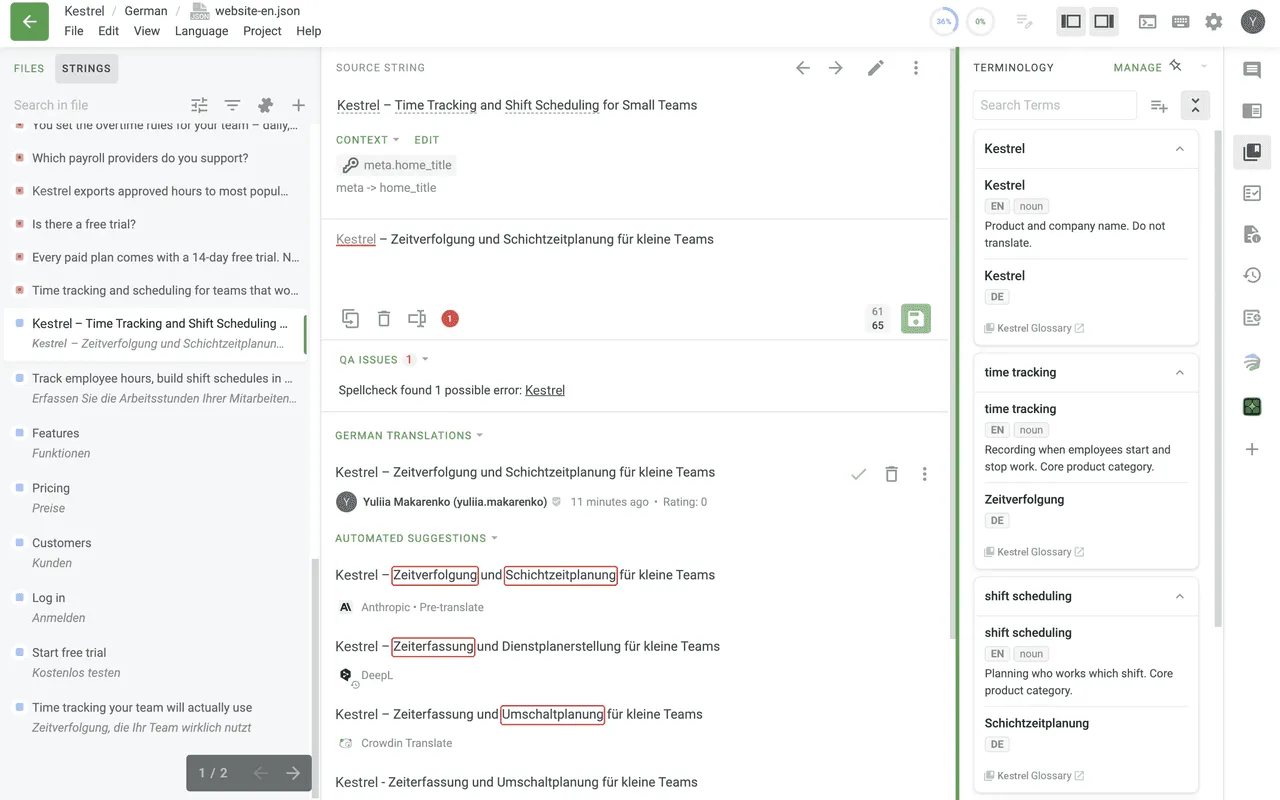
AI auto-translation followed the glossary exactly. The German homepage title became “Kestrel – Zeitverfolgung und Schichtzeitplanung für kleine Teams” – consistent, and invisible in German search.
Machine translation without the glossary happened to suggest the market term Zeiterfassung. One engine also suggested “Umschaltplanung”, reading “shift” as switching. So dropping the glossary is no solution, because a glossary keeps translations consistent. It just needs to be built on how people search – and that’s the core of keyword localization.
Let’s move to the practical part.
How do you connect Ahrefs MCP to Crowdin Assistant?
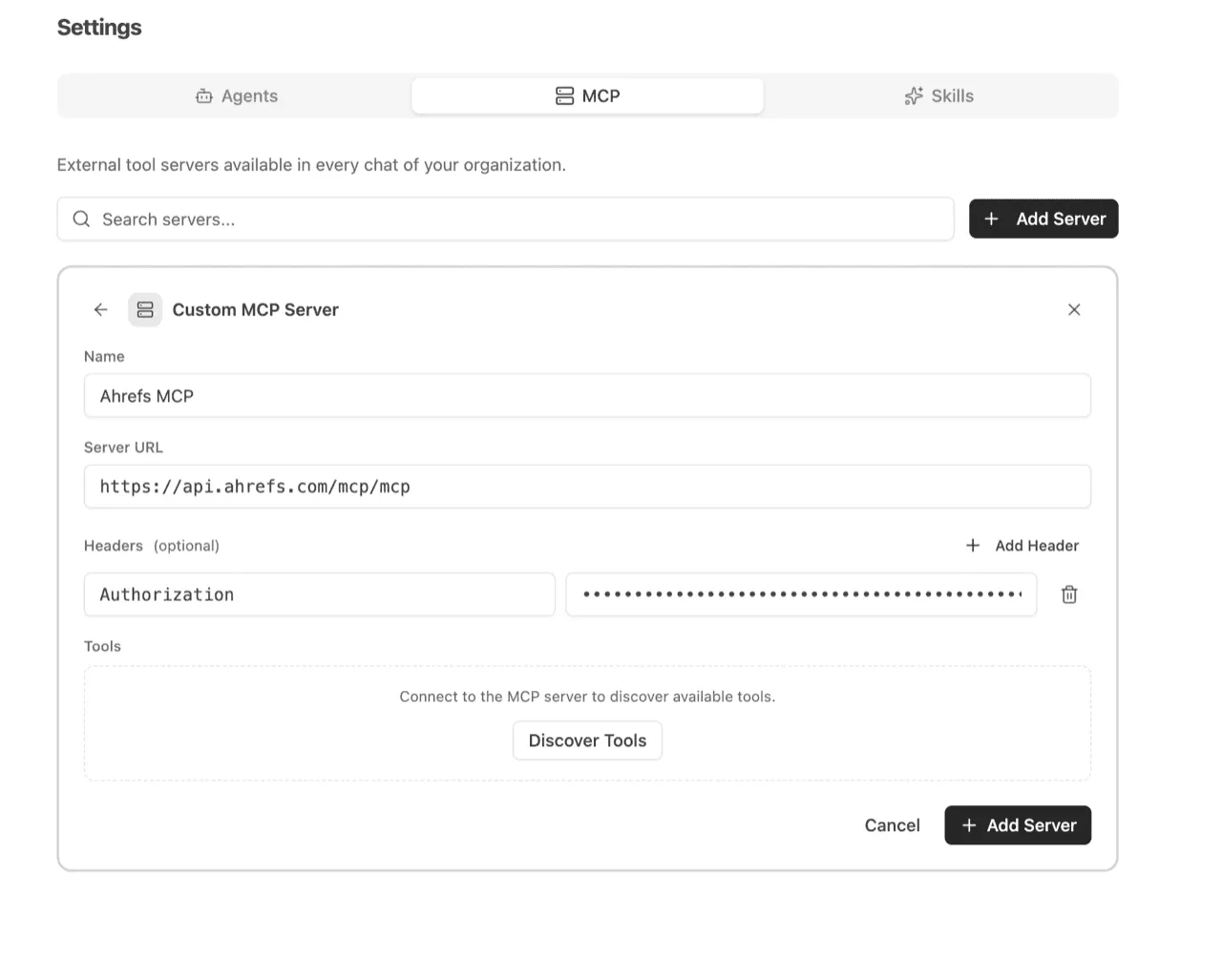
You add Ahrefs as a custom MCP server in Crowdin Assistant settings. It takes about five minutes.
- Create an MCP key in Ahrefs. Go to Account settings → API keys and generate a key with MCP access. Set a usage limit on the key, since every request uses your Ahrefs API units.
- Add the server in Crowdin. In crowdin.com, open Account Settings → Crowdin Assistant. In Crowdin Enterprise, open Organization Settings → Crowdin Assistant. Go to the MCP tab and click Add Server. Enter a name (for example, “Ahrefs MCP”), the server URL
https://api.ahrefs.com/mcp/mcpand a header:Authorizationwith the valueBearer <your key>. - Discover and review the tools. Click Discover Tools. Keep the read-only tools you need – Keywords Explorer, Site Explorer, SERP Overview, Site Audit – and turn off tools that create, update or delete data in your Ahrefs account.
MCP servers you add here are available in every Crowdin Assistant chat in your organization. Everyone on the team can use them, and all requests draw on the same Ahrefs API units.
Step 1: How do people actually search for your glossary terms?
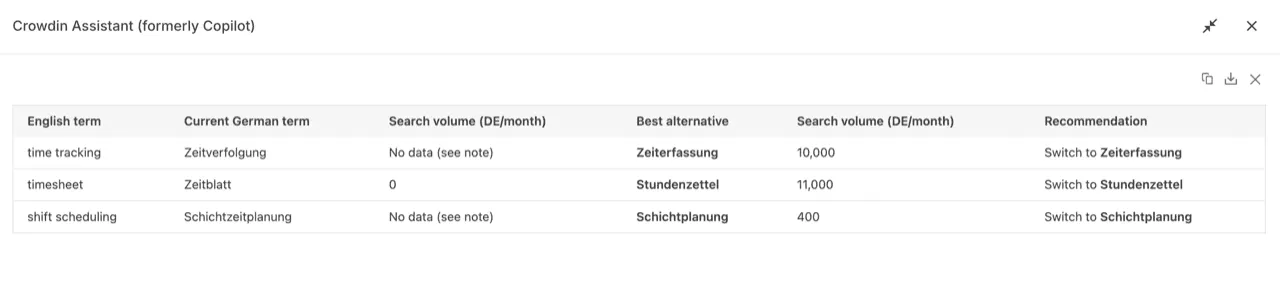
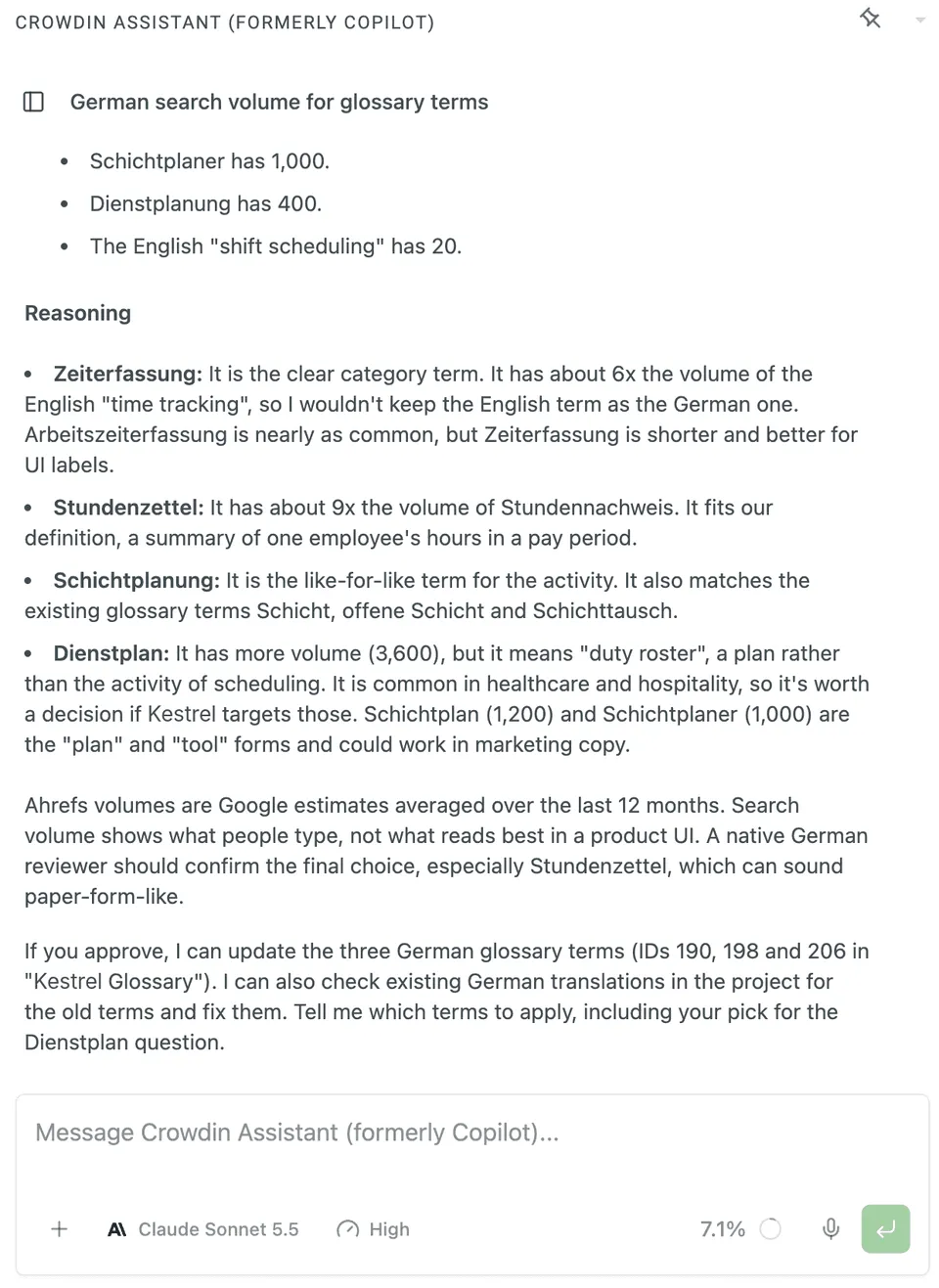
All three German glossary terms had no measurable search demand, while the market terms get thousands of searches a month. In multilingual SEO, that gap decides whether a page gets found at all. We asked Assistant:
Use Ahrefs to check how people in Germany search for the core concepts in this project's glossary: "time tracking", "timesheet", and "shift scheduling". For each term, compare the monthly search volume in Germany for our current German glossary translation with the most common alternatives. Show the results in a table. Don't change anything in the glossary or translations yet – wait for my approval.| English term | Glossary term | Searches/month | Market term | Searches/month |
|---|---|---|---|---|
| time tracking | Zeitverfolgung | no measurable volume | Zeiterfassung | 10,000 |
| timesheet | Zeitblatt | 0 | Stundenzettel | 11,000 |
| shift scheduling | Schichtzeitplanung | no measurable volume | Schichtplanung | 400 |
Search volumes from Ahrefs, Germany, November 2026. Stundenzettel also has a keyword difficulty of 0 – the term with the most demand is also the easiest to rank for.
We double-checked the numbers in Ahrefs Keywords Explorer, and they match what Assistant returned:
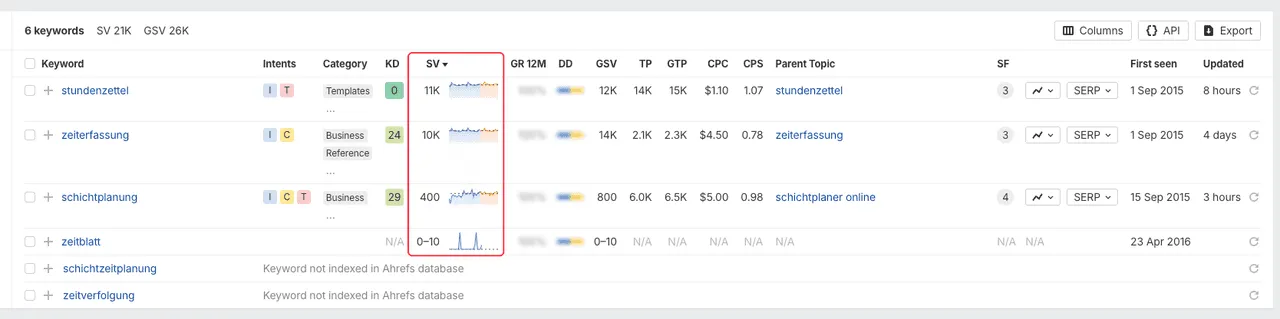
Assistant looked beyond the biggest number. Dienstplan has 3,600 searches, but it means “duty roster” – a plan, not the activity of scheduling. Arbeitszeiterfassung is almost as popular as Zeiterfassung, but it’s longer and works worse in UI labels. Assistant also recommended a native German reviewer for the final choice and changed nothing until we approved.
Step 2: How do you update the glossary with search data?
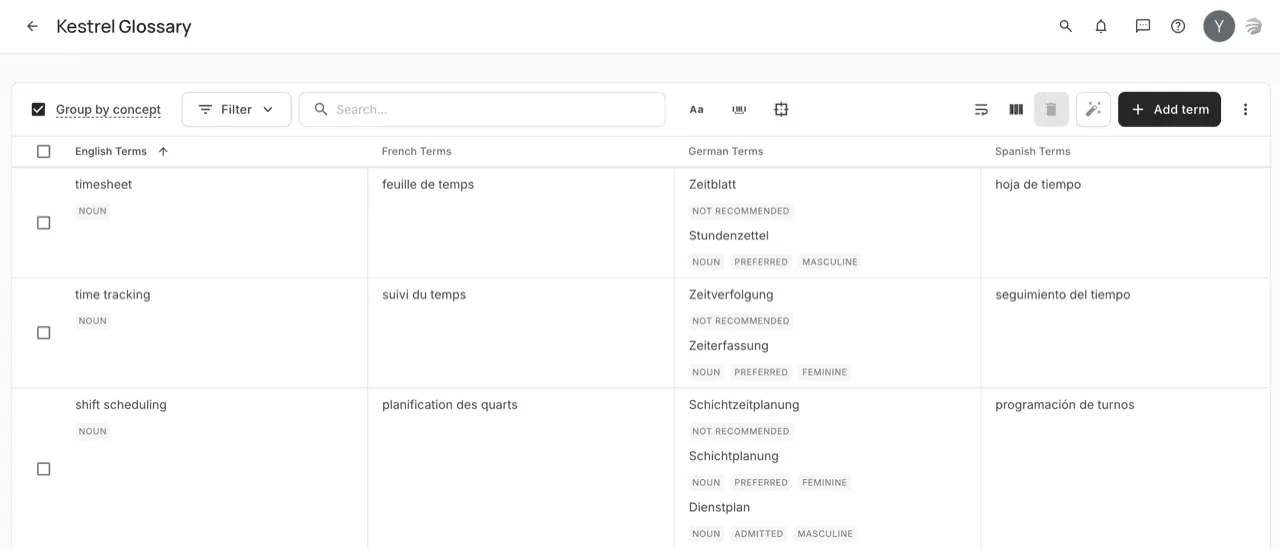
Assistant added the market terms as preferred, kept the old ones as “not recommended” and stored the search data in each term’s note. Our request:
Approved. Add "Zeiterfassung", "Stundenzettel", and "Schichtplanung" as preferred German terms. Mark the old terms as not recommended instead of deleting them. For each German term you changed, add a note with its Ahrefs search volume in Germany and today's date.What changed in the glossary:
- New preferred terms sit in the same concepts as the old ones, so they stay linked to the English source terms. Assistant also set part of speech and grammatical gender without being asked.
- Old terms stay visible with the “not recommended” status. Translators see both the right term and the one to avoid.
- Each note records the data, for example “Ahrefs, DE, Nov 2026: 10,000 searches/month”. Anyone can see why a term was chosen and when.
- Dienstplan was added as admitted, with a description that it’s for marketing copy and meta titles in hospitality and healthcare. When we first asked for it as preferred, Assistant pointed out that the concept would then have two preferred terms.
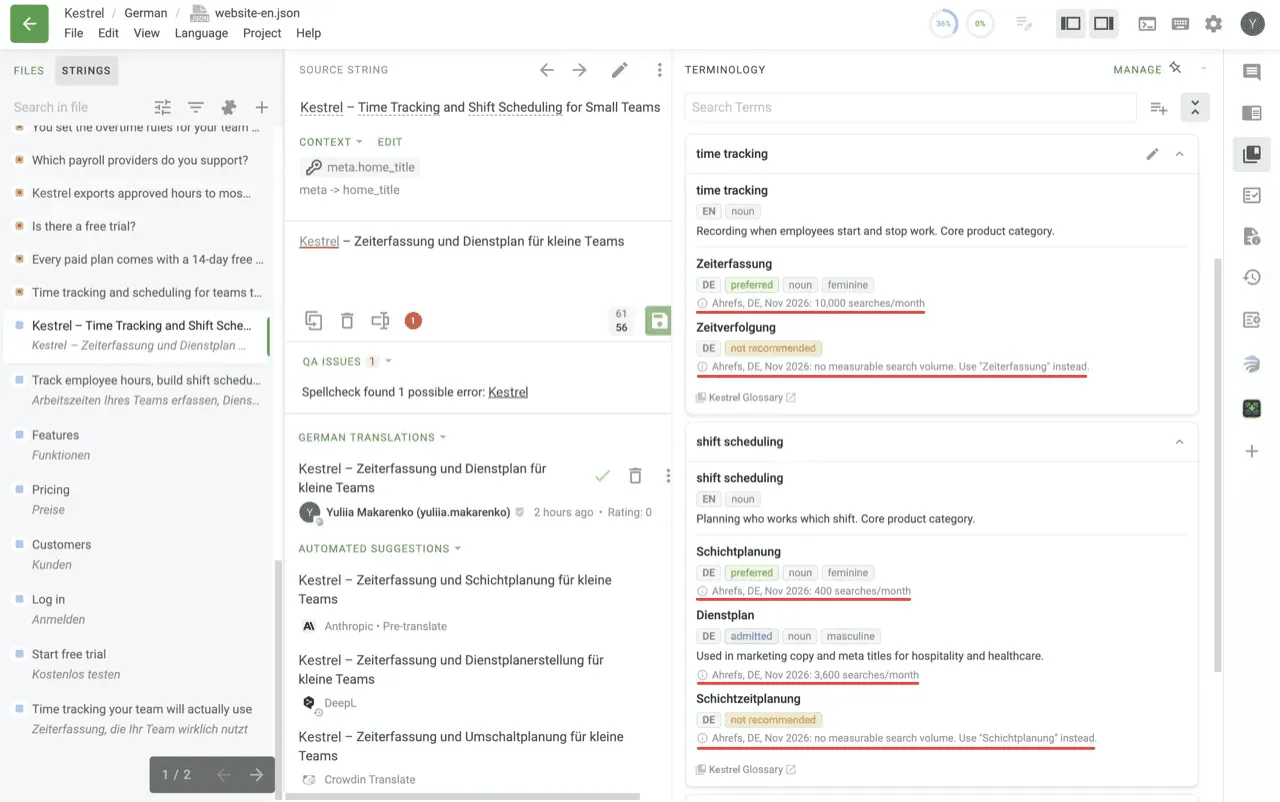
In the Editor, translators see all of this right next to the string: the preferred term, the one to avoid, when to use Dienstplan and the search data behind each choice.
Step 3: How do you fix translations that already use the old terms?
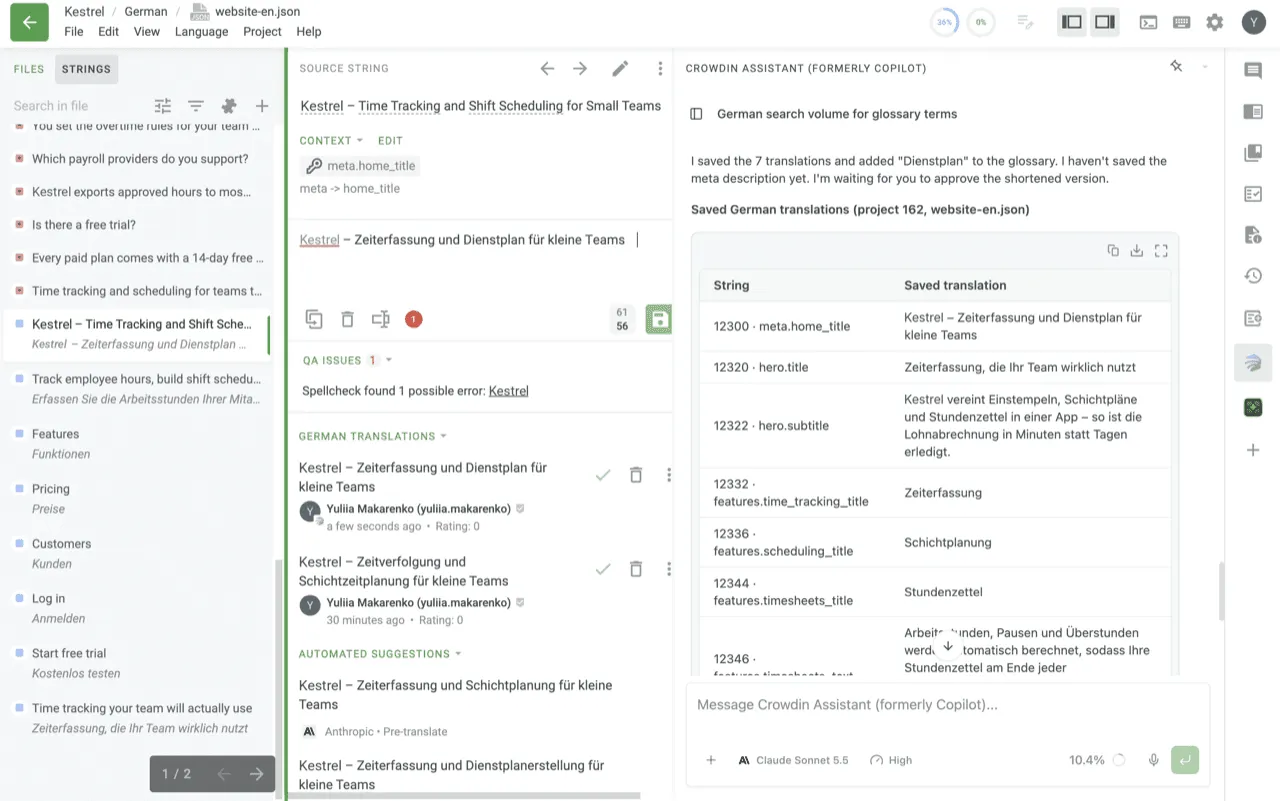
Assistant found 8 German strings with the old terms, proposed a fix for each and saved them only after approval. Our request:
Find all German translations in this project that still use the old terms. For each one, show the current translation and your proposed fix. For meta titles and descriptions, use the terms with the highest search volume. Wait for my approval before saving any translations.| String | Before | After |
|---|---|---|
| meta.home_title | Kestrel – Zeitverfolgung und Schichtzeitplanung für kleine Teams | Kestrel – Zeiterfassung und Dienstplan für kleine Teams |
| hero.title | Zeitverfolgung, die Ihr Team wirklich nutzt | Zeiterfassung, die Ihr Team wirklich nutzt |
| features.time_tracking_title | Zeitverfolgung | Zeiterfassung |
| features.scheduling_title | Schichtzeitplanung | Schichtplanung |
| features.timesheets_title | Zeitblätter | Stundenzettel |
The UI label and the meta title use different terms on purpose. The feature name stays Schichtplanung, in line with the rest of the glossary. The meta title uses Dienstplan, which gets about 9 times more searches. For the wider strategy behind this, see our SEO localization guide.
Assistant also caught a problem we didn’t ask about: the German meta description was about 190 characters, so Google would likely cut it off. It proposed a 157-character version that keeps the formal tone and waited for approval before saving it.
All fixes were saved as suggestions, so reviewers still approve them in the regular workflow. AI prepares the changes, and the team stays in control of what goes live.
Bring search data into your localization workflow
How does search data reach AI translation?
AI translation follows your glossary, so search data reaches it through the rules you set – which is how keyword localization scales beyond a handful of strings. Ahrefs works at the decision level: Assistant and your team choose the terms, and AI translation applies them to every string. AI doesn’t need the raw numbers – it needs to know which term to use and when.
| What AI needs | Where to store it | Who sees it |
|---|---|---|
| Which term to use | Term status: preferred, admitted, not recommended | AI and translators |
| When and why to use it | Term description | AI and translators |
| Exact search volumes and dates | Term note | Reviewers |
When search demand decides between two correct terms, write the reason into the description and leave the exact number in the note. For example: “Preferred in meta titles and marketing copy – higher search volume in Germany than Schichtplanung.”
The pricing page title was still untranslated during the demo. Before the update, AI auto-translation suggested “Kestrel Preise: Zeitverfolgung für Teams jeder Größe”. After the update, it suggested “Kestrel-Preise – Zeiterfassungstarife für jede Teamgröße” – with the term people search for.
What else can you do with Crowdin Assistant and Ahrefs?
The same connection works for other localization and SEO tasks. Some of them need your website set up as a project in Ahrefs.
1. Choose which markets to localize first
Assistant compares your organic traffic by country with the languages already in your project – a data-driven take on our localization prioritization framework. You see where demand exists but localized content doesn’t.
Compare our organic traffic by country in Ahrefs with the target languages in this project. Which markets have demand but no localized content yet?2. Write meta titles that match local search results
Before translating meta tags, Assistant checks how top-ranking pages in that country phrase their titles.
Check the top 10 German search results for "Zeiterfassung App" and suggest a German meta title for our pricing page in the same style.3. Build a glossary for a new market from competitor keywords
Assistant finds which terms local competitors rank for and lists the ones missing from your glossary. This works even before your localized site goes live.
Use [competitor domains] as our main competitors in France. List the French keywords they rank for that relate to our product, and show which are missing from our French glossary, with their search volume.4. Find hreflang issues after launch
Assistant pulls hreflang errors from Ahrefs Site Audit and matches them to files in your project. For the full setup, see our website localization guide.
Check Ahrefs Site Audit for hreflang issues and tell me which files in this project they relate to.5. Check how AI assistants mention you in each language
With Ahrefs Brand Radar, Assistant compares how often AI answers mention your brand in different languages and suggests content to localize to close the gap.
Compare how often our brand is mentioned in AI answers in English and German, and suggest which content to localize to close the gap.What do you need to get started?
- A Crowdin account with Crowdin Assistant and AI credits to run it. Assistant is available to all users – see its listing in Crowdin Store for details.
- Access to Assistant settings in your organization to add an MCP server.
- A paid Ahrefs plan (Lite or higher) with MCP access. Each request uses Ahrefs API units, so set a limit on the key.
- Your website as an Ahrefs project – only for use cases that analyze your own site, such as market prioritization or Site Audit checks.
Conclusion
Keyword localization works best when localization and SEO happen together. With Ahrefs connected to Crowdin’s AI localization agent, your team researches keywords, updates terminology and fixes translations in one place – where the content already lives.
Your glossary then does double duty: it keeps translations consistent and carries the terms people search for into every new string. Assistant brings the numbers and spots the risks, and your team makes the final decision.
Localize your product with Crowdin
FAQ
What is keyword localization?
Keyword localization means using the terms people in each market actually type into search, rather than translating your source keywords word for word.
How do I connect Ahrefs MCP to Crowdin Assistant?
Create an MCP key in Ahrefs, then add a custom MCP server in Crowdin Assistant settings with the URL https://api.ahrefs.com/mcp/mcp and an Authorization header with the value Bearer <your key>.
Which Ahrefs plan do I need?
A paid Ahrefs plan (Lite or higher) with MCP access. Each request uses your Ahrefs API units, so set a usage limit on the key.
Can I use another SEO tool instead of Ahrefs?
Yes. Crowdin Assistant supports MCP, so the same approach works with any SEO platform that offers an MCP server.
Does Crowdin AI see the search volumes in my glossary?
No. When Crowdin AI translates, it reads each term’s status, part of speech and description, along with the concept definition. Term notes stay out of its view, so keep search volumes in the note and usage guidance in the description.
Will Crowdin Assistant change my glossary or translations without approval?
You decide. In our example, we asked Assistant to wait for approval before each change, and it saved the fixed translations as suggestions that reviewers approve in the regular workflow.
Does it work on both crowdin.com and Crowdin Enterprise?
Yes. On crowdin.com, add the MCP server in Account Settings → Crowdin Assistant. In Crowdin Enterprise, use Organization Settings → Crowdin Assistant.

Yuliia Makarenko
Yuliia Makarenko is a marketing specialist with over a decade of experience, and she’s all about creating content that readers will love. She’s a pro at using her skills in SEO, research, and data analysis to write useful content. When she’s not diving into content creation, you can find her reading a good thriller, practicing some yoga, or simply enjoying playtime with her little one.