

SEO localization is the complete adaptation of your website and SEO elements to fit the language, culture, and search intent of specific target markets. This process, when done correctly, guarantees you traffic growth. If you ignore it, you end up with invisible content and wasted resources.
Nowadays, simple translation is no longer enough. To win in multilingual search, you need to combine the best SEO practices with the must-have localization process. In this guide, we will discuss exactly how to build a successful SEO Localization strategy.
The article covers:
- What is SEO localization, and how does it differ from simple SEO translation?
- Why is localizing SEO beneficial for you?
- Which elements do you need to localize?
- 5 Main Steps for SEO localization.
- What tools to use.
- SEO localization checklist.
- KPIs to track the performance.
- How to utilize AI and localization tools to simplify the process.
Interested in the practical part? Jump to the key steps of SEO localization.
What Is SEO Localization?
SEO localization is the process of adapting a website’s content and technical elements to specific target markets. Localization in SEO includes optimizing hreflang tags, localizing metadata, adapting currency and imagery, and building local backlinks to ensure the content resonates with native users and ranks in local SERPs.
To localize SEO successfully, you need two things: website content localization + SEO elements localization. Interested in a general website localization guide? Check out our detailed overview on how to localize a website.
In this article, we focus specifically on SEO localization, which requires additional adaptation, resources, and strategy to win the target market.
Key Difference Between SEO Localization and SEO Translation
| Feature | SEO Translation | SEO Localization |
|---|---|---|
| Focus | Word-for-word conversion. | Cultural and search intent adaptation. |
| Keywords | Translated terms. | Regional terms people actually use. |
| Technical | Usually ignored. | Adapting hreflang tags, hosting, URL slugs and more. |
| Goal | Readability in a new language. | Higher visibility and traffic from a new market. |
SEO translation focuses on simply converting SEO content from one language to another. However, SEO localization is about fully adapting SEO elements and strategy to align with local culture, search habits, and regional search engine algorithms.
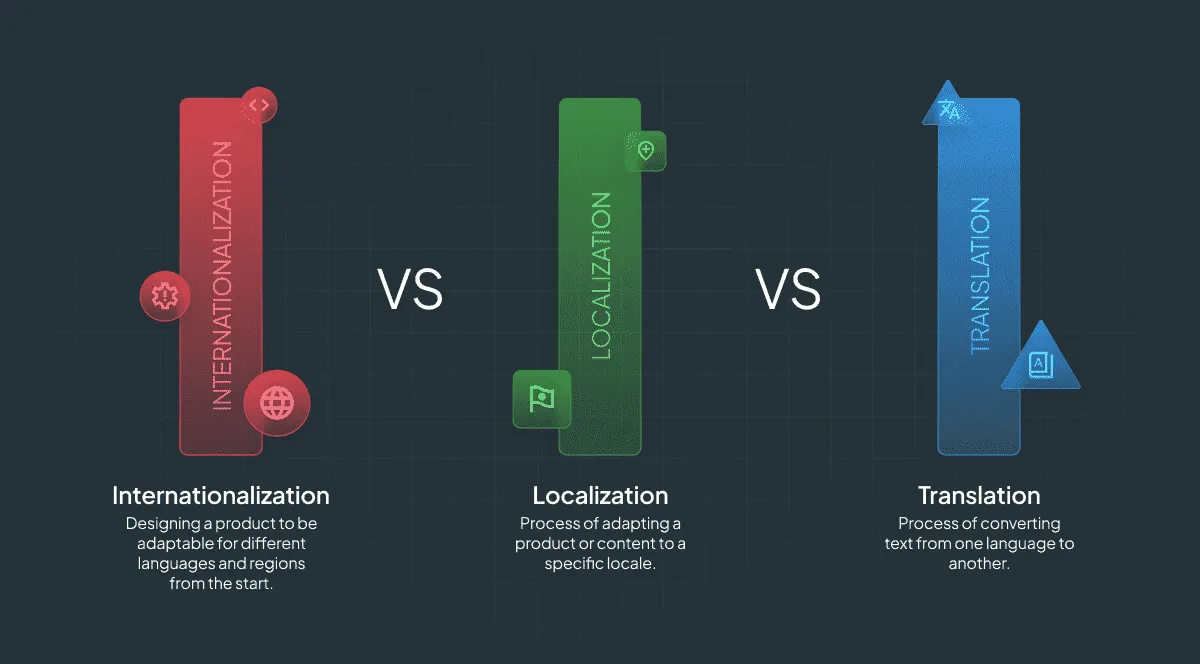
Localization can be done in different ways. As we are Crowdin, a localization platform, we are going to give you an example of how modern teams do localization effectively and fast.
4 Reasons Why You Need to Localize SEO
- Higher Organic Traffic: English is a popular language for surfing the net, however, it is less than 48% of the Global Search Potential. Basically, if you deliver only English content, you miss a lot of potential traffic to your site.
- Better User Experience (UX) -> Better Conversion Rate: According to Shopify partner data, e-commerce stores that provide localized language support and multi-currency payment options see higher conversion rates than those limited to English-only content.
- LLM Visibility: Multilingual models (MLLMs) are becoming more common. Models like GPT-4o, Claude, and Gemini support many languages. As with organic traffic from Google, SEO and website localization directly influence your site’s visibility in Large Language Model chatbots. The more content you create, and the more languages you have optimized it to, the more awareness and traffic you will get from LLM citations.
- Competitive Advantage: 1) Your competition may already be earning organic traffic from target markets that you still cannot capture well without localized content. 2) There may be competitors that are still not localizing their SEO, take advantage and get that traffic coming to your site!
The one summarizing reason why you need to localize your SEO is international growth. Your brand will not be visible in other markets without it.
Key Components of SEO Localization
Each element mentioned in the list is being described in detail down the article:
- URL structure (slugs): choosing a specific URL structure for your localized pages.
- Technical SEO: implementing correct hreflang attibutes, localizing sitemaps, and more.
- Local keyword research: identifying search terms that are actually used by native speakers.
- Localized metadata: inserting local keywords into title tags and meta descriptions.
- Page content: localizing the language, idioms and cultural references.
- Alt texts: localizing alt texts based on the local keyword research and culture.
- Currencies/units of measure: adapting the prices, weights, and other units to fit local preferences.
- Date formats: formatting the dates based on local preferences.
- Local Link Building: seeking backlinks from local domains (e.g., .de or .fr) to build local authority.

Resources You Need for Successfully Localized SEO
As for any task, no matter you are E-commerce or SaaS, you need special software for proper SEO localization:
1. SEO Tools for Research
- Ahrefs/Semrush/SE Ranking: For keyword, competitor, and market research.
- Google Search Console (GSC): To check traffic per country.
- Screaming Frog: A crawler to check technical health (hreflang tags, broken links) across your localized pages.
- Google Trends: A great tool for checking the popularity of your niche in the target market.
2. Analytical Tools
GSC shows how you appear in search, however, you also need to know what users do once they arrive. SEOs usually use tools like GA4 (Google Analytics 4) or Amplitude. Here, you will track engagement, conversion rates, and related metrics. These tools allow you to measure the true ROI of localization.
Example case: Are users from Germany actually converting? Or are they bouncing because the shipping costs are not in euros?
3. Translation Management System (TMS)
Translation Management System (TMS) is an excellent tool. It connects your content to your translators and ensures your SEO strategy actually makes it to the page. It manages glossaries, context, and workflows.
5 Steps to Build a Website Localization SEO Strategy
The SEO industry experiences extreme changes every month: the rise of ChatGPT and Generative Engine Optimization (GEO), AI Overviews, and constant Google Core Updates. You may often hear, “SEO is dead”; however, it is not. SEO is evolving. Even with the rise of AI, Google has made it clear that high-quality, optimized content remains the foundation of visibility.
Step 1: Market Research and ROI Analysis
If you have already identified your target market/s, skip to Step 2.
Before making your SEO multilingual and writing a single line of code, you should first validate the opportunity, choose the markets you plan to expand into, and ensure that the ROI meets your company standards.
SEO localization is one input into a bigger ROI equation — our multilingual content management guide covers how to measure and scale localization spend across the whole process.
Check opportunities in your analytics tool
Use Google Analytics 4 (GA4) or Amplitude to check for countries where you already have visibility/traffic but have low CTR (Click-through rate)/conversion rates.
If 10% of your traffic comes from Germany and bounces because the site is in English, that is your “low-hanging fruit”.
Analyze the market for traffic volume and value
Just because a keyword has volume in English does not mean the translated version does: “Software” is a high-volume term. In some countries, users search for the English term, however, in others, such as France for example, they might use “Logiciel”.
To check the traffic volume of a specific localized content:
- Take the keywords
- Translate them
- Input into the keyword research tool
- Collect and analyze the traffic volumes and values you get
In the following example, you can see how we checked the volume of the keyword “projektleitung” in German search results:
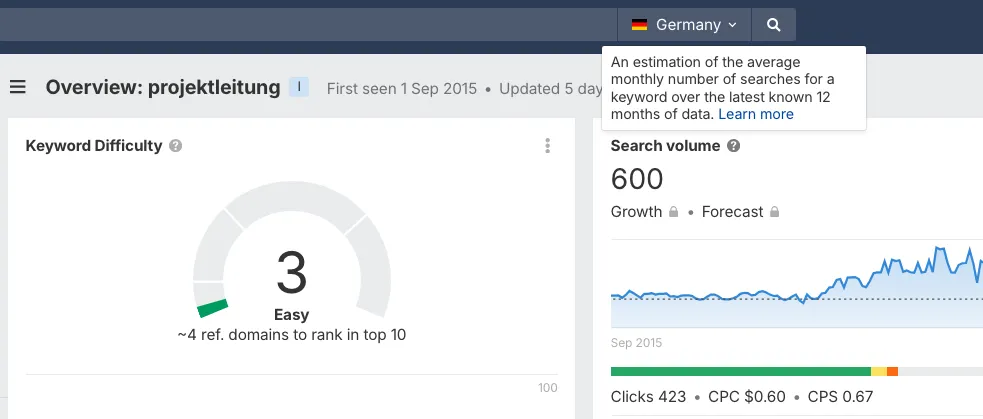 Image source: Ahrefs
You can also use Google Trends to compare English term vs. translated term popularity in different countries.
Here, on the screenshot, we can see that the English term “project management” is more popular in German search than the German translation of the term “Projektleitung”:
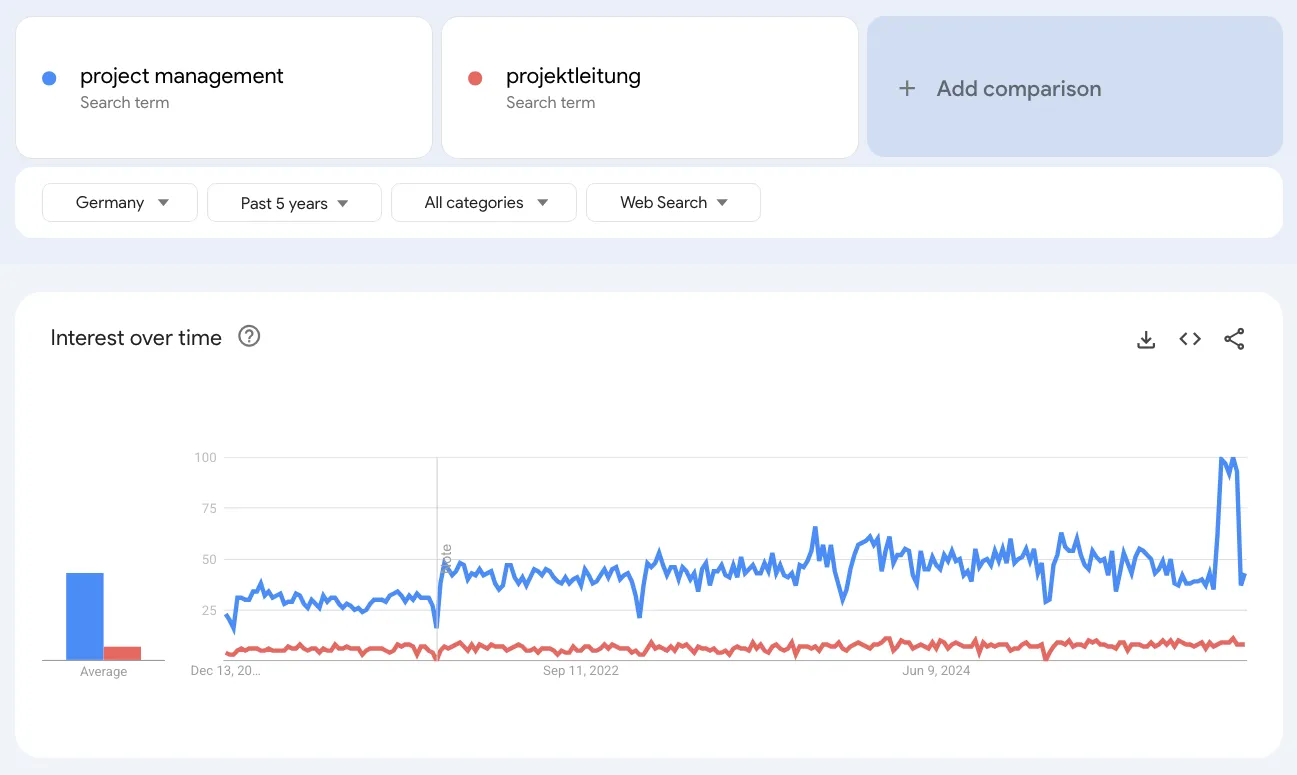 Image source: Google Trends
Analyze the competition for traffic volume and value
The easiest and most effective strategy to make sure you localize to the right market, is to analyze your competition. Imagine how much work went into their SEO target markets’ choice; use the information and work on it.
- You can use Ahrefs, Semrush, or other SEO tools to see which languages are driving competitors’ growth:
- Enter a competitor’s domain into the domain research tool.
- Choose the target country you want to show the reports for.
- Go to the “Top Pages” report and see which competitor’s pages appear, localized or the primary English language pages.
Here is an example of nike.com rankings in Germany:
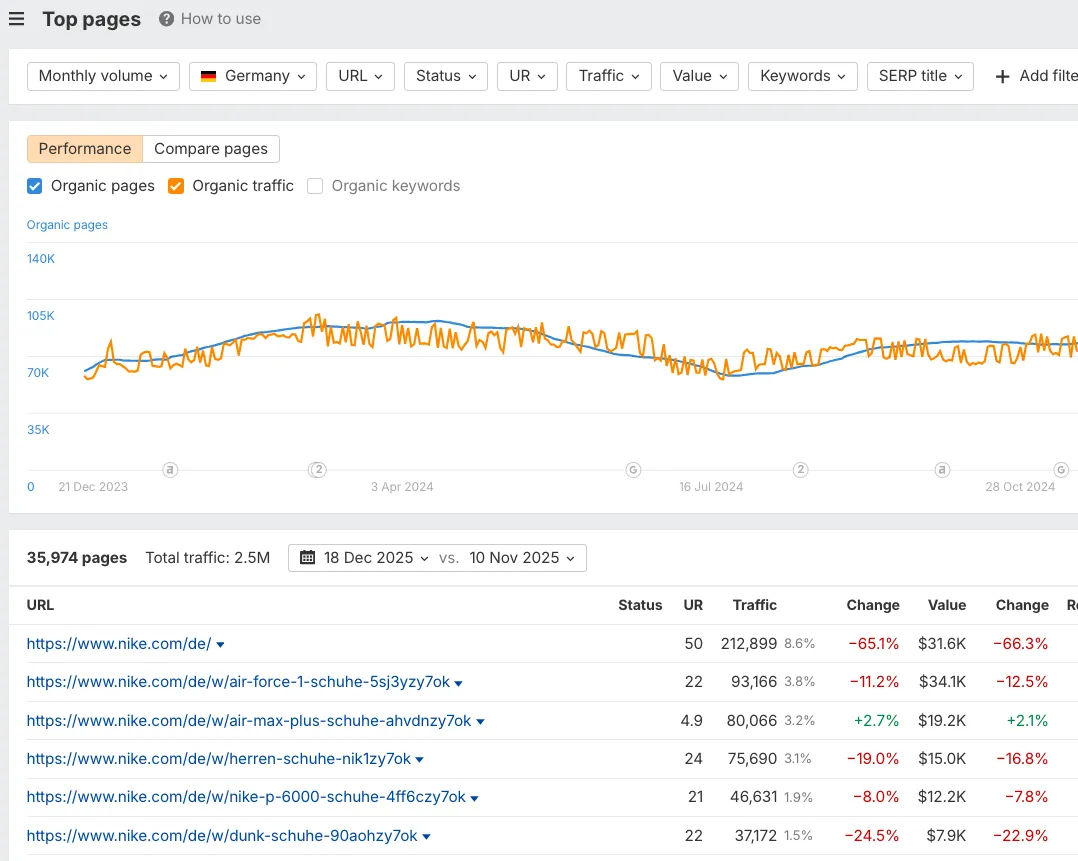 Image source: Ahrefs
- Do not just look at traffic volume, look also at the traffic value.
- Use a tool like “Site Explorer” to check a competitor’s “Organic Traffic Value” for a specific country. This metric calculates the likely cost of buying the same traffic via PPC.
Traffic Volume and Value for nike.com from the US:
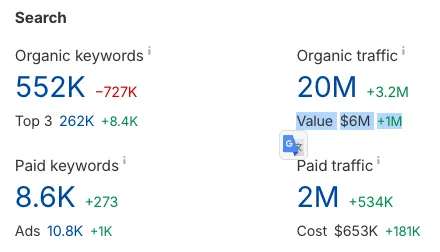 Image source: Ahrefs
From Germany:
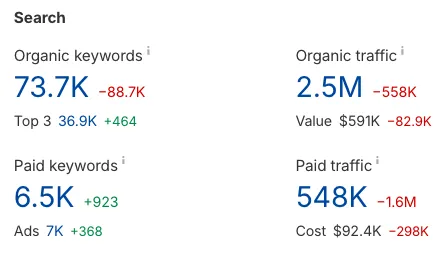 Image source: Ahrefs
For example, a high traffic value in Germany shows high-intent and profitable keywords. High traffic with low value in another region may indicate that this market is not a good option for expansion.
Know which search engine to focus on
Google is not always the only player on the market. If you are targeting China, you must optimize for Baidu. In South Korea, it is Naver. Each search engine has its unique ranking factors.
Calculate the approximate ROI: Traffic value vs. cost
The Translation Cost Estimate feature calculates the budget required based on your word count. Compare this against the potential traffic value (CPC) from your SEO tools to get a rough ROI forecast. And, do not forget about developers and SEO specialist working hours cost. Additionally, check our research on how much AI translations acually cost.
Note: Sometimes, like in the case of Google Trends example above, there is no sense in localizing your content into another language if you can still get good traffic from that country with your primary-language pages.
Step 2: Technical SEO Foundation
Before translation, you must build a foundation that allows search engines to understand your website’s architecture. If this foundation is weak, your content will not rank, no matter how good the translation is.
Choose the URL structure for your localized pages
There is no “perfect” choice, there is a right choice for your resources.
- Subdirectory (
site.com/de): Recommended for most cases. This URL structure consolidates your Domain Authority (DA). All backlinks to your German blog post boost your overall domain rating. This structure is also easy to set up in CMSs like WordPress or Webflow. - ccTLDs (
site.de): Strongest local signal but expensive. When you set up a separate domain, you start with zero authority and have to maintain separate legal/technical entities. This is the best choice for big enterprises like Amazon. - Subdomains (
de.site.com): Generally not recommended in 2025. Google often treats subdomains as separate entities, which badly impacts your link equity.
Hreflang and HTML tags
Hreflang tags (rel="alternate" hreflang="x") tell Google which URL to show to a user based on their language and region. A few insights:
- Every page must reference itself and all its alternates.
- Always include
hreflang="x-default". This tag serves as a fallback language for users who do not match any of the languages you support (for instance, a user from Thailand visiting your site when you only have English and Ukrainian).
<head>  <link rel="alternate" hreflang="x-default" href="https://example.com/" />
<link rel="alternate" hreflang="en" href="https://example.com/" /> <link rel="alternate" hreflang="de" href="https://example.com/de/" /> <link rel="alternate" hreflang="fr" href="https://example.com/fr/" /></head>- Do not forget to set the
<html lang="es">tag in the page header. This helps browsers render the page correctly.
Canonicalization
Without correct canonical tags, multilingual sites risk being treated as having duplicate content. When similar pages exist in multiple languages.
Always set the canonical URL for each localized page to point to itself (for example, the German page should canonicalize to the German URL).
Example of a canonical tag for a page:
<link rel="canonical" href="https://nike.com/de/" />Speed and local servers (CDNs)
Website speed is a ranking factor, fact. A user in Tokyo who accesses a server in New York will experience lower speed of your pages. To solve the challenge, use a Content Delivery Network (CDN) like Cloudflare or AWS CloudFront to serve your localized content from the server closest to the user.
Multilingual sitemaps
- Each translated version of the website must come with a separate XML sitemap (or be included in a Sitemap Index).
- Submit each separate XML sitemap in Google Search Console (GSC). This will help Google discover your new pages faster.
In the robots.txt file, remember to reference each sitemap.
# Robots.txt example referencing localized sitemapsUser-agent: *Sitemap: https://example.com/sitemap_index.xml# Or specific language sitemaps:Sitemap: https://example.com/sitemap-en.xmlSitemap: https://example.com/sitemap-de.xmlAvoid automatic redirection
Never redirect a user based on their IP address without asking them first. Why? Googlebot usually crawls from a US IP address. If you auto-redirect US IPs to your English page, Google may never see or index your French or German pages.
Best practice is to use a “Language Switcher” banner. Example text may be: “It looks like you are in Germany. Switch to German?”.
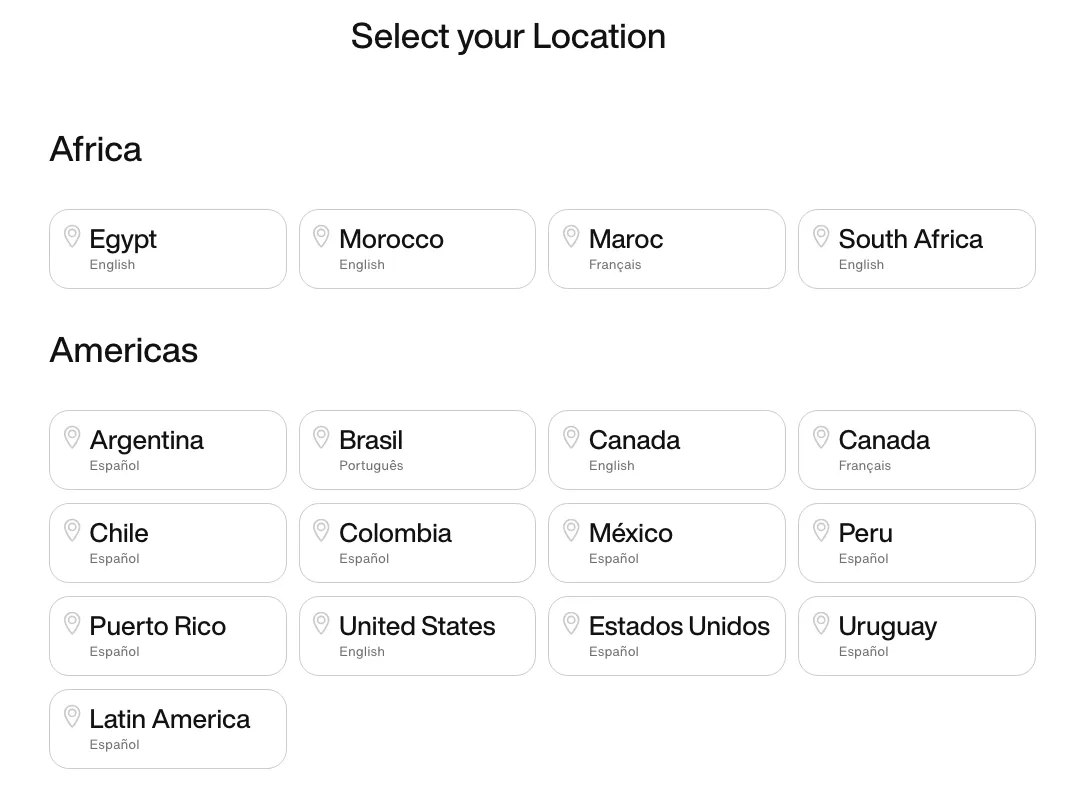 Image source: Nike.com
Crowdin tip: Use Crowdin’s Website Translator to manage language routing and subdomain/subdirectory configuration without any complex coding!
Step 3: International Keyword Research
The topic of international keyword research is vast and warrants a single, detailed article. Therefore, here is a list of the key points to keep in mind when researching the keywords to rank for in a foreign market:
1. Transcreation
Translation of keywords is the fastest way to fail. Focus on transcreation and better use of SEO tools to demonstrate the quality of keyword research.
2. Search volume vs. traffic potential
Better not to prioritize keywords with high “Search Volume” but low actual traffic. A page often ranks for hundreds of long-tail variations. “Search Volume” only shows data for one specific phrase. Look at Traffic Potential. This metric shows the total estimated traffic to the page.
3. Collect keywords from content gap analysis
The fastest way to build a local keyword list is to see what your competitors rank for that you do not. On the screenshot below, you can see how a popular tool Monday has 68k keywords their biggest competitors rank for, while Monday doesn’t.
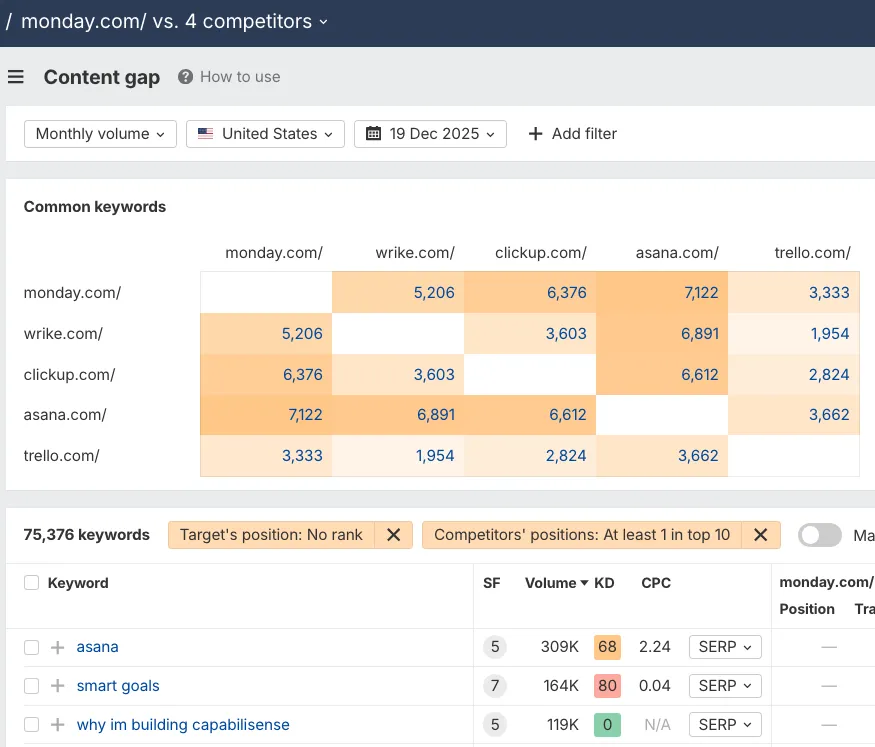 Image source: Ahrefs
4. Identify the search intent
If you optimize for a keyword, but the top 10 results are all definition blogs, and you are trying to sell a product, you will not rank. Google has decided that users want information for that query, not a product.
 Image source: Ahrefs
5. A simple international keyword research workflow
- Take your top 10 English topics.
- Ask a native speaker to brainstorm local synonyms.
- Run a Content Gap analysis for the specific region.
- Import all the data into Google Sheets.
Crowdin tip: Glossaries are your SEO safety net. Upload your validated target keywords to your TMS Glossary. This ensures that every time a translator sees “Cell Phone”, they are forced to translate it as “Mobile” (for the UK) or “Handy” (for Germany). This way, SEO is preserved automatically.
Step 4: On-Page Optimization and UX Localization
In SEO, content localization is not only about the text - it is about user experience (UX). If a user lands on your page and sees a foreign currency, a high probability they quit. High bounce rates kill SEO rankings.
Localize metadata, schema markup, and headings
On-page SEO requires you to adapt:
- Title tags: English is compact. German can be 30% longer. There is a high chance that a 60-character title in English might break the limit in German. Rewrite titles to fit the criteria.
Plain translation:

Localization:

- Headings (H1-H6): Make sure your localized keywords appear in the H1-H6 tags.
- Schema markup: Same as your meta tags, schema markup also needs to be localized and show translated versions of properties.
To help you translate the metadata easily and fast, there is website translation software that syncs with your CMS/Code, extracts the metadata, lets you translate it, and syncs back instantly without any code changes.
UX adaptation
As for UX, you need to localize:
- Currencies and units: If you display $ to a European user, it creates friction.
- Payment methods: In the US, Credit Cards are more popular. In the Netherlands, iDEAL. In Brazil, it is Pix. Provide the right solutions to increase trust and conversion rates.
To improve UX adaptation efficiency, companies often use TMSs with advanced capabilities. For example, in Crowdin’s TMS, we provide users with a suite of tools for visual localization: In-Context Editor, Figma integration, check out more in our store.

Step 5: Off-Page SEO and Local Link Building
You cannot rank in competitive markets just with on-page SEO. You need backlinks from that specific region to prove your pages’ relevance to the target markets.
The power of local backlinks
A backlink from a high-authority .de website is worth 10x more for your German SEO than a link from a .com. Such signals tell Google that you are relevant to the local users.
German domains linking to Crowdin:
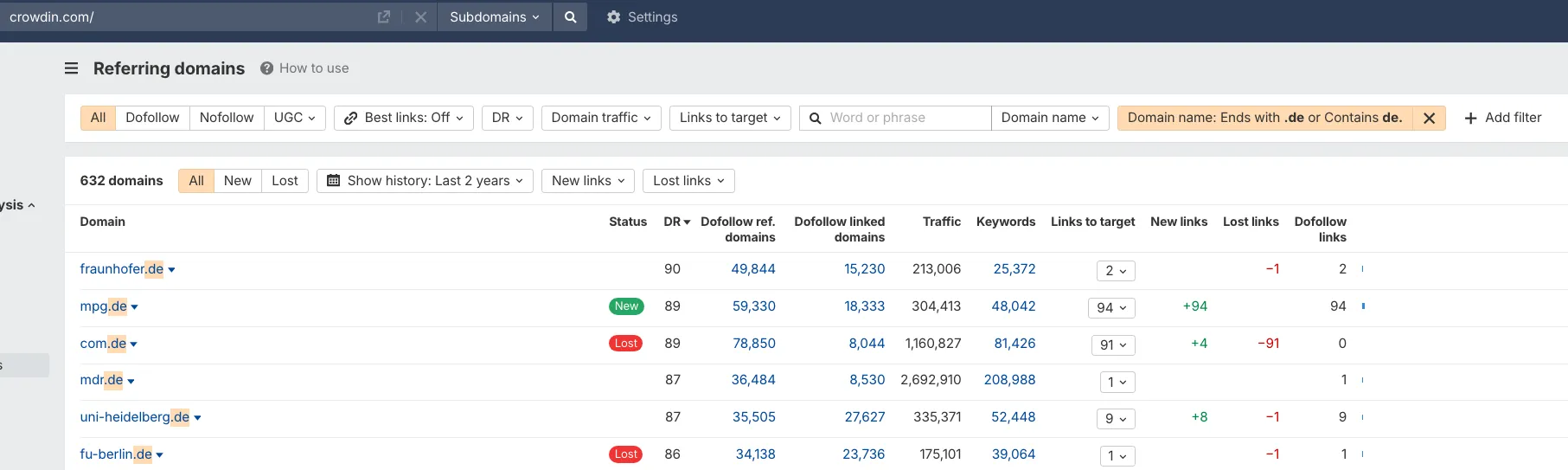 Image source: Ahrefs
German pages linking to Crowdin:
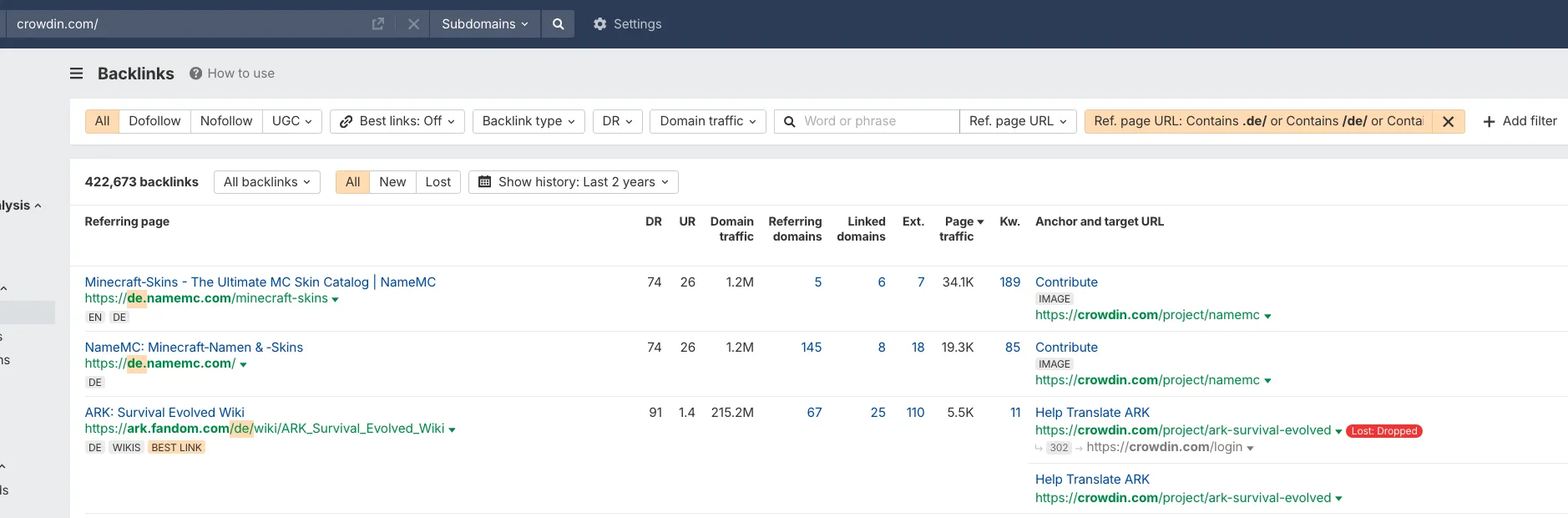 Image source: Ahrefs
Citations in local directories
Find and list your site/brand/company in authoritative local business directories (for example, local Chambers of Commerce). This proves that you are actually present in that market.
Being listed in local listicles and comparisons would also be very beneficial.
Localization SEO Workflow - Checklist by Crowdin
Do not worry about losing the insights. We heard you and created a simple to-do list to copy and paste into a note-taking app:
Market & ROI Research (if not done yet):
- Analyzed the existing traffic in Google Analytics 4 or Amplitude.
- Checked competitor traffic in Ahrefs/Semrush/Seranking to find target markets.
- Checked what the search demands are for the niche in the target regions.
- Calculated Potential ROI (Translation Cost vs. Traffic Value).
Preparation:
- Translation strategy chosen based on budget and quality requirements.
Tech SEO:
- URL structure configured.
- Self-referencing canonical tags are implemented on every localized page.
- Hreflang tags added (including
x-default). - Correct HTML
langattribute added to the<html>tag of every page - A separate XML sitemap is submitted for each language version in GSC.
- Language switcher installed (no auto-redirects).
Content & Keywords:
- Target keywords identified for each region (not just translated).
- Meta title and description localized (fitting the pixel limits).
- H1-H6 tags naturally include local keywords.
- Images Alt text localized.
- Currencies, dates, and units of measure adapted.
Off-Page & Authority:
- Strategy for growing local backlinks (e.g., .de links) created.
- The brand is listed in relevant local directories (Wikipedia, etc.).
Who Needs to Take Part in Your Localization Initiative
Successful website SEO localization requires the involvement of several key stakeholders:
- SEO specialist
- Developers
- Content managers
- Translation team
- QA specialists
Collaboration among these team members is the foundation for a smooth localization workflow.
KPIs to Track Performance in New Markets
As a crucial step to your SEO strategy, tracking traffic and user engagement is essential. Track the right metrics with the right tools:
- Organic Traffic per Country (Google Search Console).
- Keyword Rankings per Region (Ahrefs/Semrush).
- Engagement Rate by Language (GA4).
- Conversion Rate by Language (GA4).
- Revenue from localized markets.
AI Revolution in SEO Localization
Artificial Intelligence (AI) revolutionized the website SEO localization industry:
- More efficient processes
- Optimized localization workflow
- Reduced turnaround times
- Improved quality and consistency of translations
Here you can find SEO localization prompts for LLMs that you can use for AI to be more effective.
No-Code SEO Localization: Crowdin Website Translator
For marketing teams that need to go international without waiting for developers, Crowdin offers a Website Translator.
Website Translator is a “no-code” solution that makes it easier to manage the technical side of SEO localization. The tool has the following features:
- Crowdin’s translator handles correct language routing (subdirectories like
/esor subdomains likees.site.com). - This solution detects and lets you translate all meta tags on your site to every language you need.
- Moreover, it monitors your website for changes and immediately syncs new content for translation.
Want to use AI for localization? Crowdin supports all popular AI providers.
We are one of the few platforms that do not charge extra for AI usage. You pay only for the AI provider’s subscription. See Crowdin pricing here.
Summing Up
SEO localization is an investment. When planned well, it produces proportional returns. In this guide, we went from the foundation of technical SEO to a complete localization strategy.
Localization in SEO can be your success, however, simple text translation can be your enemy. Therefore, start with small, quality steps toward international markets. Based on hundreds of verified reviews, Crowdin is a tool that actually simplifies your website’s SEO localization, and guarantees high ROI.
Read more about our solution on crowdin.com. Or check out our tutorial on Website Translation Automation.
Localize your website and SEO with Crowdin
Further reading:
- Localization Management with Crowdin Copilot
- JavaScript localization tutorial
- Other website building frameworks localization guides
FAQ
What is location-based SEO?
Location-based SEO (or Local SEO) is a process of website and SEO content optimization (including translation) to increase its visibility and traffic for the relevant local searches (e.g. “Best Italian restaurant in Tallinn”, “Localization services in Texas”).
What is localized SEO?
Localized SEO is the process of website and SEO content adaptation to rank high in search engines for a specific language or region.
How much does SEO localization cost?
The cost varies based on word count and method. AI translation with human post-editing is the most cost-effective method (~$0.05-$0.10 for a word). If you want to build an effective localization workflow, you would also need to include the cost of the: technical setup, translation management system and SEO tool.
What tools are the best to use for SEO localization?
Our recommendation of the SEO localization stack would be: Ahrefs or Semrush for keyword research, Google Search Console, and Crowdin as your Translation Management System (TMS) to manage the localization.

Volodymyr Popovych
Volodymyr Popovych is an SEO Manager at Crowdin. He came to us with fire in his eyes that never stops burning. Volodymyr manages all sides of SEO: On-page, Tech, and Off-page, from strategy to execution. He has a lovely Sphynx cat, he likes going to the gym in Tallinn’s city centre, dreams of a trip to Japan, and if you see him without a protein shake, be sure it’s not him - it’s definitely an imposter.