

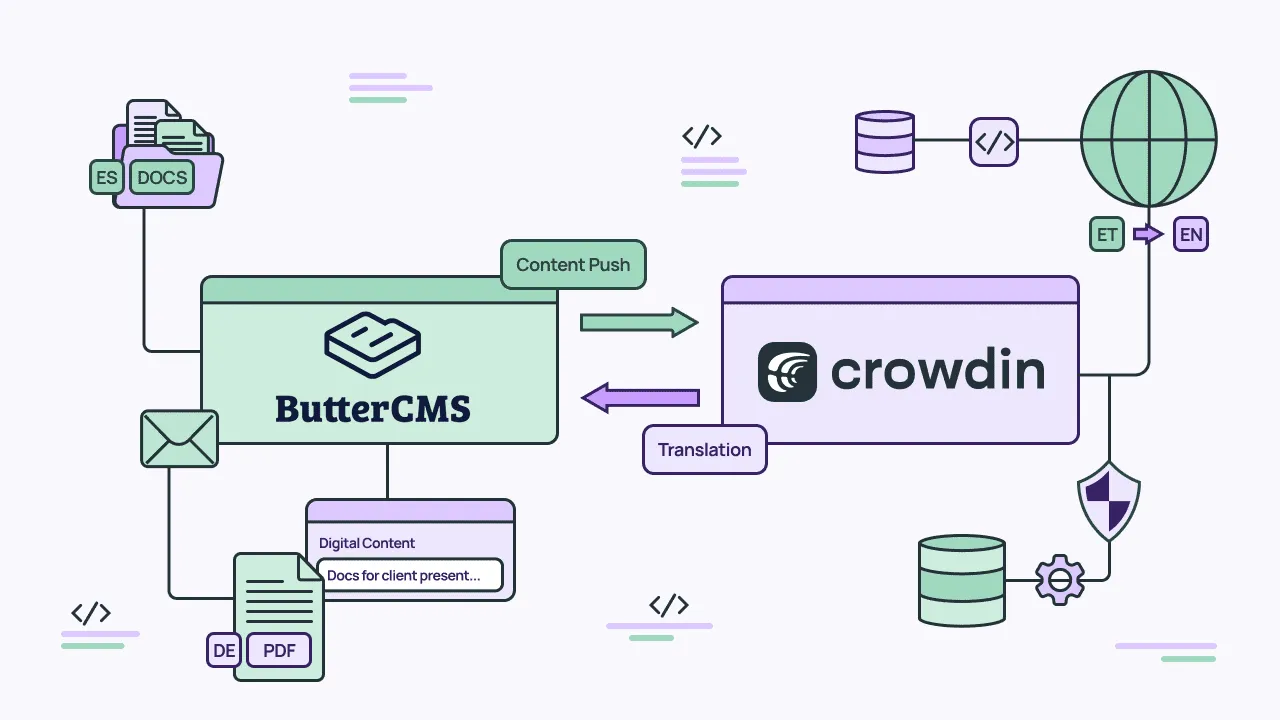
If you’ve ever managed multilingual content, you know what a grind it can be. It’s tedious, time-intensive work that’s prone to errors and ultimately isn’t scalable unless it’s automated. Traditional content management system (CMS) platforms haven’t helped. Because of their architecture, content often gets tangled up in templates or the presentation layer, making it hard to extract.
Headless CMS architecture is different. Content lives in structured, API-accessible fields, which means translation can be treated as a data operation rather than a manual one, making translation much easier and scalable.
In this guide, we’ll cover how headless CMS architecture sets you up for multilingual content from the start, what teams forget to localize beyond body copy, best practices for developers, and how ButterCMS + Crowdin work together to automate the translation workflow.
Translation, localization, and internationalization: A quick distinction
Before we get into architecture, there are three terms developers use interchangeably that mean different things in practice.
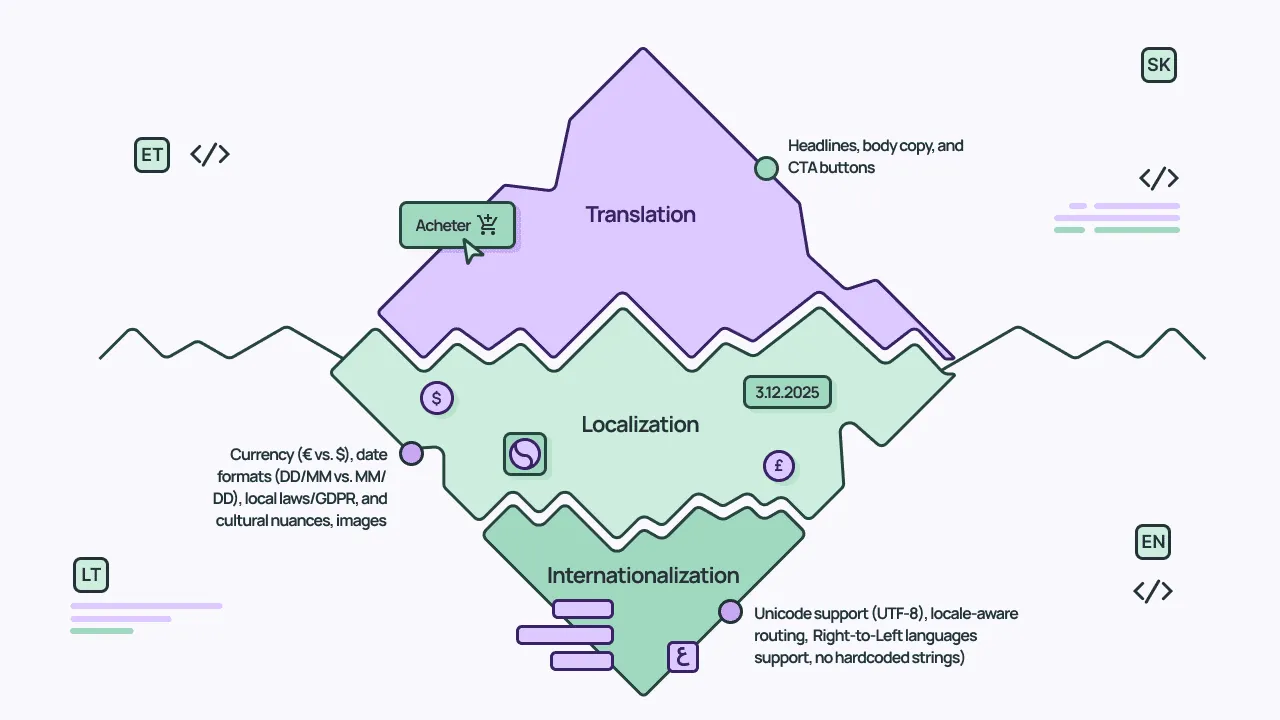
Translation refers to the process of converting text from one language to another. It’s the most visible part of going multilingual.
Localization (l10n) goes further. It’s the process of adapting content to a specific market or locale. So not just the language, but also cultural references, date and number formats, currencies, imagery, and even legal requirements. A properly localized experience doesn’t feel translated; it feels native.
Internationalization (i18n) refers to the architectural work that enables translation and localization. It’s about designing your entire system (including your CMS, front end, and content models) to support multiple locales without re-engineering. Basically, it’s the infrastructure layer: locale-aware routing, dynamic formatting, and content structures that separate translatable fields from layout logic.
This guide touches on all three, but really focuses on how the right CMS architecture makes translation manageable as you add markets and languages.
Why headless CMS architecture makes multilingual content scalable
In a traditional monolithic CMS, translatable content is often buried inside page templates, rich-text blobs, and tightly coupled presentation layers. Extracting the text that actually needs translation (separate from layout markup, navigation elements, and template logic) is painful. Translating it at the field level and keeping localized versions in sync is even harder.
A headless CMS stores content differently. Every piece of content lives in its own typed fields and is served through APIs. There’s no presentation layer mixed in. Every field is individually accessible, and every content type supports a locale parameter. So you can request the same page in English or French from the same endpoint and get back the same field structure with different values. The schema stays the same across locales. Only the content changes, which makes automated translation much more straightforward.
A translation management system (TMS) can pull content from a headless CMS field by field, translate it, and push it back through the API without ever needing to parse HTML, scrape rendered pages, or build custom extraction logic.
This setup follows a TMS-centric integration model. There are generally two ways to connect a CMS to a translation management system: either keep the CMS as the hub for multilingual content and review translations on published output, or let the TMS manage the translation workflow and treat the CMS as both the content source and destination. The ButterCMS + Crowdin setup covered later in this guide follows the second approach.
What to localize (beyond body copy)
Most teams start with the obvious: headlines, body copy, CTAs. But localization goes deeper than language, and the technical fields developers control often get overlooked, even though they directly affect user experience and search visibility.
- URLs and slugs. Localized paths (/fr/tarification/ vs. /pricing/) improve SEO in target regions and signal to users that the page is meant for them.
- Meta titles and descriptions. These drive click-through rates in search results. A translated page with English metadata is invisible to local search engines.
- Date, time, and number formats. 02/03/2026 means February 3rd in the US and March 2nd in most of Europe. Comma-separated decimals (1.234,56) are standard in Germany. These are important localization issues that can damage user trust if ignored.
- Image alt text. Alt text is critical for accessibility and SEO. If it stays in English across your locales, it will hurt your search performance and accessibility in your other target markets.
- Hreflang and Open Graph tags. These tell search engines and social platforms which language version to serve. Getting them wrong means Google may show the wrong locale to the wrong audience, or social shares may pull English metadata for a French page.
You can treat this as a localization checklist. These are the technical fields to review for every locale, not just the content your writers produce.
CMS translation best practices for developer teams
While you don’t necessarily need deep localization expertise to set this up right, a few practical decisions early on will save you a lot of rework later. Consider the following:
1. Plan for text expansion
German, French, and Spanish text commonly run 20 - 30% longer than the English source. If your UI is designed pixel-perfect around English string lengths, translated content will overflow containers or get cut off, and your layouts may break. Build flexibility into your front end from the start. It’s also worth knowing that languages handle pluralization very differently – English has 2 plural forms, Polish has 3, and Arabic has 6 – so any UI component that displays counts or quantities needs to account for more than just adding an “s”.
2. Give translators visual context
Translators produce significantly better results when they can see where content appears on a page. A headline in a hero banner needs a different tone than the same words in a footer. A good TMS will offer WYSIWYG previews and in-context editing, letting translators see the rendered page as they work, so they aren’t just staring at isolated strings in a spreadsheet.
3. Structure content for reuse, not pages
Model content as individual components and fields rather than large page-level blocks. This avoids duplicating shared content across locales and makes incremental updates simpler.
4. Keep user-facing strings out of your code
Any text a user sees (like button labels, error messages, form placeholders, etc.) should come from your CMS or a localization file. Hardcoded strings can’t be translated without a code deploy, which defeats the purpose of a content-driven localization workflow.
On a related note, avoid building sentences by concatenating fragments in code. Many languages have grammatical gender where adjectives must agree with nouns, so a sentence assembled from parts in English will produce grammatically broken output in French, Spanish, or German. Always provide translators with complete sentences.
5. Use translation memory and glossaries
Translation memory stores previously translated segments and suggests them when similar text appears, reducing redundant work and keeping things consistent. Glossaries ensure that product names, technical terms, and brand language stay consistent across every language. Both save time and improve quality, especially as you add more content and languages.
This pairs well with a continuous localization approach, where new content gets sent for translation as soon as it’s created rather than in large batches. It keeps translations current and avoids the backlog that builds up when teams wait to translate in bulk.
How to automate your localization workflow: The ButterCMS + Crowdin integration
So far we’ve covered how to structure content for translation, what to localize, and best practices. Here’s how the ButterCMS + Crowdin connector puts that into practice.
How it works
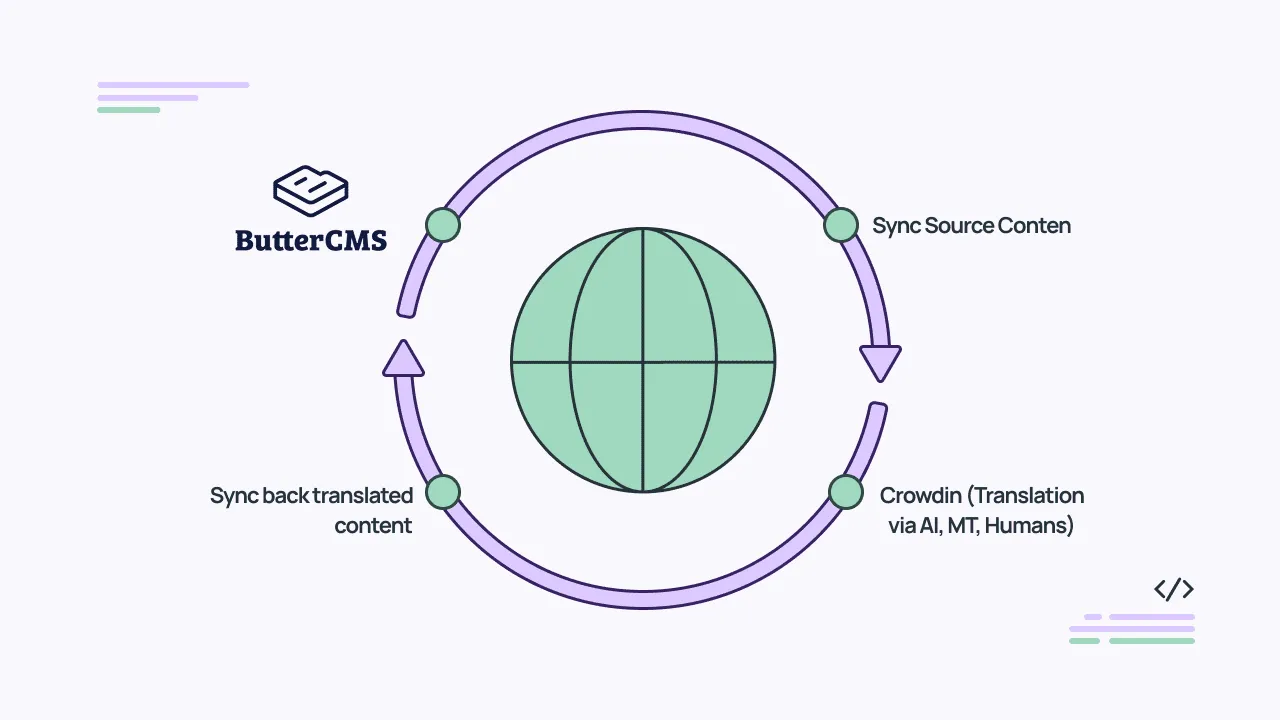
The connector syncs content blocks like Pages and Collections from ButterCMS into Crowdin for translation. From there, teams can translate using translation memory, machine translation engines (like DeepL, Google Translate, Amazon Translate, and others), glossaries, QA checks, and WYSIWYG preview. Once translations are approved, they get pushed back to the correct locale versions in ButterCMS through the Write API. The Write API supports multi-locale payloads, so multiple language versions of a page can be updated in a single call. No spreadsheets or manual copy-paste required.
What sync looks like
You can sync manually or set up scheduled auto-sync for daily updates. You can also use webhooks to trigger translation automatically whenever content changes in the CMS, creating a fully hands-off loop. Changes are incremental, so updating a single field only triggers re-translation of that field, not a full resync.
For teams managing content across multiple markets, this replaces manual coordination with an automated workflow. Want to take a look at the full setup instructions? See the ButterCMS localization guide and the Crowdin ButterCMS integration page.
Closing thoughts
Getting CMS translation and localization right comes down to how your content is structured and how it moves between systems. A headless CMS that stores content in structured, API-accessible fields paired with a TMS that handles the actual translation workflow gives you a system where new languages don’t mean proportional new work.
If you’re managing multilingual content and tired of the manual overhead, check out the ButterCMS + Crowdin integration.
Localize your product with Crowdin

Bonnie Thompsom
Bonnie Thompson is a content marketer with over six years of experience in the tech industry, helping brands create meaningful content that empowers readers to achieve their business goals. When she’s not writing, you’ll find her hiking in the Blue Ridge Mountains, planning her next national park adventure, or enjoying Friday night pizza and movie nights with her family.