

When choosing a translation management system, the evaluation usually starts with a feature checklist: AI capabilities, GitHub integrations, and a smooth UI for translators. But when you look closely at the pricing page, things get tricky. The real differentiator often isn’t the feature set – it’s how the platform counts your words.
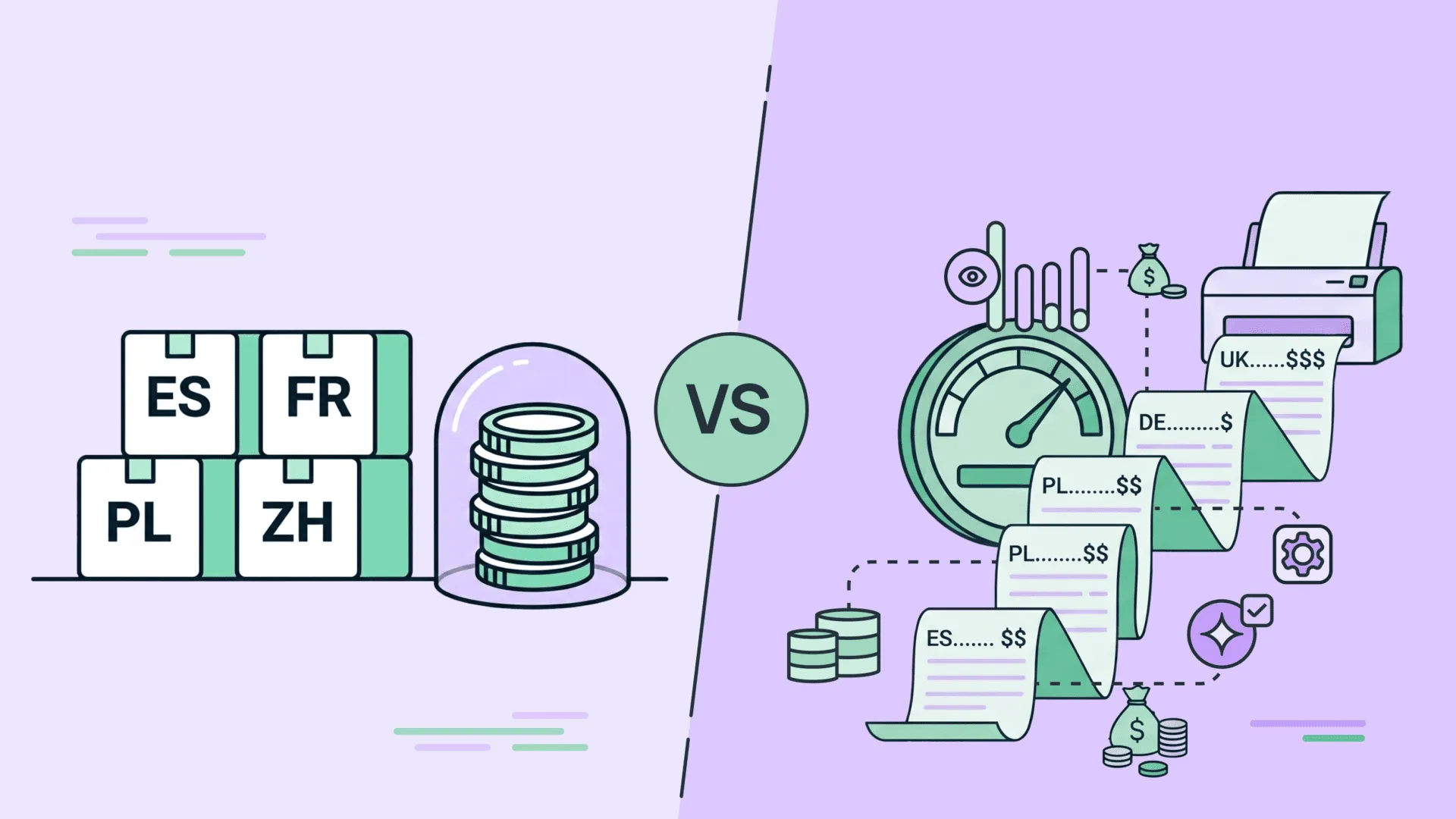
The localization market is currently split between two fundamentally different pricing models: Hosted Words and Processed Words. While the distinction might seem technical on paper, it directly impacts your bottom line. It determines whether you pay for the actual size of your product or for every single action your team takes inside the platform.
Let’s look at how these models work and where the hidden costs are buried.
Core difference: Storage vs. activity
To understand the difference between these two approaches, think of how you manage physical assets.
Hosted Words (Storage Model)
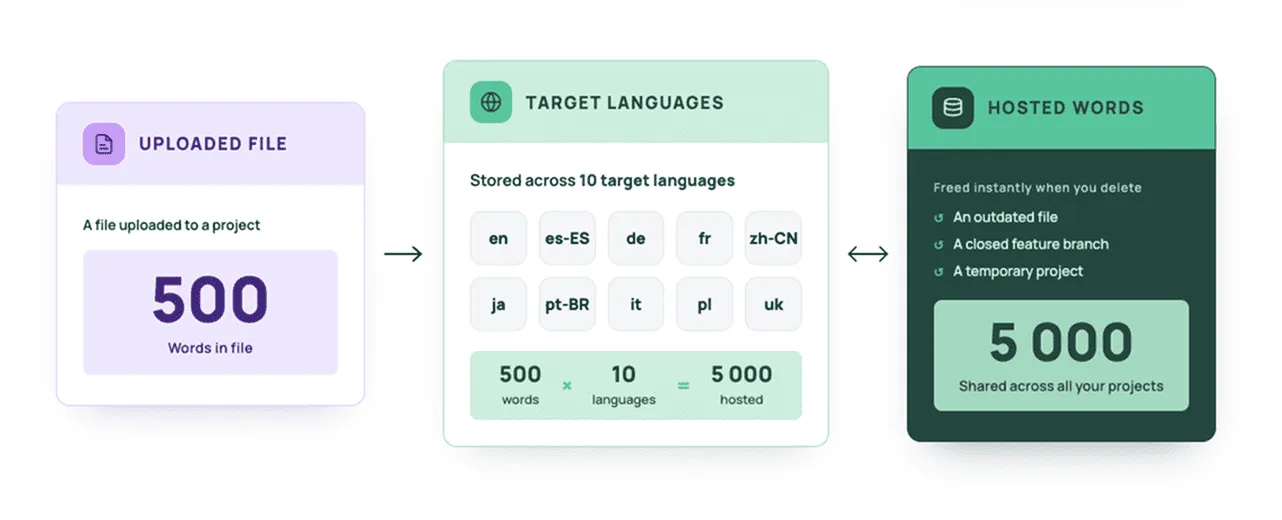
This works like renting warehouse space based on your active inventory. You pay for the number of words that should be translated multiplied by the number of the project’s target languages (the source language itself doesn’t count).
Math in Practice: If you upload a file with 500 words to a project with 10 target languages, you will use 5,000 hosted words (500 x 10). This limit applies collectively to all the projects created under your account or organization. The moment you delete an outdated file, a closed feature branch, or a temporary project, those slots are instantly freed up. You are in full control of this volume.
Processed Words (Metered Model)
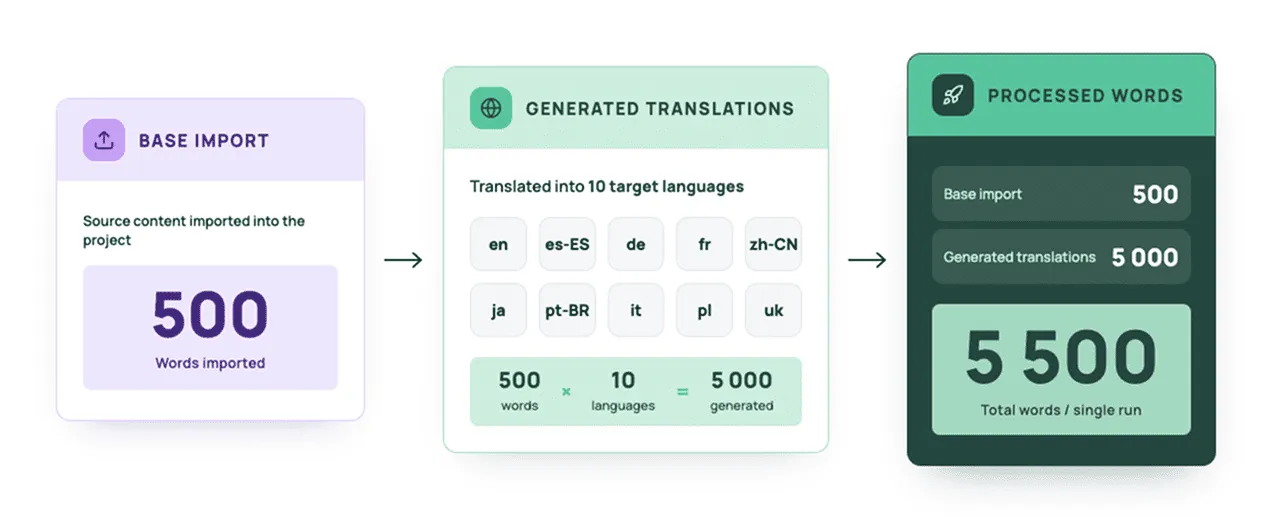
This model operates like a taxi meter, focusing on activity. Focusing on activity. As a general rule of thumb in this model, if a word flows through an active operation (such as a file import, API update, AI translation, or automation) it is processed and counted.
The Math in Practice: This model bills you for both ends of the workflow. For example, if you take that same file with 500 words and translate it into 10 target languages, the system charges you for the initial base content import (500 words) plus the translations generated across those languages (500 x 10 = 5,000 words). This brings your total processed usage to 5,500 words for a single run. Be aware that any future updates, edits, or re-runs will trigger additional charges, and since these operations are permanent, deleting the file after the fact will not restore your balance or reverse the bill.
Unlimited storage makes a great headline, but the fine print tells a different story. If you have millions of words, a low annual cap on processed words gets eaten up by just a few updates.
Let’s see some everyday examples, where the processed words model can catch you and add coins to your monthly spending.
How both pricing models work in 4 everyday scenarios
To see how this plays out in production, let’s look at 4 situations that development and localization teams face constantly.
Scenario 1: Accidental git push
What if a developer accidentally syncs the wrong Git branch, an outdated folder, or a massive 50,000-word test file to the localization project? They may catch that error ten minutes later and immediately delete the file.
- With Hosted Words: No harm done. Deleting the file instantly restores your word count to its previous state. It costs you absolutely nothing.
- With Processed Words: The system logged the import and immediately “processed” those 50,000 words. Even if you wipe the file a minute later, those words are deducted from your annual or monthly allowance. You just paid for a simple human error.
Scenario 2: Testing AI and setting guardrails
Now, let’s imagine you are tailoring an AI engine to match your brand’s specific voice. To get the perfect output, you need to experiment – tweaking your custom guidelines, changing the style instructions (for example, from “formal” to “casual”), or adding new context, glossaries, and then running a batch of text to compare the results.
- With Hosted Words: You can play with AI configurations and run tests completely free of worry. You generate a translation, review the results, adjust your guardrails or style rules, and overwrite the text until it is perfect. To be completely objective, you will still pay your LLM provider for the AI tokens consumed during these runs, but Crowdin adds zero platform markup on top – you only pay the direct provider rates. Because your project’s total stored volume remains unchanged, optimizing your prompts and running multiple iterations doesn’t cost you a penny more in platform fees. (You can read more about how LLM metrics scale in our data-backed guide to the real cost of AI translations).
- With Processed Words: Innovation comes with a steep tax. Every single prompt adjustment acts as a brand-new billing transaction. If you run AI on a 10,000-word module, tweak the prompt, and run it again to see if the tone improved, you have just burned 20,000 processed words. Testing three different prompt variations means paying three times over for the exact same content. This model completely kills your team’s ability to experiment and refine their AI workflows.
Scenario 3: One-time documents and TM leverage
Imagine that you need to translate a quick, one-off file – like a legal contract or a 5,000-word marketing brief.
- With Hosted Words: You upload the document, translate it, download the completed file, and remove it from the project. The translations are safely saved in your translation memory for future use, but the document no longer counts toward your active word limit. You can cycle and update content endlessly without your costs scaling up.
- With Processed Words: The system bills you for the initial source text import, and then bills you a second time for every word generated in the target languages. Deleting the file afterward won’t save your budget – your word allowance is spent.
Scenario 4: Localization agencies running quotes
As an agency or service provider, you may receive a request from a prospective client for a cost estimate to translate a large website. To give an accurate quote, you need to upload their files, analyze TM matches, and calculate costs. The client might choose you or absolutely another vendor.
- With Hosted Words: You safely upload the files, run the analysis, and send the quote. If the deal falls through, you simply delete the project. Your cost: zero.
- With Processed Words: Because importing new base content triggers the processing counter, you burn through your own word allowance just to pitch a lead. If they don’t sign, that budget is completely wasted.
Illusion of “Free AI”
It’s incredibly common right now to see platforms advertising “completely free and unlimited AI translation”. It sounds like the perfect deal.
But if the platform uses a Processed Words model, there’s a major catch:
AI engine itself might be free as a feature, but every single word it generates or modifies counts as a “processed word” against your plan limit.
Running an AI translation across an entire project will instantly drain your word pool because an automated action and text modification took place. Technically, the marketing copy didn’t lie – you weren’t billed for the AI tool itself. But you will get hit with a massive overage bill for the “processed” volume at the end of the month.
Who wins where? Find the right fit for your business
To be fair, the Processed Words model isn’t that bad – it just serves a completely different type of workflow. Depending on your business model, one approach will naturally make more sense than the other.
When the Processed Words model wins
If you run a business with massive repositories of legacy content that rarely changes, the metered model can actually save you money.
- For giant technical documentation archives, historical databases, or massive e-commerce catalogs with millions of static SKUs.
- Advantage: Since many platforms using this model offer unlimited hosted words, you can store millions of words in the cloud for free. It is a one-time transaction: you pay for source text upload, pay for translations to target languages, and then that content sits there for years without triggering ongoing storage costs.
When the Hosted Words model wins
If you are building software, running dynamic marketing campaigns, or constantly iterating on your product, the hosted model is the clear winner.
- Perfect for SaaS platforms, mobile apps, games, agile engineering teams, and fast-moving marketing departments.
- Advantage: You aren’t charged for being active. You can sync code daily, deploy hotfixes, swap out design copy in Figma, and test AI prompts endlessly. As long as your product’s core footprint fits your tier, your monthly bill is completely stable and predictable.
Hosted words vs. Processed words: Comparison table
| Metric | Hosted Words Model (Crowdin) | Processed Words Model |
|---|---|---|
| What are you billed for? | The volume of text stored in your system right now (Source × Targets). | Every active operation: imports, translations, updates, AI tasks. |
| Cost of a technical mistake | $0 (delete the file, your limit resets). | High (words are permanently deducted upon import). |
| Testing & experimentation | Unlimited. Upload, test, and delete as much as you want. | Highly restricted. Every test shrinks your annual/monthly pool. |
| AI & automation ROI | Predictable (costs only scale if your core project size grows). | Unpredictable (every AI iteration eats up your limits). |
| Best for | Agile teams, apps, SaaS, and continuous development. | Massive, static databases and legacy text archives. |
Conclusion
A Processed Words model forces your team to walk on eggshells. It sparks constant internal debates: “Should we push this branch today?”, “Will running AI on this paragraph cost us too much?”, “We synced the files twice by accident, are we going to run out of words before Q4?” This creates artificial friction between your development and localization workflows.
At Crowdin, we built our platform around the Hosted Words model because we believe localization should be continuous. You should be able to update content an infinite number of times, test ideas, delete clutter, and experiment with AI without calculating the cost of every single mouse click. We choose pricing transparency, where you pay for the actual size of your product, not for the background noise of your workflow.
Want to verify which pricing model is better for your case?
FAQ
If a platform offers unlimited hosted words, why should I care about the processed words metric?
Because “unlimited hosted words” is often just a marketing hook. It means you can store as much data as you want for free, but you can’t actually do anything with it unless you hit a paywall. If your team is continuously updating code, tweaking AI instructions, or running automated translation cycles, you will quickly smash through the restrictive “processed words” cap hidden in the fine print.
If I have a 1,000-word file and translate it into 5 languages, how does that affect my count?
In Crowdin’s Hosted Words model, this counts as 5,000 hosted words (1,000 words to translate × 5 target languages). The source language doesn’t count toward your limit.
The key difference is what happens after that. In a hosted model, those 5,000 words just sit there as your stable asset. In a Processed Words model, if you use AI to re-translate those lines, run an automated script, or update the file three times in a month to fix typos, the system keeps adding up every action. You could easily end up consuming 15,000+ processed words for that exact same 1,000-word file.
What happens if we accidentally hit our plan’s word limit?
With hosted words, if a massive push puts you over the limit, the system won’t just freeze your localization or block your developers. You will receive a notification to upgrade your tier, or temporary overage terms will apply, so your deployment goes through smoothly. You can then clean up your projects, delete temporary branches, or adjust your plan later.

Yuliia Makarenko
Yuliia Makarenko is a marketing specialist with over a decade of experience, and she’s all about creating content that readers will love. She’s a pro at using her skills in SEO, research, and data analysis to write useful content. When she’s not diving into content creation, you can find her reading a good thriller, practicing some yoga, or simply enjoying playtime with her little one.