

Managing content in one language is already a challenge. Managing it across 10, 20, or 50 languages, while keeping up with release schedules, is where most teams fall apart.
Translators waiting on file exports, developers fixing layout bugs post-launch, and marketing are blocked because a string wasn’t ready in time. That’s how localization becomes the bottleneck.
What you can do to prevent this – automate handoffs, reuse what you have already translated, and treat localization as part of the development cycle.
Here are seven practices that make the difference.
1. Centralize all your multilingual content in one place
If your current translation process looks like a long email thread with plenty of files to/from your translators, it’s time for an upgrade. When you send files over email, you lose version control, risk losing translations, and expose content to unnecessary security risks.
To fix that, try to use a Translation Management System (TMS) that serves as your single source of truth.
- Connect all content sources (your CMS, code repositories, and marketing tools) in one place.
- Keep developers, managers, and external vendors working in a secure environment without giving full repository access.
- Marketing and design teams can plug tools like Figma, Contentful, or Notion directly into Crowdin (with zero coding). Translators work on copy without touching developer repos or asking for manual file exports. Explore all available plugins on Crowdin Store.
Not sure which architecture fits your stack? Our guide on how to choose and configure a multilingual CMS walks you through the key decisions.
2. Automate continuous localization via CI/CD
Starting translation only after a sprint ends delays your entire release. Development teams rely on CI/CD pipelines to ship code continuously – so why not adopt the same continuous approach for localization?
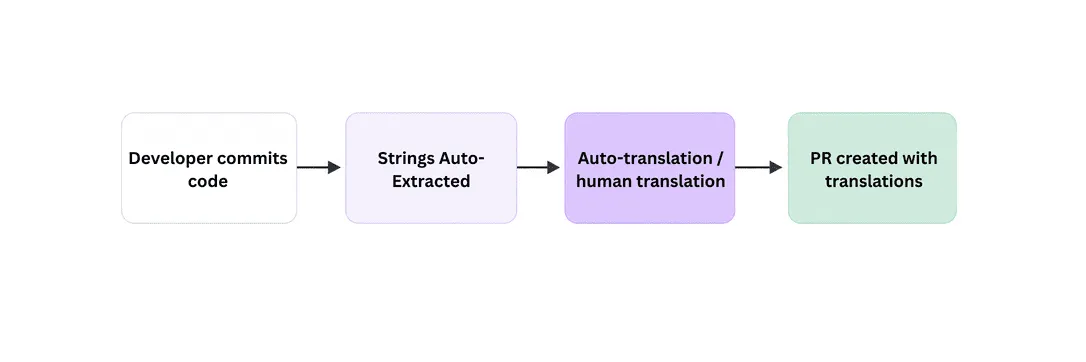
Best practices for continuous localization
- Automate file syncing – use native integrations with GitHub Actions, GitLab, Azure DevOps, etc. to automatically pull source strings when new code is committed.
- Auto-submit translations – merge finished translations back into your repo via pull requests.
- Support feature branching – translate strings directly inside feature branches before merging to your main branch.
If your dev and marketing teams are still handing off files manually, setting up an automated CMS localization sync is the fastest way to fix that.
3. Maximize efficiency with translation memory and glossaries
Why pay to translate the exact same phrase twice? High localization costs usually come from a lack of reusable asset management.
How to use TM and terminology:
- Translation memory stores every segment your team translates. When a similar string appears in the future, your TM suggests or auto-fills the translation – so you are not paying to translate the same phrase twice.
- Glossaries define key brand terms, product names, and industry jargon to maintain your brand voice and accuracy across all target languages.
4. Find the right mix of AI, machine translation, and human review
Raw machine translation is fast and cheap, but it often produces copy that is grammatically correct but doesn’t sound natural. Fully manual translation is accurate, but it can’t keep pace with continuous releases. The winning strategy is Machine Translation Post-Editing (MTPE) and context-aware AI.
Use context-aware AI and MT engines:
- Machine translation: Use traditional MT engines (DeepL, Google Translate, Amazon Translate) for high-volume, standard content where speed is the top priority.
- AI localization: Use AI configured with your glossaries, translation memory, style guides, and custom prompts to maintain your exact brand tone and style rules.
Build a flexible human-in-the-loop pipeline
Once AI or MT creates the initial draft, route content to human experts:
- In-house teams: Best for core UI copy, brand-critical positioning, and product releases. In-house linguists know your product inside out and ensure strict quality control.
- Freelancers: Ideal for ongoing, specialized content (like blog posts or technical docs). Managing freelancers directly in your localization platform keeps costs lower than agency markups while maintaining high accuracy.
- Translation agencies (LSPs): Perfect for scaling into 10+ new languages at once or handling massive backlogs when you don’t have internal linguistic capacity.
Choosing the right approach by content type
| Content type | Auto-translation | Human involvement |
|---|---|---|
| Legal and compliance | — | Always |
| Healthcare and medical | — | Always |
| Core UI copy | First draft | Always |
| Marketing and campaigns | First draft | Recommended |
| Onboarding flows | Yes | Recommended |
| Blog and technical docs | Yes | Optional |
| Support articles | Yes | Optional |
| Metadata and tags | Yes | Optional |
For a deeper look at structuring this pipeline at scale, see how enterprise localization workflows are built.
5. Provide rich context for linguists and AI models
Without context, a single word can have vastly different meanings. For example, does the button text “Save” mean saving a file or saving money? Translating out of context leads to high QA bug reports after release.
The ways you can provide context:
- Use tools like Crowdin In-Context to let translators work directly on a live preview of your web app or website.
- Automatically attach screenshots to source strings during code commits so translators see exact placement.
- WYSIWYG editor allows you to translate rich HTML or Markdown in a visual environment, keeping formatting and inline links intact without exposing raw code.
- Text сontext – include descriptive comments, parameters, and field metadata in your source files so translators know whether a string is a CTA button, an error message, or a formal notification.
- Use AI skills to automatically enrich your source strings. Instead of writing manual notes, AI agents scan your codebase, component structure, and repositories to generate detailed context, explain variables, and enforce brand-specific guidelines before translation even begins.
6. Build a scalable i18n content architecture
Before you can localize (l10n), your codebase and content architecture must be properly internationalized (i18n). Structuring your code for multilingual content delivery prevents breaking layouts and functionality.
- Avoid hardcoded strings. Never concatenate strings in code (example:
"Click " + "here"). Sentence structures vary dramatically across languages. - Support complex rules. Ensure your content system supports proper pluralization and gender rules using standards like ICU message syntax.
- Build for text expansion. Some translations run up to 30% longer than your English source. Make sure your UI components have enough padding to handle it (otherwise you will be fixing layout bugs after launch).
- Localize formats and RTL. Use standard libraries for regional dates, currencies, and number formatting, and prepare UI layouts for Right-to-Left (RTL) languages like Arabic or Hebrew.
Before you localize, your codebase needs to be ready for it – this i18n guide for engineering teams covers everything from string handling to RTL support.
7. Measure localization ROI and scale smartly
Localization should drive revenue growth, not just add to your engineering costs. But if you scale into 20 languages at once without validating demand first, you will burn budget fast. To maximize Return on Investment (ROI), adopt a data-driven, iterative approach:
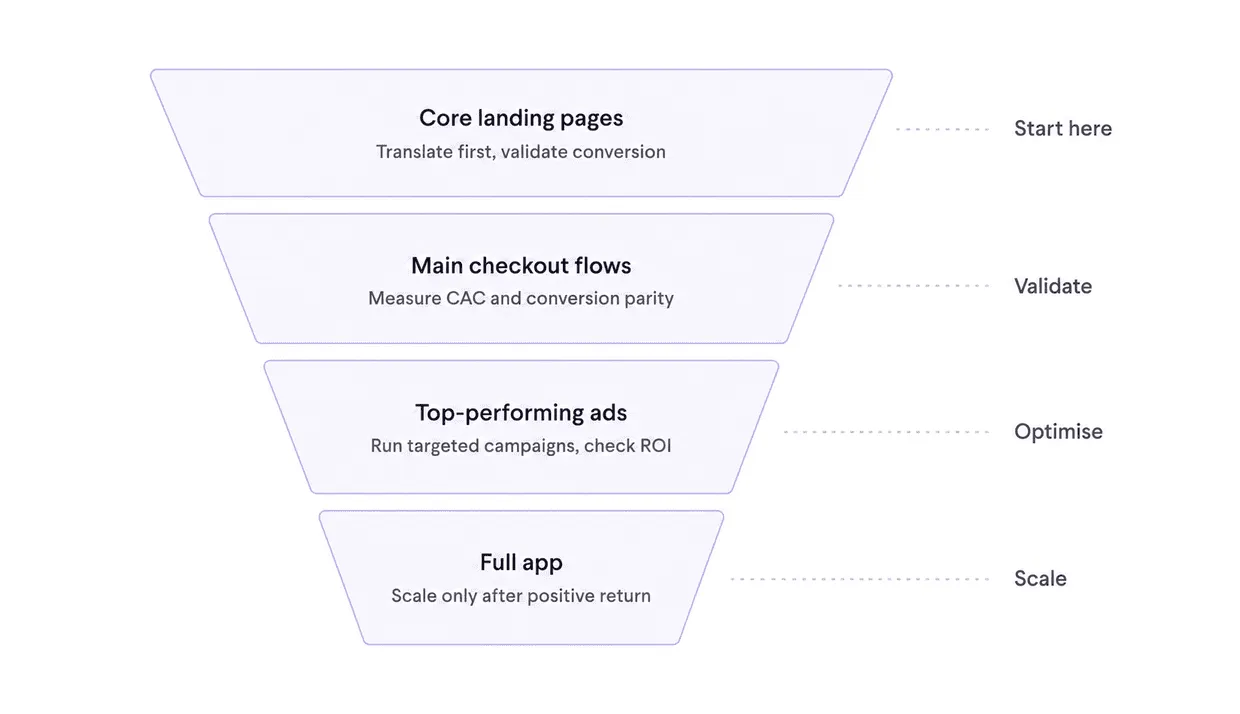
Start with Minimum Viable Localization (MVL)
Don’t translate your entire knowledge base or app upfront. Translate your core landing pages, main checkout flows, and top-performing ads first. Run targeted ad campaigns in the new market, validate conversion rates, and only scale translation efforts once you see a positive return.
Analyze browser and device locale data
Look beyond simple geographical IP traffic in Google Analytics. Check the actual browser language settings of your visitors. If 50% of your visitors in Scandinavia or Western Europe comfortably use your site in English, your immediate localization dollars might yield a higher ROI when spent on markets with lower English proficiency (such as LATAM, Japan, or LATAM).
In-Country language demographics
Don’t overlook multilingual demographics within a single country. For example, peer-to-peer car-sharing platform Turo analyzed user preferences in the US and discovered a massive Spanish-speaking audience. By adding Spanish localization to target users right at home, they unlocked a major growth segment. Check out the Turo localization case study to see how they scaled their localized experience.
Track revenue growth by region
Compare key performance indicators (KPIs) before and after launching a localized experience. Measure:
- Conversion rate parity: Are your localized landing pages converting at similar (or better) rates than your native English pages?
- Customer Acquisition Cost (CAC): Does localizing ad copy and landers decrease your cost per acquisition in that region?
- Regional LTV and revenue: Is total revenue from target countries growing enough to cover multilingual content maintenance costs?
- SEO localization: Are you localizing for search intent rather than just translating keywords directly?
Let user behavior and revenue metrics dictate your translation priorities. Start small, measure conversion impact, and scale your localized content alongside actual market growth.
Manage your multilingual content with Crowdin
Most localization problems aren’t translation problems – they are process problems. Files sent over email, context missing from source strings, translations that start only after a sprint closes.
7 practices above are fixable without rebuilding everything at once. Pick the one causing the most friction in your current workflow and start there. The teams that scale globally tend to do it one automated handoff at a time.
Localize your product with Crowdin
FAQ
What is multilingual content management?
Multilingual content management is the process of creating, translating, and maintaining content across multiple languages from a single workflow. It typically involves a Translation Management System (TMS) that connects your content sources (CMS, code repositories, design tools) so teams can localize without manual file handoffs or duplicated effort.
What’s the difference between i18n and l10n?
Internationalization (i18n) is the technical groundwork that includes structuring your code and content architecture so it can support multiple languages. Localization (l10n) is the actual translation and cultural adaptation that happens on top of it. You need i18n before you can do l10n effectively. Read more about the difference between i18n and l10n.
How much does multilingual content management cost?
Costs vary widely depending on language count, content volume, and your translation approach. Teams that leverage translation memory and machine translation typically reduce costs by up to 50% compared to fully manual workflows. The biggest cost driver is usually launching too many languages at once without validating demand first. See also how much AI translations actually cost.
When should you use machine translation vs. human translation?
Machine translation works well for high-volume, lower-stakes content where speed matters – support articles, metadata, product descriptions. Human translation is better suited for brand-critical copy, legal text, and core UI strings where accuracy and tone carry weight. Most localization teams use both, routing each content type to the right approach based on its tier.

Yuliia Makarenko
Yuliia Makarenko is a marketing specialist with over a decade of experience, and she’s all about creating content that readers will love. She’s a pro at using her skills in SEO, research, and data analysis to write useful content. When she’s not diving into content creation, you can find her reading a good thriller, practicing some yoga, or simply enjoying playtime with her little one.