

Expanding technical documentation into new markets sounds straightforward. In practice, it breaks down fast when technical documentation teams treat localization as an afterthought, tacking it onto the end of a content workflow.
When content is written, approved, and then handed off for translation, it creates duplicate effort, inconsistent terminology, and increases translation costs. The more technical content you produce, the harder it is to keep content aligned across languages. If you are managing content for highly regulated markets, the challenges compound.
Localization isn’t a task you throw in at the end. It’s a content strategy decision that belongs in the content lifecycle from day one. When it isn’t built into the content lifecycle upfront, even well-run documentation teams struggle.
Why localization belongs in your content strategy from day one
Teams that plan for localization upfront operate differently. They create structured, reusable content that can be translated once and deployed across every product, version, and language without duplication. The entire localization model changes, reducing costs, improving accuracy, and helping you scale faster across new markets.
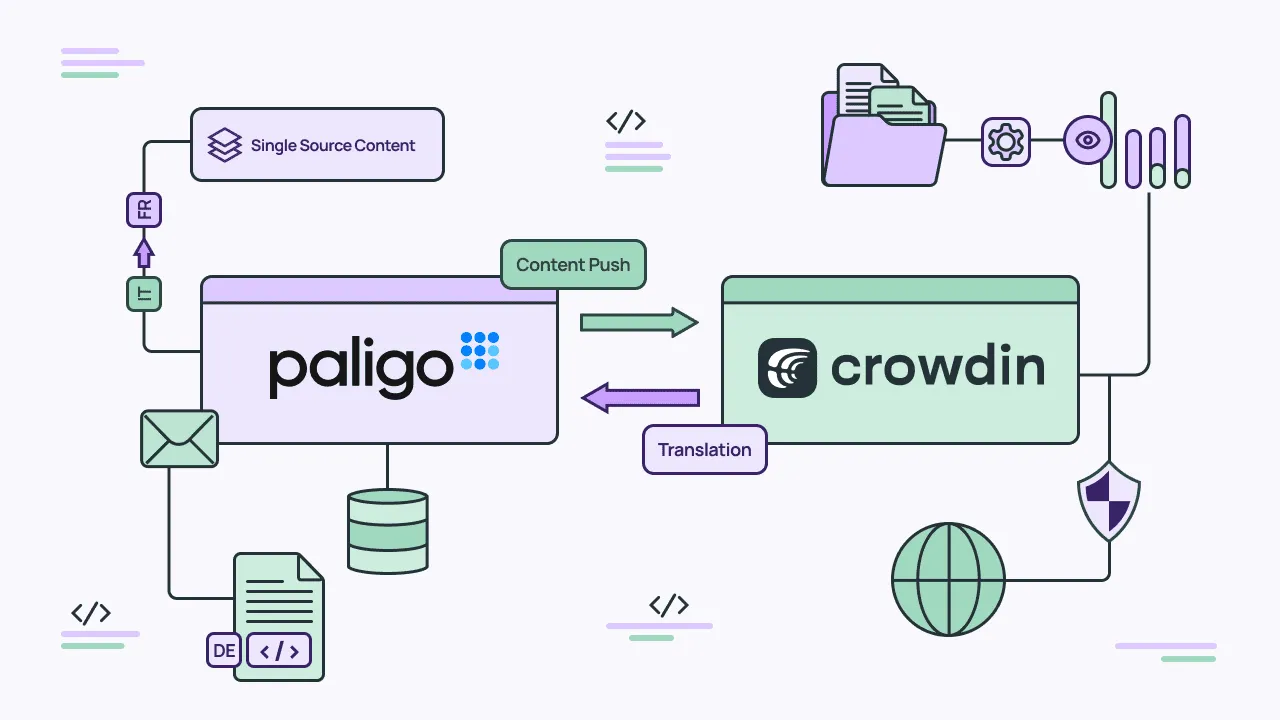
This is where a component content management system (CCMS) like Paligo and a localization platform like Crowdin come together. Structured content provides the foundation. Integrated workflows keep content and translations continuously aligned. The result is a system where authoring, translation, and publishing move in sync, instead of working against each other.
Why tech docs are uniquely hard to localize
While all content localization is challenging at times, technical documentation has some unique features that make localization even harder.
A lot of technical documentation has precise content requirements. Detailed instructions to install or use a product, safety warnings, and other critical information must be accurate in every language. Inaccurate localized information risks real harm if users don’t use a product properly.
Technical content also gets updated frequently due to bug fixes, feature releases, and major versions. Tracking and managing all these changes in multiple languages manually is difficult.
Regulatory compliance is another reason it’s hard to localize tech docs because requirements vary by market. In this case, we’re talking about content such as warranties, terms of use, and compliance declarations.
Finally, technical documentation includes a lot of proprietary terminology. Managing this terminology in one language is difficult enough; managing it consistently across languages is even harder.
Localization only scales when your content model is built for it from the start.
How structured, component-based content cuts translation costs and errors
With a structured content model, you create content as discrete components (or topics), separating content from formatting. These components are reused across all your documentation, not only reducing the amount of content you create but also improving the accuracy and consistency of your content. When you need to translate your documentation, you send the individual components for translation, not the full, monolithic document.
By breaking content into components and reusing those components, you reduce the amount of translation required and ensure consistent translations across all documentation.
Another benefit to translating components over complete documents is that structured content is translated before it’s formatted. When you send a Word or PDF document for translation, there is an additional charge for formatting the content properly. Because structured content is translated before it’s formatted, you reduce the amount of desktop publishing costs, significantly reducing overall translation costs.
Paligo CCMS is built to manage structured content. When you use it to manage all your documentation, it becomes the system of record for all language versions. When you combine Paligo with Crowdin, you manage and translate your tech docs in one smooth workflow.
Link authoring and localization with the Crowdin + Paligo connector
When localization is manual and disconnected, scaling technical documentation across languages breaks down. By integrating Paligo and Crowdin, you can avoid this by linking authoring and localization into one continuous process.
In this integrated model, you author and manage content in Paligo and then send it to Crowdin for translation. Once it’s translated, it’s synced back to Paligo. This integration is set up and managed from Crowdin directly. To get started, a writer installs the Paligo app from the Crowdin Store and connects Paligo CCMS using Paligo’s API key.
How it works: syncing content from Paligo to Crowdin
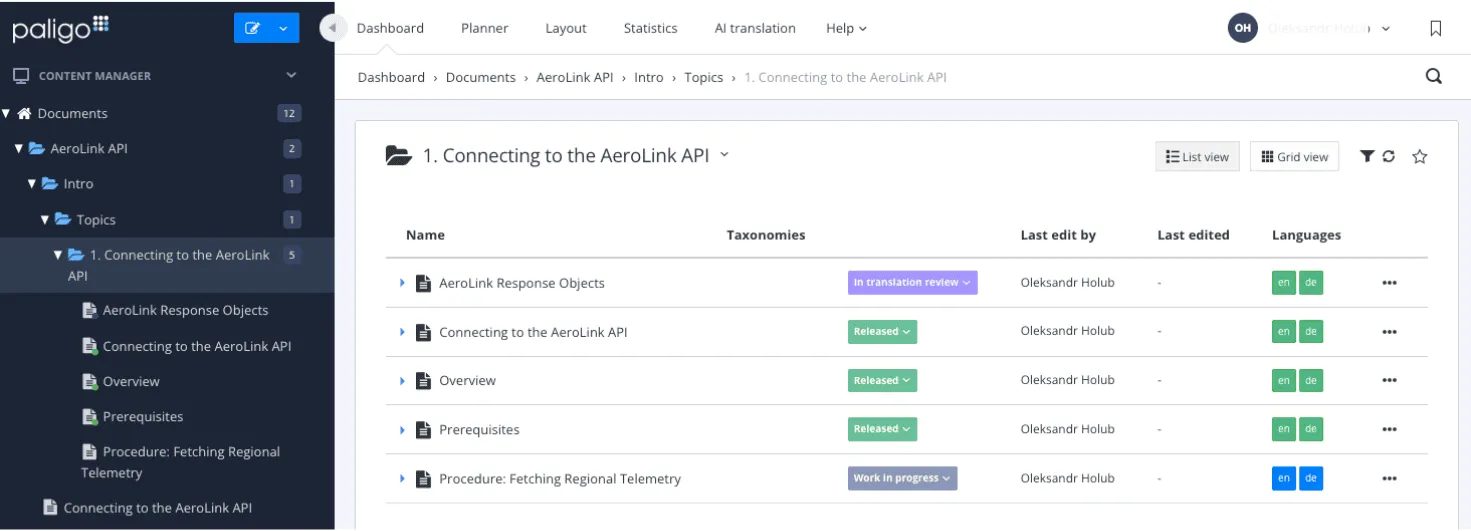
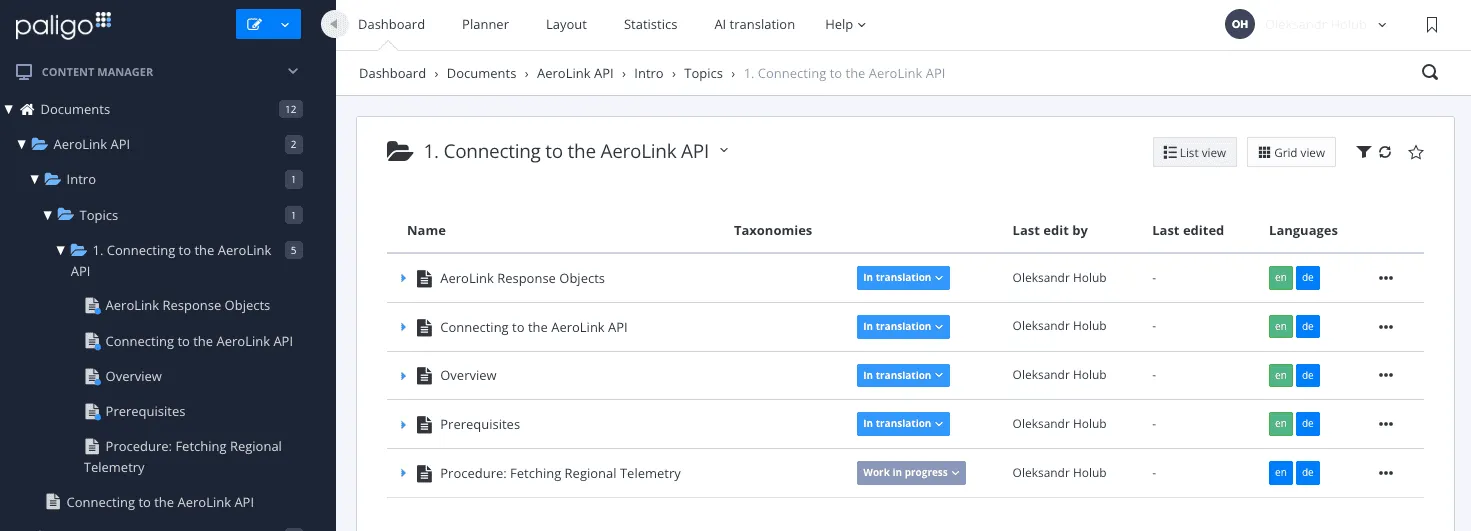
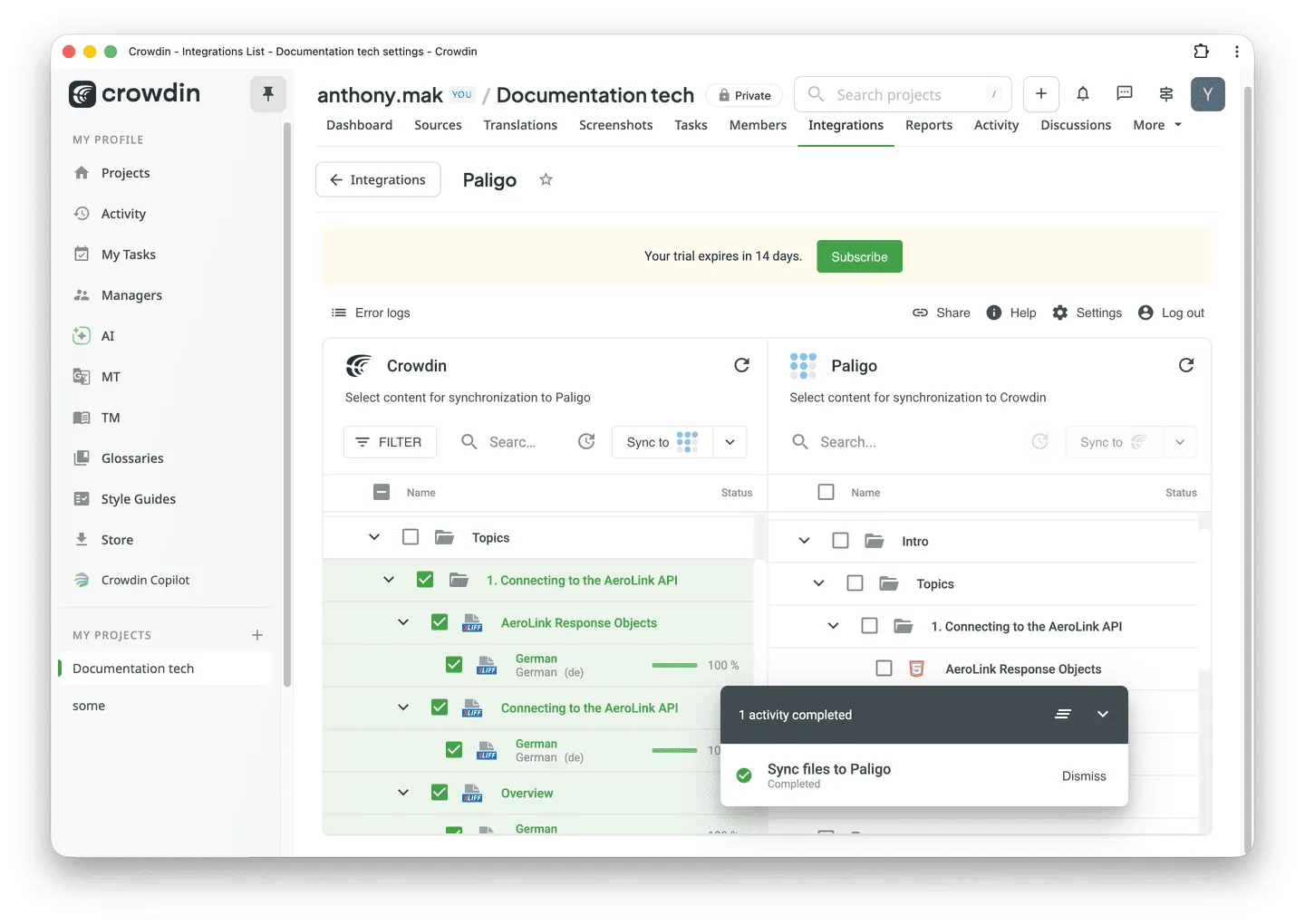
Once the integration between Paligo and Crowdin is set up, it’s easy to send content for translation. In Paligo, the author sets the status of the topic (component) to “In Translation”. They then navigate to the Crowdin Paligo app, select the content to translate and click “Sync” to sync the content to Crowdin. This imports the content to Crowdin for translation.
You can perform this sync manually or set up a scheduled auto-sync with email notifications to ensure continuous localization.
How it works: translating, reviewing, and syncing back to Paligo
Once the content is with Crowdin, translators begin the translation process using Crowdin’s editor, leveraging features such as translation memory, glossaries, and QA checks to speed up and improve translation quality.
When they have completed the translation, Crowdin notifies the author that the content is ready to import into Paligo. The translated content is then synced back to Paligo and the status is set as “In Translation Review” in Paligo.
The author or translation reviewer checks the translation, and if it is complete, sets the topic to “Approved”. If it’s incomplete, the reviewer sets the status back to “In Translation” and notifies the translator that more work is required. The reviewer sets approved translations to “Release”, and they are ready for publishing.
Throughout the entire translation process, the technical writer remains in control without needing to work inside Crowdin.
Where AI accelerates the workflow
Content translation can take time, but with the assistance of artificial intelligence (AI), you can speed up the process considerably. Crowdin provides an AI-powered pre-translation process that generates draft translations automatically. So, AI does the first pass and translators refine the translations for nuance and compliance.
The key here is that AI is assisting the translation process, it’s not replacing it. AI accelerates the first pass, but the quality of the final translation depends on keeping a human in the loop to review and approve those translations. With AI-assisted translations, you can improve the speed of the translation process without sacrificing translation quality and accuracy.
How translation memory and glossaries reduce costs over time
You can also improve the quality of translations through the use of translation memory and glossaries.
Translation memory is the process of storing previously translated content in a database such as sentences, paragraphs, headings, or topics, in the case of structured content. When new content comes into Crowdin to translate, it compares the new topics against the ones stored in translation memory. Depending on how closely the new content matches what is in translation memory, translators have less work to do to translate the new content. As more content is translated, translation memory grows, and each update cycle requires less translation.
Terminology glossaries are another tool to improve translations. Glossaries inform translators on the meaning and usage of key terms and phrases, which in turn ensures consistency of those terms and phrases across all languages and documentation sets.
Overall, the investment in structured localization pays increasing dividends over time.
How to build localization into your documentation workflow from the start
When you are ready to build translation into your technical documentation management process, there are a few principles worth applying from the outset:
-
Design your content model with localization in mind from the start: Even if you aren’t translating your content right away, create a content model that supports multiple languages. Then, when you are ready to start publishing content in different languages, your model is ready to support the work.
-
Build translation into the content workflow: The translation process shouldn’t happen separately from the rest of your content management process. Your content workflow should include steps for identifying content for translation, sending it for translation, reviewing translated content, and marking it ready for publishing.
-
Create terminology glossaries: Work with subject matter experts (SMEs) to identify the key terms and phrases used regularly in your technical documentation and provide it to your translation partner. Remember to keep the glossaries up to date as changes happen with your products.
-
Empower reviewers with the right guidelines and tools: Don’t let your authors and reviewers create their own translation processes. Define the process from start to finish, include guidelines for how to review translated content, and ensure reviewers have the right tools to review translated content easily.
-
Measure translation performance: Identify metrics to track how well your translation process is working. KPIs such as translation memory use, translation turnaround times, first-pass quality rates, and others will help you understand if your translation process is working as expected or needs improvement.
Ready to scale your technical documentation across every market?
With structured content and integrated workflows, localization becomes a competitive advantage rather than a bottleneck. A well-defined translation process, mapped to your content workflow from the beginning, helps you move into new markets faster with less rework and fewer surprises.
When you connect Paligo CCMS with Crowdin, you lower costs through reuse, translation memory, and glossaries, ensuring stronger brand and terminology consistency across every language. This, in turn, helps you improve compliance confidence for every market.
Explore how the Crowdin + Paligo connector helps you scale documentation across every market.
Get started with the Paligo + Crowdin integration

Andrea Francis
Andrea Francis is Principal Marketing Manager at Paligo, a structured content management platform for technical documentation teams. With 14+ years of B2B SaaS marketing experience, she focuses on building growth programs that help companies scale into new markets efficiently.