

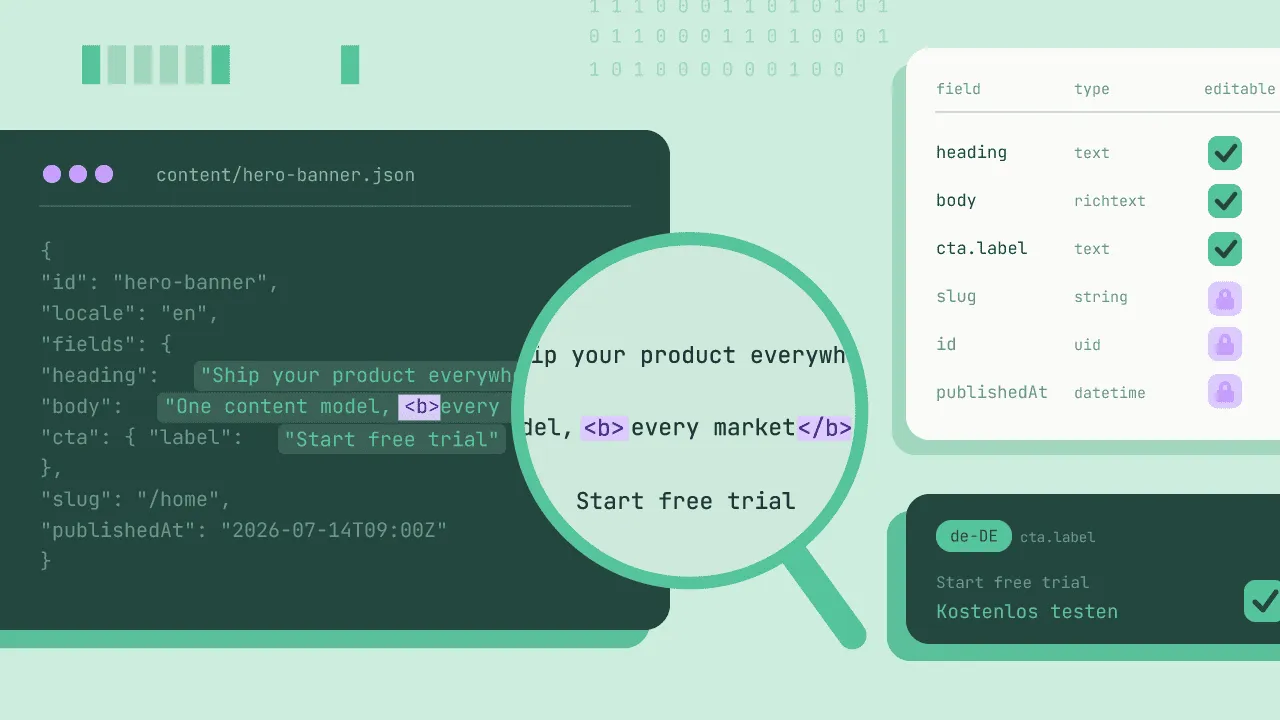
Moving to a headless CMS architecture like Storyblok, Contentful, Strapi, or Hygraph solves a massive engineering problem: it decouples your content from the presentation layer. Instead of managing a monolithic website where layout and text are fused together, content becomes structured data delivered via an API.
Headless CMS localization is the process of translating and adapting this modular data across multiple languages. Because headless content is broken down into hundreds of decoupled component blocks, nested fields, and standalone data entries, localization cannot be a simple page-by-page copy-paste. It requires an automated pipeline that can parse and translate raw data streams without damaging the underlying layout code or application architecture.
To scale global content delivery without turning your engineering team into manual data couriers, you need a localization pipeline that matches your headless philosophy. This means choosing between plug-and-play integrations and custom API automation, while ensuring your translation quality directly impacts business performance.
Field-level vs. Space-level content models – which to choose?
Before configuring your translation pipeline, you must align your localization strategy with your headless CMS data model. Most CMSs offer two primary approaches to managing multilingual content:
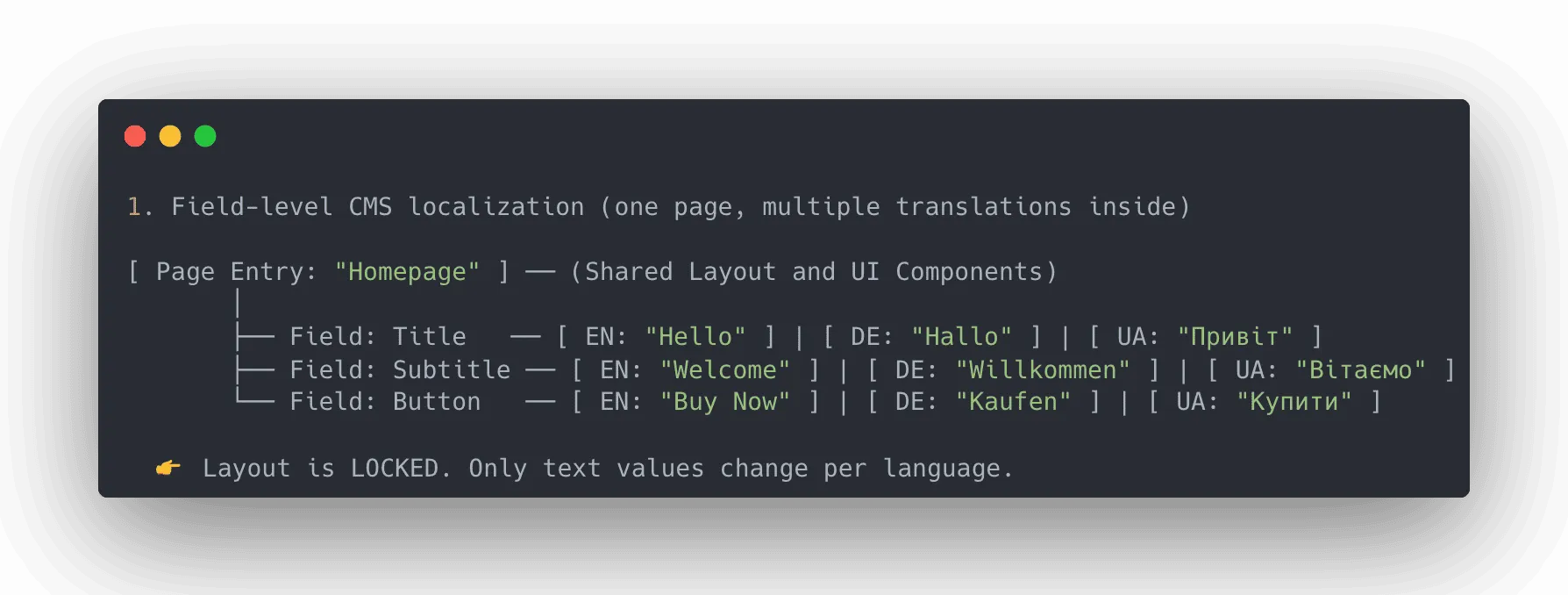
1. Structured / Field-level СMS localization (strict layout)
Examples: Contentful, Strapi, DatoCMS, Kontent.ai, Pimcore, ButterCMS
One page entry contains all languages under the hood. You toggle translation on for specific text fields, while structural fields (IDs, component order, configurations) stay locked and shared.
- Best for: SaaS apps, checkout flows, and product catalogs where the interface layout must remain identical across all global markets.
- Translatable payload: Crowdin API bypasses layout configurations and extracts only the text strings.
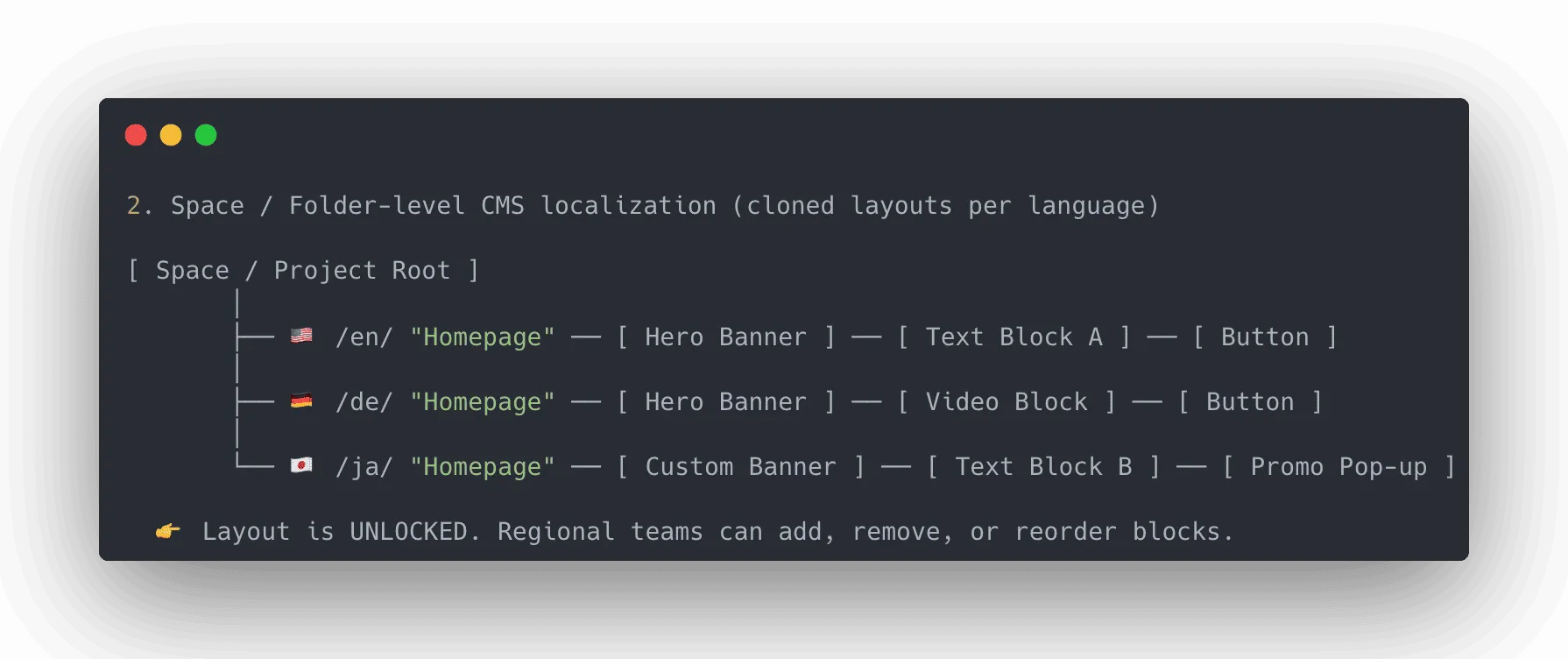
2. Decoupled / Space, folder, or entry-level localization (flexible layout)
Examples: Storyblok, Hygraph, Contentstack, Builder.io
You duplicate the entire page tree or space wrapper for each language. This gives regional marketing teams absolute freedom to change page layouts, swap out media assets, or delete blocks specifically for individual markets.
- Best for: Highly localized marketing landing pages, regional promo campaigns, and documentation hubs (like Paligo) where content structure varies by country.
- Translatable payload: Crowdin isolates the text fields embedded deep within your design blocks without disrupting the customized layout nodes.
Your translation management system (TMS) must adapt to either model. If your localization platform cannot parse nested components or handle localized field relationships, your content structures will break during synchronization loops.
Field-level vs. Space-level CMS for localization
| Feature / Aspect | Field-level localization | Space / Folder-level localization |
|---|---|---|
| Layout Control | Centralized – identical structure & UI across all languages. | Decentralized – fully customizable layouts, assets, and blocks per region. |
| Localization Payload | Only translatable text strings (JSON/Markdown) are extracted. | Text strings are embedded deep inside duplicated design nodes. |
| Translation Process in Crowdin | Layout code is locked, so translators cannot break UI syntax or component order. | Translators/Marketers can adjust layout-dependent copy (e.g., shorter words for tight blocks). |
| Translation Memory (TM) Efficiency | Shared component strings are automatically reused across all languages. | Requires proper key mapping to avoid re-translating identical blocks across cloned spaces. |
| Workflow Complexity | Single-click syncs for all target languages within one entry. | Requires syncing separate language trees, entries, or regional spaces. |
| Best For | SaaS interfaces, checkout flows, design systems, mobile apps. | Regional marketing pages, localized promo campaigns, docs hubs. |
| CMS Examples | Contentful, Strapi, DatoCMS, Kontent.ai, Pimcore, ButterCMS | Storyblok, Hygraph, Contentstack, Builder.io |
2 paths to localization automation: Ready-made connectors vs. Custom APIs
Automating the data flow between your headless CMS and your translation environment generally follows one of two paths, depending on your team’s engineering capacity and workflow complexity.
Path 1. Quick deployment via ready-made integrations
For product managers and localization teams looking to eliminate manual asset management without writing custom integration code, the Crowdin Store offers connectors for leading headless CMSs.
These apps connect your CMS spaces directly to your Crowdin Enterprise translation workflows. Once configured, content synchronization operates via a straightforward management interface:


- No-code data transfer: Localization managers select specific content trees, components, or web pages directly within the UI and send them to translation workflows in a few clicks.
- Automated ingestion: The app automatically extracts the translatable text strings, filters out structural JSON or Markdown code, and presents clean text to copywriters or translation agencies.
- Direct return loops: As soon as translations pass approval validation, the connector pushes the localized data back to the matching field or language folder in your CMS, ready for staging review.
This path removes developers from the daily loop of exporting and importing content files, allowing them to focus on core product features.
Path 2. Tailored pipelines via APIs and webhooks
For teams running highly customized headless infrastructures or composite architectures combining multiple content repositories, standard plug-and-play integrations might not cover every operational edge case. When web content updates frequently involve deleting components, shifting blocks dynamically, or updating page components simultaneously, a custom engineering approach is required.
By building on top of Crowdin’s API and webhook architecture, development teams can construct precise, event-driven pipelines:
- Automated webhook triggers: When a content creator saves or publishes a component block inside the CMS, a webhook fires a payload to Crowdin to check for new or modified string keys.
- Shared key management: To control translation costs and guarantee voice consistency across different landing pages, teams can map identical UI strings to shared message keys. This ensures that an updated feature description is only translated once, even if it appears across dozens of modular web templates.
- Custom verification logic: Teams can build internal validation layers between the translation environment and the production deployment cycle, ensuring that localized web layouts never break the customer-facing frontend.
Problems of headless CMS localization and how to solve them
While decoupled data provides engineering flexibility, it introduces unique challenges for the localization lifecycle that legacy translation tools fail to handle.
1. Broken rich text and code tags
Headless content is rarely just plain text – it’s a mix of Markdown, HTML, and custom Rich Text JSON structures (like AST nodes). If a translator accidentally alters a code syntax, deletes a bold tag, or breaks a shortcode, your frontend application will crash.
- Crowdin solution is syntax protection. Crowdin automatically isolates engineering tags and code syntax, turning them into uneditable visual badges for translators. Linguists can rearrange them to fit the language’s grammar, but they cannot corrupt the underlying code. Read more about expression syntax elements and ICU message syntax in Crowdin.
2. Content versioning
Unlike code, which lives in neat Git branches, headless content updates are often fluid, asynchronous, and continuous. When product teams work on a major new feature deployment, they introduce new text strings into the CMS weeks before launch. Managing what needs to be translated now versus what should remain a draft for the next release is a constant headache.
- Solution – branching and version control. Crowdin brings developer-grade version control to the localization process. It allows teams to isolate content updates and manage ongoing translations in parallel with your staging and production releases, without accidental overwrites or leaks of unready content.
3. Dynamic updates
Marketing copy and UI text change constantly. If a product manager edits a single sentence inside Contentful or Strapi, how does the translation pipeline handle it without resetting the entire page’s translation?
- Crowdin solution here is continuous string sync and usage of translation memory. Crowdin tracks content at the string level. When an update occurs, only the modified string is sent for re-translation. Crowdin also has translation memory to auto-populate identical or highly similar phrases, reducing localization costs and eliminating duplicate work.
4. Lack of visual context
The biggest challenge for linguists working with headless architectures is the absence of visual context. Because content is delivered as raw data strings, translators frequently review text inside isolated fields without knowing whether a string belongs to a hero banner, a compact button, or a technical footer. As we know, context is King in localization and can greatly improve translation accuracy. Translation without visual context often leads to text overflows, broken layouts, and strange phrasing.
- In-context previews: Translators work within editing interfaces that can render real-time WYSIWYG previews of the web layout, matching the raw JSON content to its physical presentation block.
- Design-to-CMS context loop: True context starts before the CMS – in the design phase. By using Crowdin’s Figma integration, developers and designers can attach actual design screenshots to strings. When the content moves into the headless CMS and then to Crowdin, translators see exactly how the text fits within the design boundaries. Check our guide on design-stage localization.
5. Fragmented international SEO
In a headless stack, SEO metadata (like page titles, descriptions, and alt-text tags) are just independent text fields inside a massive JSON payload. Because they are completely divorced from the main visual layout, these search-engine elements are easily overlooked during the translation process.
- Pull structural and meta-fields into the same translation project as your body copy. Crowdin ensures that no hidden SEO component is left behind. Your multilingual pages launch fully optimized, protecting your organic search ranking in new target markets. Check our guide on SEO localization.
Ready to scale your headless content globally?
If you plan to use AI for translation, the next section is for you. We expanded on why native AI features in headless CMS platforms are not always sufficient and showed when Crowdin AI wins.
Native CMS AI: Why in-platform AI translation fails
As headless CMS platforms rush to integrate built-in AI assistants, many teams think they can solve localization with a single click inside their content dashboards.
But relying on native CMS AI tools often creates a fragmented, unmanaged environment that introduces massive operational risks:
- No memory, higher costs: Built-in CMS AI engines treat every translation request as a brand-new task. They lack a translation memory. If you edit one sentence on a landing page, native AI will re-translate the entire page from scratch, charging you for duplicate tokens and ignoring past human-approved translations.
- Always changing brand voice: Native CMS extensions don’t natively enforce your brand’s strict glossaries, style guides, or do-not-translate lists. Without these guardrails, AI will translate technical product names, legal terms, or trademarked branding, leading to inconsistent messaging across different markets.
- Security and data privacy blind spots: Passing your unreleased, sensitive product copy through a generic built-in CMS AI plugin often means sending data to third-party LLMs without enterprise data privacy agreements. This risks leaking your IP or upcoming feature announcements into public training models.
- Zero collaboration workflow: Once the AI dumps the translated text into the CMS fields, there is no system for proofreading, no linguist collaboration workspace, and no quality assurance (QA) framework.
When do Native CMS AI translations actually make sense?
Don’t get us wrong – if localization budget is non-existent, brand reputation isn’t a top priority yet, and you just need fast translations for minor experiments, native CMS AI can serve as a quick solution.
However, the moment your brand scales, relying on raw AI outputs without proper workflows introduces more risk than value.
Context-aware headless CMS localization with Crowdin
To scale your headless content without losing quality or security, your AI needs to live inside your translation management ecosystem, not inside a raw database.
Crowdin AI localization changes that. Crowdin is an orchestrated, context-aware layer that turns raw LLMs into specialized corporate translators. When content moves from your headless CMS into Crowdin, the AI doesn’t just look at the raw strings – it analyzes the entire brand context:
1. Multi-context
Unlike standard AI plugins, Crowdin passes comprehensive context to the LLM. AI processes strings, visual metadata, and key identifiers. It knows exactly whether a string is a call-to-action button or a legal footer, resulting in accurate, context-aware first drafts. Learn how context can improve translation accuracy.
2. AI Pipelines
Instead of using a single prompt, you can build multi-stage AI Localization Pipelines. For example, you can automatically route technical documentation to a fast, cost-effective model, while sending high-visibility marketing copy to a better-performing LLM – all while running automated pre-translation and post-editing steps.
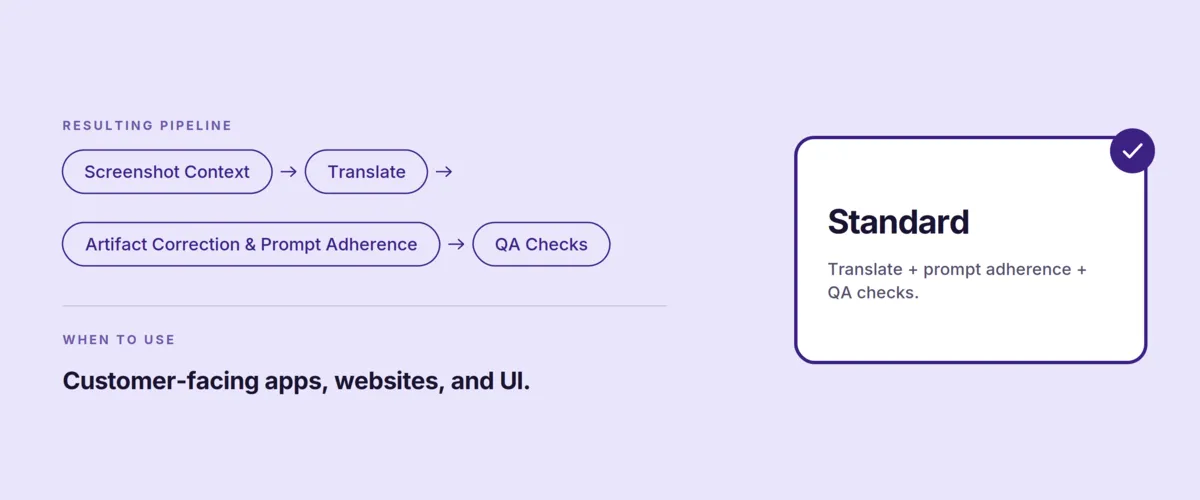
The more steps you add, the better results you will achieve.
3. Guardrails: Glossaries, style guides, and TM
Before Crowdin AI generates a single word, it references your project’s translation memory, style guide, and glossary.
- If a sentence has been translated by a human before, Crowdin reuses it instantly (saving you money).
- If the AI encounters a branded term, it strictly follows your Glossary guidelines.
- You can even feed your brand style guide directly into the AI prompt rules (for example, “Always use a professional tone for German, but a casual, friendly tone with ‘Du’ for Austrian”).
4. Automated human-in-the-loop workflows
For important content, you have an option to loop in professional linguists to translate or proofread the AI output.
In Crowdin, you can configure automated workflows where AI generates the initial translation of a CMS update, and then automatically assigns it to a professional human reviewer for post-editing. This cuts time-to-market by up to 70% while keeping humans in control of quality.
5. Enterprise data security
With Crowdin, your data privacy is locked down. Crowdin uses enterprise-level AI integrations with strict data-handling policies, ensuring your marketing copy and product schemas are never used to train public models.
When configuring AI providers in Crowdin, you can choose from two possible options:
- Bring your own API keys – Crowdin recommends this option if data security is a concern, for enhanced privacy, and to maintain ownership.
- Managed by Crowdin service – simplified AI integration without the need to manage your own API keys. Allows you to leverage Crowdin’s default settings and infrastructure to access AI capabilities in a convenient way. Ideal for straightforward, quick tasks.
Check out our blog post on Why businesses should care about TMS data security.
Conclusion
The whole point of going headless is to make your technology stack flexible and automated. Your localization process should match that philosophy. If your team is still manually copying strings or worrying about a missing tag breaking the frontend, you are doing it wrong.
Crowdin adapts to your specific content model – not the other way around.
Ready to automate your headless CMS localization?
Continue reading
- How to localize at scale without multiplying engineering work
- Measuring CMS translation quality when you don’t speak the language
- CMS translation: A developer’s guide to scalable localization
- Effective content governance for multilingual websites
FAQ
What is headless CMS localization?
It is the process of translating modular, API-driven content (like JSON or Markdown) across multiple languages. Because content is decoupled from page layouts, localization relies on automated pipelines to translate text without disrupting structural code or frontend components.
Field-level vs. Space-level localization: What’s the difference?
- Field-level: All language translations live within a single page entry under locked structural fields. Ideal for SaaS apps and checkout flows requiring identical global layouts.
- Space-level: The entire page tree is duplicated for each language. Ideal for regional marketing pages that need customized layouts, localized banners, or unique design blocks.
Why do built-in native CMS AI translations fail at scale?
Native CMS AI tools lack Translation Memory (TM), causing them to re-translate unchanged copy and drive up costs. They also ignore brand glossaries, lack linguist QA workflows, and often route sensitive, unreleased copy through public AI models without enterprise privacy protections.
How do you stop translators from breaking frontend code?
By using automated syntax protection. Translation platforms isolate raw HTML, Markdown, and Rich Text AST tags, converting them into uneditable visual badges. Linguists can reorder these badges for grammar without corrupting the code syntax.
Should I use no-code connectors or a custom API?
- Ready-made connectors: Best for no-code setups where localization managers sync content and push approved translations back to the CMS in a few clicks.
- Custom APIs and webhooks: Best for complex enterprise setups with dynamic block updates, mapped UI strings, or custom code-validation steps.

Yuliia Makarenko
Yuliia Makarenko is a marketing specialist with over a decade of experience, and she’s all about creating content that readers will love. She’s a pro at using her skills in SEO, research, and data analysis to write useful content. When she’s not diving into content creation, you can find her reading a good thriller, practicing some yoga, or simply enjoying playtime with her little one.